Direct Answer
To use Rank Math Content AI for SEO-optimized posts, enter your focus keyword in the WordPress editor’s Content AI module. It analyzes top-ranking SERPs to suggest optimal word counts, headings, and LSI keywords. Simply follow its color-coded recommendations to naturally integrate keywords and boost your article’s search engine rankings.
If you run a small business, manage a growing blog, or work at a busy marketing agency, you already know the everyday struggle of content creation. Creating blog posts that people actually want to read is hard enough. Making sure Google wants to rank those blog posts on the first page is even harder.
Most business owners spend hours researching keywords. Then, they look at what their competitors are doing. They spend days writing a draft, only to cross their fingers and hope it lands somewhere near page one of the search results. It is a slow, exhausting, and often frustrating process.
But imagine if things were different. What if you had an intelligent SEO assistant living right inside your WordPress dashboard? An assistant that tells you exactly what topics to cover, how long your post should be, and exactly what words to include to beat your competition?
That is precisely what Rank Math’s Content AI does for you.
In this complete guide, we are going to show you step-by-step how to use Rank Math’s Content AI. You will learn how to write highly optimized blog posts that bring in real traffic, save hours of research time, and grow your business organically.
| Disclosure: Your support helps keep the site running! We earn a referral fee for some of the services we recommend on this page. |
- Direct Answer
- Supercharge Your SEO with AI
- Step 1: Connect Your Account, Enable the Module & Understand Credits
- Step 2: Start with Your Focus Keyword
- Step 3: Activate the Content AI Assistant
- Step 4: Review Your Competitor Data
- Step 5: Build Your Outline with AI Help
- Step 6: Write the Content Naturally
- Step 7: Hit Your Final Optimization Goals
- Rank Math Content AI
- Fix SEO Tests with AI
- Track AI Search Traffic
- Blogging & Article Creation
- SEO Optimization Tools
- Social Media Content
- Advertising & Copywriting
- eCommerce & Product Marketing
- Video & Audio Content
- Business, Outreach & General Writing
What is Rank Math’s Content AI?
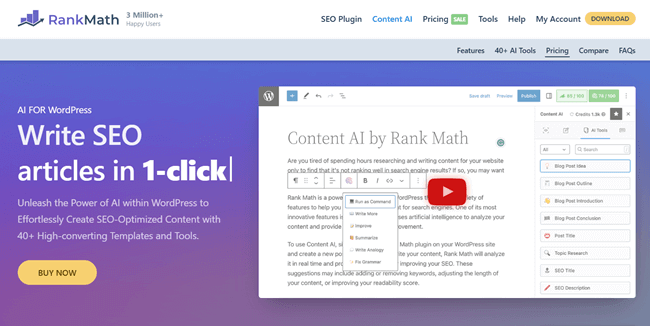
If you run a WordPress website, you may already have the Rank Math SEO plugin installed. It is currently one of the most popular and highly-rated SEO plugins in the world. Recently, the team behind Rank Math introduced “Content AI.” This is a powerful feature that brings artificial intelligence directly into your WordPress editor.
Now, you might be thinking, “I already use ChatGPT, why do I need this?”
Standard AI chatbots are great, but they have a central blind spot: they guess. When you type a prompt into a generic AI, it writes based on general knowledge. Rank Math’s Content AI is completely different because it is built entirely for search engine optimization.
When you give Rank Math a target keyword, it does not just guess what you should write about. Instead, it goes to the web and scans live search engine results pages (SERPs) in real time. It examines the top-ranking articles for your specific keyword. It gathers data on why those pages are winning, and then it gives you a personalized, data-backed blueprint.
Rank Math Content AI tells you:
- How many words does your article need to be competitive?
- How many headings, links, and images should you use?
- Which related keywords and semantic phrases do you absolutely need to include?
- The exact questions your target audience is asking online, so you can answer them.
It takes the confusing guesswork out of SEO writing and gives you a clear checklist for success.
Supercharge Your SEO with AI
Bypass writer’s block and publish high-ranking articles in minutes. Let Rank Math Content AI write perfectly optimized content for you directly inside WordPress.
Get Content AI NowWhy You Need Content AI?
If you are a solo blogger, a small business owner, or part of an agency team, time is your most valuable asset. You do not have 40 hours a week to dedicate to SEO research.
Here is why adding Content AI to your daily workflow makes a massive difference:
1. It Replaces Expensive SEO Software. Usually, to get this kind of deep, data-driven SERP analysis, you have to pay for expensive standalone software tools. Tools like SurferSEO, Clearscope, or Frase are amazing, but they can cost hundreds of dollars every month.
Rank Math builds this feature right into your website backend. This saves you money and keeps you working in one single window.
2. It Drastically Speeds Up the Research Phase. Before AI, you had to manually click through the top 10 Google results. You had to read your competitors’ posts, see what headings they used, and guess what keywords they were targeting.
Now, the AI does this manual labor for you in about 15 seconds. It hands you the research on a silver platter.
3. It Keeps Your Writing Highly Focused. When you sit down to write, it is very easy to go off-topic. You start writing about one thing and end up rambling about another.
The Content AI scoring system serves as a strict yet helpful guide. It gives you a score out of 100 based on how well you are optimizing the post. It turns writing into a fun game where the goal is simply to get your score into the green zone.
Step-by-Step Guide: How to Use Rank Math’s Content AI
Are you ready to write your first perfectly optimized blog post? Just follow these simple, actionable steps.
Step 1: Connect Your Account, Enable the Module & Understand Credits
Before you can start generating outlines and optimizing your text, you need to make sure your Rank Math plugin is appropriately set up.
To begin using Content AI, you must first connect your Rank Math Pro plugin directly to your Rank Math account.

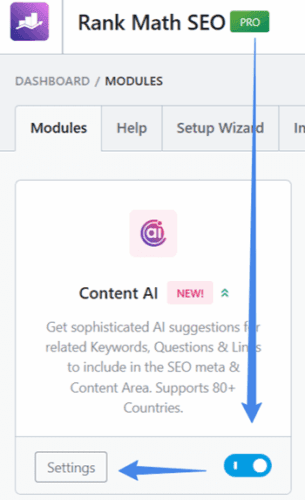
Once connected, navigate to Rank Math SEO > Dashboard in your WordPress backend and toggle on the Content AI module. It is highly recommended to click into the module’s settings to set up your global preferences—such as selecting your default country and preferred tone—at first. Doing this upfront means you won’t have to adjust these settings manually every time you write a new post.
Then, set your target audience, default writing tone, and language. Select post types where you want to use Content AI.
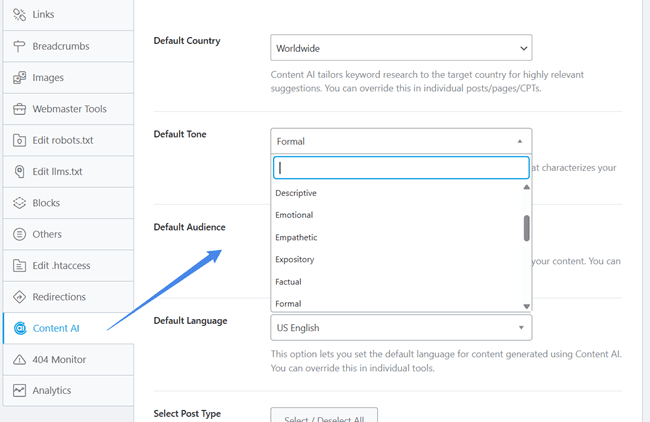
Finally, save changes. Content AI will generate content based on these settings. However, you can override the default audience and tone settings for each content type if required. Rank Math also allows you to add more focus keywords and suggest your own points while writing blog posts, product descriptions, social media posts, etc.
Content AI operates on a credit system. Because scanning live search results and generating high-quality AI text requires advanced computing power, each action you take (like researching a new keyword, generating a paragraph, or writing a meta description) uses a specific number of credits.
You can easily track your remaining credits directly inside your WordPress dashboard, so you always know precisely how much AI generation power you have left.
Step 2: Start with Your Focus Keyword
Before you ever click the AI button, you need to know what you are actually writing about. You must choose a primary keyword that you want to rank for.
For this example, let’s pretend you are writing a blog post for a local bakery, and your target keyword is “best gluten-free cake recipes.”
First, log in to your WordPress dashboard and create a new post. Add your main title at the top. Next, look over to the right side of your screen at the Rank Math sidebar. Enter “best gluten-free cake recipes” into the “Focus Keyword” box.
Step 3: Activate the Content AI Assistant
Right above where you typed your focus keyword, you will see a button that says “Content AI.” Go ahead and click it.
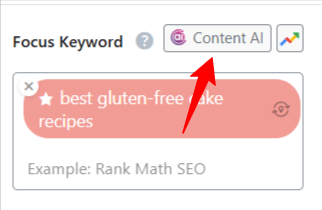
A small window will pop up. If you haven’t set up your global defaults in Step 1, Rank Math will ask you to confirm your target audience’s country and language here. This step is very important.
Search results in the United States look very different from search results in the United Kingdom or Australia. You need to tell the AI exactly where your ideal customers live so it pulls the correct data.
Once you confirm your country and language, click the “Research” button. Sit back and let the AI do its magic. This usually takes about 10 to 15 seconds while it scans the live Google results.
Step 4: Review Your Competitor Data
Once the quick research phase is complete, a brand-new dashboard will open in your WordPress sidebar. Think of this as your SEO command center.
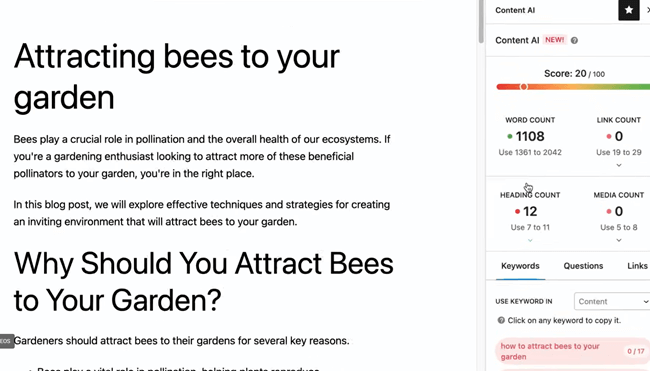
Right at the top, you will see a colored score bar. Below that score, the AI will give you specific targets. These targets are based purely on what the current top-ranking pages on Google are doing. The tool will tell you:
- Word Count: The ideal length for your post. If the top 10 articles on Google average 2,000 words, you need to aim for at least 2,000 words.
- Link Count: Exactly how many internal links (links to your own site) and external links (links to other sites) you should aim for.
- Heading Count: The number of H2 and H3 tags needed to break up your text.
- Media Count: How many images or videos should you include to keep readers engaged?
You no longer have to guess how long a blog post should be. You now have a clear, mathematical blueprint for success.
Step 5: Build Your Outline with AI Help
Staring at a blank white page is terrifying for most writers. Instead of stressing out, let the AI help you structure the post before you write a single paragraph.
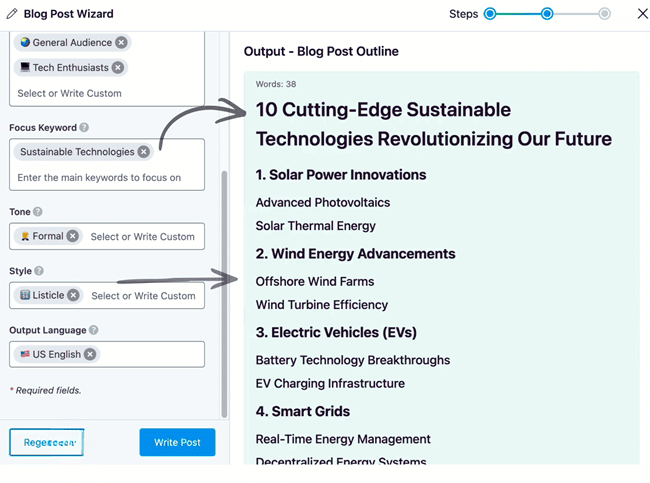
Rank Math has built-in AI tools to generate full blog outlines and even a full article in seconds.
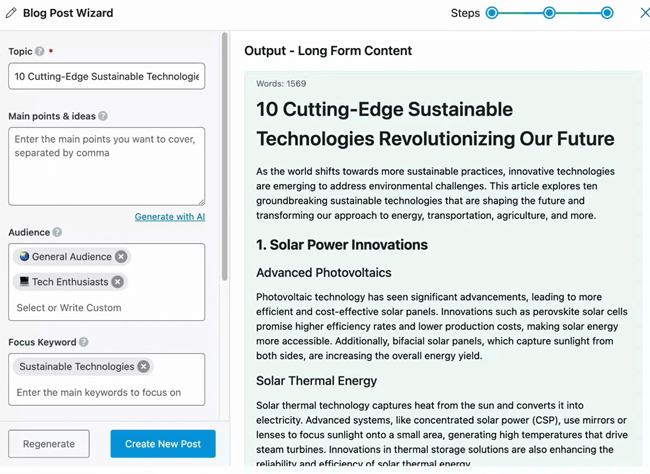
You can ask the AI to suggest headings based on the data it just researched. It will look at what your competitors are writing about and suggest a logical, easy-to-read flow of H2 and H3 headings.
Even better, look closely at the “Questions” tab in your Content AI sidebar. This tab shows the exact questions real people are typing into Google (also known as the “People Also Ask” section on the search results page).
Add these questions directly to your outline as H2 headings. If you answer these questions clearly in your post, you give yourself a massive chance of winning a highly coveted featured snippet at the very top of Google.
Step 6: Write the Content Naturally
Now that your outline is ready, it is time to write. As you type your paragraphs, keep an eye on the “Keywords” tab in the Rank Math sidebar.
Rank Math provides a long list of related keywords, LSI (Latent Semantic Indexing) keywords, and phrases that the top-ranking articles are actively using. To make it easy, they are color-coded:
- Red: You have not used this word yet. You should try to include it.
- Green: You have used this word the perfect number of times. Great job!
- Orange: You are overusing this word. You need to delete a few to avoid looking spammy.
Your main goal is to naturally weave these keywords into your sentences as you write. But do not force them. If a word simply does not make sense in a sentence, skip it entirely. You must always write for human beings first, and search engines second.
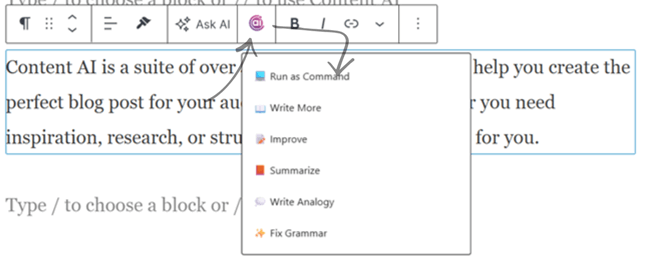
If you ever get stuck or experience writer’s block, you can use Rank Math’s AI writing assistant blocks. You can highlight a confusing sentence and ask the AI to “Write more,” “Improve,” or “Summarize” it. You can even use the “Fix grammar” option to have the AI scan for grammar mistakes in the content you just created.
Step 7: Hit Your Final Optimization Goals
As you continue to write, add your images, and include links to other helpful pages, you will notice your Content AI score going up. It will slowly move from the red zone, into the yellow zone, and finally into the green zone.
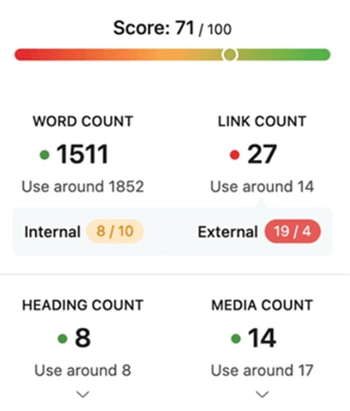
A score of 80 out of 100 (or higher) is generally considered excellent. Please remember that you do not need a perfect 100/100 to rank number one on Google. Just make sure the content reads smoothly, fully answers the user’s questions, and lands in the green zone.
Finally, use the Content AI tool to generate a catchy SEO title and a compelling meta description. This is the short text that actually shows up on Google’s search page, so it needs to be exciting enough to make people want to click on your website instead of your competitors’.
Rank Math Content AI
Stop guessing, start ranking. Write perfectly SEO-optimized content that Google loves in a fraction of the time.
Write Better Content TodayFix SEO Tests with AI
You no longer need to manually tweak your text to pass technical SEO checks. A new “Fix with AI” button now appears next to failed SEO tests in the Content AI meta box. With a single click, the AI will automatically resolve the issue for you.
How to Optimize Existing Blog Posts with Content AI
The great thing about Rank Math’s Content AI is that you can use it to refresh and optimize your older, underperforming blog posts just as easily as writing new ones! In fact, updating old content is one of the fastest ways to boost traffic.
The process is almost exactly the same:
- Open up an existing blog post in your WordPress editor.
- Make sure your primary target keyword is entered into the Rank Math Focus Keyword box.
- Click the Content AI button and run the research just like you would for a new post.
- Look at your starting score. Because you already have text on the page, your score will likely be higher than zero.
- Review the recommendations. Does the AI suggest making the post longer? Do you need to add more H2 headings or internal links to hit the target goals?
- Go through the “Keywords” list and naturally weave the missing (red) keywords into your existing text. You can also use the AI tools to expand on outdated paragraphs or add a new FAQ section at the bottom using the suggested questions.
Just keep tweaking and updating the old content until your score hits the green zone, then hit update!
Track AI Search Traffic
This is a massive update for modern SEO. Rank Math Analytics now allows you to track search traffic coming directly from AI search engines like ChatGPT and Google Gemini, helping you understand how AI bots are interacting with your site.
Best Practices for Using AI Content
Rank Math’s Content AI is an incredible tool, but it is not a magic “print money” button that lets you publish anything without thinking. To get the absolute best results and protect your website’s reputation, you need to follow a few basic rules.
Always Edit and Add a Human Touch. AI can write paragraphs incredibly fast, but it lacks true personality. It does not know your specific brand voice. It does not have your personal experiences or memories. You must always read through the AI-generated text. Rewrite stiff or boring sentences. Add a personal story, a real-life example from your business, or a lighthearted joke to make the writing sound like you.
Fact-Check Everything Thoroughly Artificial intelligence can sometimes make things up entirely (in the tech world, this is called “hallucinating”). If the AI writes a specific statistic, a historical date, or a technical fact, you must double-check it on Google. Your business reputation is on the line. Publishing false information will erode readers’ trust and ultimately hurt your SEO.
Do Not Stuff Keywords. Even though the Rank Math sidebar gives you a list of great keywords to use, do not just cram them all into one single paragraph. Google’s algorithm is brilliant. It easily recognizes when an article is unnaturally stuffed with keywords. Sprinkle your keywords evenly throughout the text, placing them only where they fit perfectly into the conversation.
You might also be interested in these posts:
Conclusion
SEO absolutely does not have to be a frustrating guessing game. By using Rank Math’s Content AI, small businesses, solo bloggers, and marketing agencies can easily level the playing field against massive corporations. You get the exact blueprint of what Google wants to see, right inside the WordPress editor you already know how to use.
By taking the time to research your target keyword, following the AI’s suggested word counts, answering the right questions, naturally including related terms, updating older posts to remain competitive, and utilizing the latest features like one-click SEO fixes, you can finally write content that actually ranks.
Take the heavy stress out of your content creation process. Start using Content AI on your very next blog post. Remember to write for your human readers first, optimize for the search engines second, and watch your organic website traffic grow month after month.
Click here to buy Content AI and write SEO-optimized blog posts in minutes (30-day money-back guarantee)
BONUS: The 40+ Built-In Rank Math Content AI Tools Explained
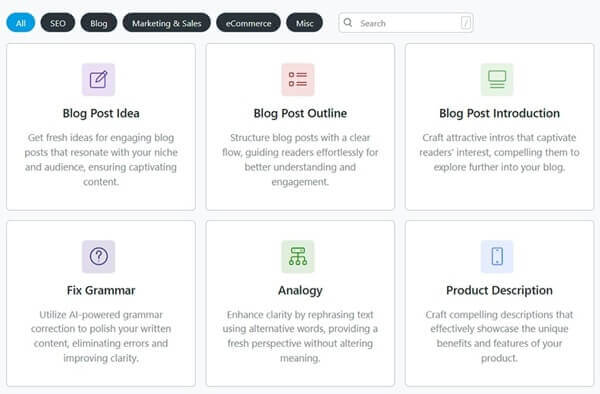
Rank Math’s Content AI isn’t just an optimization scorer; it comes packed with over 40 distinct AI templates built directly into your WordPress dashboard. Here is a breakdown of every tool you can use to write, edit, and optimize faster:
Blogging & Article Creation
- Blog Post Idea: Instantly brainstorm highly engaging, relevant blog post topics tailored to your specific niche and target audience.
- Blog Post Outline: Generate a complete, logical structure for your articles, including SEO-optimized H2 and H3 headings.
- Blog Post Introduction: Hook your readers from the very first sentence with compelling, click-worthy introductory paragraphs.
- Blog Post Conclusion: Wrap up your articles effectively, summarize the key points clearly, and include strong calls to action.
- Paragraph Rewriter: Take any existing text and rewrite it to be clearer, more engaging, or completely unique.
- Paragraph Expander: Overcome writer’s block by taking a short, simple sentence and expanding it into a detailed paragraph.
- Paragraph Summarizer: Condense long, complex blocks of text into short, easy-to-understand summaries for quick reading.
- Sentence Simplifier: Take dense, complicated sentences and rewrite them in plain, simple English for much better readability.
- Analogy Provider: Explain complex or technical topics easily by generating simple, relatable, real-world analogies for your readers.
SEO Optimization Tools
- SEO Title: Craft catchy, click-worthy titles fully optimized for search engines to boost your organic click-through rates.
- SEO Meta Description: Write concise, action-driven meta descriptions that encourage users to click on your search results.
- Focus Keyword Ideas: Let the AI suggest the most relevant and profitable keywords based on your initial topic idea.
- FAQ Generator: Create a list of relevant, commonly asked questions to help you win Google’s “People Also Ask” snippets.
- Topic Research: Dive deep into a broad subject to uncover hidden subtopics and semantic keywords you need to cover.
Social Media Content
- Social Media Post: Quickly draft engaging updates tailored specifically for multiple platforms to keep your audience engaged.
- Facebook Post: Generate casual, community-driven posts designed to get likes, comments, and shares on Facebook.
- Twitter Tweet: Craft punchy, character-limited tweets complete with the best trending hashtags for maximum reach.
- LinkedIn Post: Write professional, networking-focused updates that resonate well with a B2B audience on LinkedIn.
- Instagram Caption: Create highly visual, aesthetic, and engaging captions perfect for the Instagram aesthetic.
Advertising & Copywriting
- AIDA Copy: Automatically generate marketing copy using the proven Attention, Interest, Desire, Action framework.
- PAS Copy: Create high-converting text using the Problem, Agitate, Solution formula to address customer pain points.
- Facebook Ad Copy: Generate persuasive advertising text designed to catch attention and drive clicks on Facebook.
- Google Ad Copy: Create highly optimized, character-count-perfect text for your Google Search campaigns.
- Call to Action (CTA): Generate strong, action-oriented phrases that tell your readers exactly what they need to do next.
- Slogan Generator: Brainstorm catchy, highly memorable slogans and taglines for your brand, product, or campaign.
eCommerce & Product Marketing
- Product Description: Write compelling, benefit-focused descriptions for your eCommerce products that drive sales and conversions.
- Pros and Cons: Quickly list out the distinct advantages and disadvantages of any product, service, or concept.
- Review Summary: Condense dozens of customer reviews into one easy-to-read summary paragraph for potential buyers.
- Feature to Benefit: Transform boring technical product features into compelling customer benefits that actually sell.
- Testimonial/Review: Draft realistic, high-quality sample reviews or customer testimonials for products and services.
- Recipe Instructions: Quickly format detailed, step-by-step cooking directions that are easy for your readers to follow.
Video & Audio Content
- YouTube Video Title: Brainstorm highly searchable and clickable titles to help your videos rank much better on YouTube.
- YouTube Video Description: Write detailed, SEO-optimized video descriptions that include timestamps, links, and relevant keywords.
- Podcast Title: Generate catchy and highly memorable titles for your upcoming podcast episodes and series.
- Podcast Show Notes: Automatically draft comprehensive summaries and show notes based on your podcast audio topics.
Business, Outreach & General Writing
- Comment Reply: Instantly generate polite, professional, and engaging responses to user comments or customer feedback on your blog.
- Email: Draft high-converting cold outreach emails, professional follow-ups, or engaging newsletters in a fraction of the time.
- Job Description: Create detailed, attractive job postings that clearly outline role responsibilities and help you attract top-tier talent.
- Company Description: Craft a compelling “About Us” profile that perfectly captures your brand’s mission, vision, and core values.
- Freeform Writing: Give the AI open-ended, custom prompts to generate text for any unique scenario or specific content need.
- AI Command: Issue advanced, direct commands inside the editor to instruct the AI exactly what to write, edit, or format on the fly.
Read Best Rank Math Settings 2026: The Complete “Set It & Forget It” Tutorial