Direct Answer
GeneratePress vs Astra: When comparing these two popular WordPress themes, your choice depends on your needs and experience. GeneratePress is built for performance purists and developers who want ultra-lightweight, perfectly clean code. Astra is ideal for beginners and agencies, offering a massive library of pre-built starter templates and seamless page builder integrations to launch professional sites instantly.
Choosing the right WordPress theme is one of the most critical decisions you’ll make for your website. Your theme determines how your site looks, how quickly it loads, how it performs on mobile devices, and how easily you can customize it without touching a single line of code.
If you have been searching for the best lightweight WordPress themes, you have almost certainly come across the two biggest names in the industry: GeneratePress and Astra.
Both of these themes are universally loved by the WordPress community. They are incredibly fast, highly secure, and offer premium features that make website building a seamless experience. But when you look closely at GeneratePress vs Astra, they take very different approaches to design, page builder compatibility, and overall user experience.
In this comprehensive guide, we will compare GeneratePress and Astra head-to-head. We will analyze their performance, mobile responsiveness, starter templates, overall ratings, total downloads, and pricing. By the end of this post, you will know exactly which theme is the perfect fit for your next WordPress project.
| Disclosure: Your support helps keep the site running! We earn a referral fee for some of the services we recommend on this page. |
- What are Lightweight WordPress Themes?
- GeneratePress (Overview)
- Astra (Overview)
- GeneratePress vs Astra: Who Wins?
- 1. Popularity: Total Downloads and Overall Ratings
- 2. Performance and Speed
- 3. Mobile Responsiveness
- 4. Design and Starter Templates
- 5. Customization Flexibility
- 6. Header & footer builder
- 7. Navigation menu
- 8. Site Building and Templates: Astra Site Builder vs GeneratePress Block Elements
- 9. WooCommerce Integration
- 10. Customer Support and Documentation
- 11. Pricing Plans
- 12. Pros and Cons Comparison
- Final Verdict: Which Theme Should You Choose?
- FAQ
What are Lightweight WordPress Themes?
Before we dive into the direct comparison, let’s clarify why themes like GeneratePress and Astra are so highly recommended over traditional, heavily coded themes.
In the past, many WordPress themes came bundled with dozens of built-in plugins, complex sliders, and heavy animations. While these looked great out of the box, they resulted in massive page sizes and incredibly slow loading times.
Today, search engines like Google heavily penalize slow websites. Lightweight themes solve this problem.
They provide a rock-solid, incredibly fast foundation with minimal code. Instead of forcing you to use their built-in design elements, they integrate perfectly with modern page builders (like Elementor or the WordPress Block Editor), allowing you to build exactly what you want while keeping your website blazing fast. Both GeneratePress and Astra are the absolute gold standard for this modern approach.
GeneratePress (Overview)

Created by Tom Usborne, GeneratePress has built a massive cult following among WordPress developers, speed enthusiasts, and professional bloggers. What makes GeneratePress unique is its strict “less is more” philosophy. It is an engineering marvel, focusing entirely on clean code, stability, and extreme speed.
GeneratePress does not rely on third-party page builders to create beautiful layouts. Instead, the team built their own block-based plugin called GenerateBlocks. This allows you to design complex, responsive layouts directly inside the native WordPress Gutenberg editor, keeping your site incredibly lean and fast.
Who it’s for: GeneratePress is perfect for developers, professional bloggers, performance purists, and agencies who want a stable, deeply customizable, and ultra-fast foundation without any bloated features.
🔍 Want a deeper dive? Check out our comprehensive GeneratePress Review to explore all its premium features and see exactly why developers love it!
Key Features of GeneratePress
⚡ Supercharge Your Speed with GeneratePress Premium
Stop losing visitors to slow loading times. Upgrade today and experience ultimate speed, perfect Core Web Vitals, and premium flexibility.
Upgrade to GeneratePressAstra (Overview)

Developed by Brainstorm Force, Astra is a highly customizable theme in the WordPress ecosystem. It was designed from day one to be the ultimate companion for popular drag-and-drop page builders like Elementor, Beaver Builder, and Brizy.
Unlike GeneratePress, which focuses heavily on its own block ecosystem, Astra aims to make website creation as easy as possible for absolute beginners. It comes with a massive library of ready-to-use starter templates that you can import with a single click. You can literally have a fully designed, professional-looking website up and running in under five minutes.
Who it’s for: Astra is a fantastic choice for beginners, DIY business owners, eCommerce stores, and agencies that rely heavily on page builders like Elementor to design sites quickly for their clients.
✨ Ready for stunning designs? Check out our detailed Astra Review to explore its massive library of starter templates and see why beginners and agencies love it!
Key Features of Astra
🛒 Build an Unstoppable Store with Astra Pro
Maximize your sales with Astra’s powerful WooCommerce features, custom checkout pages, drop-down carts, and quick-view tools.
Get Astra Pro TodayGeneratePress vs Astra: Who Wins?
Choosing between GeneratePress and Astra is tough. Both are incredibly fast and popular WordPress themes. Let’s compare their speed, templates, and pricing to help you pick the best theme for your site.
1. Popularity: Total Downloads and Overall Ratings
When millions of users trust a product, it is usually a strong indicator of its quality and reliability. Both GeneratePress and Astra have built massive, highly active communities, but one has a significant lead in sheer numbers.
Astra: The Market Giant
Astra holds the impressive title of being the most popular non-default WordPress theme in history.
- Total Downloads: Astra boasts over 1 million active installations on the WordPress repository, with total lifetime downloads pushing well past the 7 million mark.
- Overall Rating: Despite its massive user base, Astra maintains a flawless 4.9 out of 5-star average rating. It has gathered over 6,000 five-star reviews from highly satisfied users who praise its ease of use and beautiful templates.
GeneratePress: The Cult Favorite
GeneratePress might have slightly fewer raw numbers than Astra, but its user base is fiercely loyal and highly enthusiastic about the product.
- Total Downloads: GeneratePress has over 500,000 active installations and has been downloaded millions of times since its launch.
- Overall Rating: GeneratePress holds a perfect 5 out of 5-star average rating. It has collected over 1,300 five-star reviews, with users constantly highlighting its unmatched customer support and incredibly clean code.
Winner: Astra. While both maintain perfect 5-star ratings, Astra’s massive adoption rate and millions of active installs make it the undisputed king of popularity in the WordPress theme directory.
2. Performance and Speed
If your website takes too long to load, your visitors will leave, and your search engine rankings will drop. Speed is a massive factor for SEO. Thankfully, when comparing GeneratePress vs Astra, you are looking at two of the fastest themes on the market.
Astra Speed
Astra is built strictly for speed, requiring less than 50KB of resources on a fresh install. Like GeneratePress, it uses pure Vanilla JavaScript instead of jQuery, preventing annoying render-blocking issues that slow down load times.
While it has a slightly larger footprint than GeneratePress due to its broader feature set, Astra sites easily load in under half a second.
GeneratePress Speed
GeneratePress is famous for its extreme lightness. A fresh install of GeneratePress adds less than 30KB (gzipped) to your page size. It requires zero dependencies like jQuery, which keeps HTTP requests to an absolute minimum.
In speed tests, a default GeneratePress site consistently scores a perfect 100 on Google PageSpeed Insights. It is built to be the fastest theme possible.
Winner: GeneratePress. Both themes are blazing fast and will easily pass Google’s Core Web Vitals. However, if you are a speed purist who wants the absolute leanest code possible, GeneratePress takes a slight edge because of its smaller initial file size.
3. Mobile Responsiveness
With mobile devices accounting for more than half of all global web traffic, having a mobile-friendly WordPress theme is no longer optional. Google uses mobile-first indexing, meaning they rank your site based on how it performs on a smartphone.
Astra Responsiveness
Astra is beautifully responsive and looks great on all devices. You can easily adjust mobile breakpoints and hide specific elements on mobile devices directly from the WordPress Customizer.
Additionally, Astra offers built-in support for AMP (Accelerated Mobile Pages), which strips down your pages to basic HTML for instant loading on mobile devices.
GeneratePress Responsiveness
GeneratePress is flawlessly responsive. The theme’s grid system adapts perfectly to smartphones, tablets, and desktop screens.
Furthermore, the GenerateBlocks plugin allows you to set specific padding, margins, and typography sizes for desktop, tablet, and mobile views independently. This ensures your design looks perfect on every possible screen size.
Winner: Tie. Both GeneratePress and Astra offer exceptional mobile responsiveness. They give you complete control over how your website appears on smaller screens, ensuring a great user experience and strong mobile SEO.
4. Design and Starter Templates
Staring at a blank screen can be intimidating for beginners. That is why starter templates—pre-built websites that you can import with one click—are incredibly valuable.
Astra’s Starter Templates
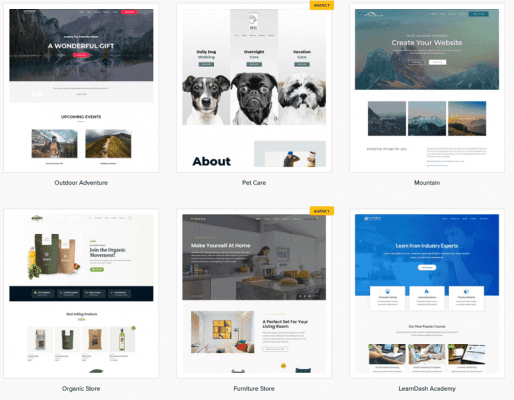
This is where Astra completely outshines the competition. Astra offers a massive library of over 250+ professionally designed starter templates.
Whether you are building a website for a local plumber, a fitness studio, an online clothing store, or a digital agency, Astra has a template ready to go. Even better, these templates are designed to work perfectly with your favorite page builder, including Elementor, Beaver Builder, and the WordPress Block Editor.
GeneratePress Site Library

GeneratePress also offers a Site Library, but it is smaller and takes a different approach. The library has around 90+ pre-built sites.
Instead of offering highly specific niche templates, GeneratePress provides clean, professional, and minimalist designs that serve as a solid foundation. Recently, GeneratePress has shifted almost entirely toward building templates using its own GenerateBlocks plugin, reducing the reliance on heavy third-party page builders.
Winner: Astra. If you want to build a website quickly without doing much design work yourself, Astra’s massive, highly diverse template library is unbeatable.
5. Customization Flexibility
How easy is it to make the theme look exactly the way you want? Both themes offer premium versions that unlock powerful customization.
Customizing Astra
Astra also uses the WordPress Customizer but offers a more visual, beginner-friendly approach. Astra gives you detailed control over your header and footer layouts with an intuitive drag-and-drop builder.
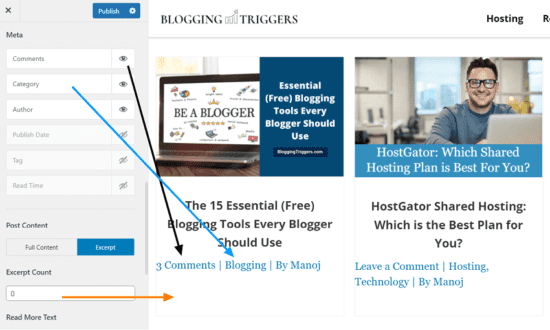
You can easily add buttons, social icons, and search bars to your navigation menu without touching a line of code. Astra Pro also includes a Custom Layouts feature, similar to GeneratePress’s Elements, that lets you create custom headers and footers without a third-party page builder.
Customizing GeneratePress
GeneratePress uses the native WordPress Customizer, offering a great deal of control over your typography, colors, and layout.
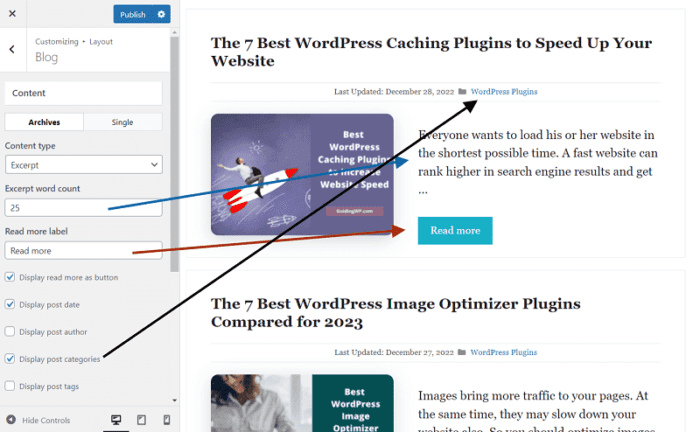
However, the real magic happens when you upgrade to GeneratePress Premium and unlock the Elements module.
The Elements module is a game-changer for advanced users. It acts as a visual hook system, allowing you to inject custom code, banners, or block-based designs anywhere on your website. You can build completely custom headers, unique footers, and dynamic post templates with GenerateBlocks, and apply them only to specific categories or pages.
Winner: Tie. Astra is more user-friendly for beginners who want simple drag-and-drop customization for headers and footers. GeneratePress is better for developers and power users who want granular control over the site architecture through a clean, hook-based system.
6. Header & footer builder
When building a website, the header (where your logo and menu live) and the footer are the first and last things your visitors see. Both themes handle these crucial areas very differently.
Does GeneratePress Have a Drag-and-Drop Header Builder Like Astra?
This is one of the most common questions we hear. The short answer is: No, GeneratePress does not have a visual drag-and-drop builder in the Customizer like Astra does.
Astra Header

Astra features a brilliant, beginner-friendly header and footer builder directly inside the WordPress Customizer. You get three rows (top, main, and bottom). You simply click the “+” icon and drag elements like your logo, primary menu, a search bar, social icons, or an HTML widget right into the rows. It is visual, fast, and very easy to understand.
GeneratePress Header
Instead of using the Customizer, GeneratePress uses a system called Block Elements. Recently, GeneratePress introduced the “Site Header Block” and “Navigation Block.” This means you build your header using the standard WordPress block editor (Gutenberg) just like you would build a regular page.
Winner: Astra. It helps you design beautiful headers for your entire website, custom page headers, mobile headers, and transparent headers, as needed. Even though GeneratePress offers transparent and mobile headers, it misses a dedicated header and footer builder.
7. Navigation menu
If you have an eCommerce store or a high-traffic blog, you probably need multiple navigation menus and a megamenu (a large dropdown menu showing multiple columns of links or images).
Looking at the Astra vs GeneratePress debate, Astra is the clear winner. Astra Pro users can insert navigation menus in 13 positions. It also comes with a built-in megamenu feature that is very easy to set up.

GeneratePress has 3 menu locations. However, with “Block Elements” and the new GenerateBlocks “Navigation Block, you can now build an unlimited number of custom navigation menus and place them literally anywhere on your website.
It intentionally leaves the megamenu out to keep its code lean. To get a megamenu in GeneratePress, you have to use GenerateBlocks Pro or any other megamenu builder plugin.
Winner: Astra. It allows you to design stunning megamenus, add icons, and highlight labels (such as “trending”, “hot”, etc) easily.
8. Site Building and Templates: Astra Site Builder vs GeneratePress Block Elements
This is where we move past basic tweaks and into full-blown theme building. How do you design global templates for your blog posts, archives, or 404 pages?
Astra Site Builder
Astra Pro includes a feature called Site Builder. You can design custom headers, footers, 404 pages, archives, and completely unique single blog post layouts.
The great thing about Astra is that you can design these custom layouts using your favorite page builder (like Spectra) and Astra will push that design across your entire website.
GeneratePress Block Elements
GeneratePress approaches site building natively through WordPress. By combining GeneratePress Premium with the free GenerateBlocks plugin, you turn your site into a dynamic theme builder.
When comparing the GenerateBlocks free vs Astra site builder, the GeneratePress method feels much faster and more integrated into WordPress. Because this is all done with native WordPress blocks, the code is incredibly light.
9. WooCommerce Integration
If you are planning to sell products online, your theme needs to integrate seamlessly with WooCommerce, the most popular eCommerce plugin for WordPress.
Astra for WooCommerce
Astra takes eCommerce very seriously and is arguably the best WooCommerce theme on the market. Astra Pro offers advanced, conversion-focused e-commerce features right out of the box. This includes quick-view product popups, drop-down shopping carts, off-canvas sidebars for filters, and infinite scrolling for product galleries. Astra’s starter library also includes dozens of gorgeous, pre-built online stores.
GeneratePress for WooCommerce
GeneratePress is fully compatible with WooCommerce. With GeneratePress Premium, you get a dedicated WooCommerce module that allows you to customize your product grids, checkout pages, and typography. It provides a clean, distraction-free shopping experience that is highly optimized for speed, ensuring your customers can check out quickly.
Winner: Astra. For e-commerce and online stores, Astra offers far more specialized features, better conversion tools, and superior out-of-the-box designs compared to GeneratePress.
10. Customer Support and Documentation
Even experts need help sometimes.
Astra offers support via a traditional ticketing system. Because Astra has millions of users, their support can sometimes take a bit longer, but mostly they will respond to your requests in a few hours.
They also have a massive, highly active Facebook group where users help each other, and their written documentation library is incredibly detailed.
GeneratePress is legendary in the WordPress community for its support. If you post a question in their premium support forum, you will often get an answer directly from the founder, Tom Usborne, or a senior developer.
They provide exact CSS or PHP snippets to solve your specific problem. It is one of the best supports in the WordPress ecosystem.
11. Pricing Plans
Both GeneratePress and Astra offer fantastic free versions in the WordPress repository. You can use these free themes forever. However, to unlock their full potential, starter templates and advanced customization modules, you will need to upgrade to their premium versions.
Astra Pricing
Astra has a slightly more complex pricing structure based on how many extra plugins and templates you want.
- Astra Pro: Starts at $59 per year (or $299 for a lifetime license). This unlocks all the advanced customization features, the header/footer builder, and WooCommerce integrations.
- Essential & Growth Bundles: Ranging from $169 to $249 per year, these higher tiers give you access to premium starter templates and Brainstorm Force’s other premium plugins (like Ultimate Addons for Elementor).
GeneratePress Pricing
GeneratePress keeps its pricing incredibly simple.
- GeneratePress Premium (Annual): Costs $59 per year. This gives you access to all premium modules, the entire Site Library, and support for up to 500 websites.
- GeneratePress Premium (Lifetime): Costs $249 as a one-time payment. This includes lifetime updates and lifetime support for up to 500 websites.
Winner: GeneratePress. While the entry-level price of $59 is identical, GeneratePress gives you access to its complete site library and all premium features at that base price. To get Astra’s premium templates, you have to upgrade to a more expensive bundle.
12. Pros and Cons Comparison
Let’s summarize the strengths and weaknesses of both themes.
Astra
Pros:
- Massive library of 250+ highly polished starter templates.
- Visual, drag-and-drop header and footer builder is incredibly easy for beginners.
- Built-in megamenu capability right out of the box.
- Deep, advanced integration with WooCommerce.
Cons:
- Premium starter templates are locked behind expensive higher-tier bundles.
- It can become slightly bloated if you activate every single Pro module at once.
GeneratePress
Pros:
- Absolute perfection in coding and site speed.
- The Block Elements system is the best native block theme builder on the market.
- Legendary, hands-on customer support.
- The modular approach allows you to easily replace bloated plugins using hooks and blocks.
Cons:
- No drag-and-drop customizer header/footer builder (relies on block editing).
- Smaller library of pre-built starter sites compared to Astra
🎨 Launch Your Dream Site in Minutes with Astra!
Get access to 250+ stunning starter templates, a drag-and-drop builder, and powerful WooCommerce tools.
Try Astra Risk-FreeFinal Verdict: Which Theme Should You Choose?
The battle of GeneratePress vs Astra does not have a single loser. They are the two best, most reliable, and fastest WordPress themes available today. Your choice depends entirely on your specific needs, your skill level, and how you prefer to build websites.
Choose Astra if:
- You are a beginner and want to build a professional site as quickly as possible.
- You want access to a massive library of ready-to-import starter templates.
- You are building a WooCommerce store and need advanced e-commerce features like drop-down carts and quick-view buttons.
- You rely heavily on drag-and-drop page builders like Elementor or Beaver Builder.
Choose GeneratePress if:
- You are a developer, agency, or professional blogger who values extreme speed and immaculately clean code.
- You prefer a minimalist, lightweight foundation over hundreds of flashy features.
- You want to use the native WordPress Block Editor (Gutenberg) combined with GenerateBlocks to design your site.
- You want unparalleled, dynamic control over your site’s architecture using the powerful Elements module.
Whichever theme you choose, you are making a brilliant investment in the speed, security, and future of your WordPress website.
🚀 Build a Lightning-Fast Website with GeneratePress!
Experience unmatched performance, rock-solid code, and endless customization with the ultimate block-based theme.
Get GeneratePress Today