Looking for the best WordPress speed optimization plugins to increase your website speed? If so, you’re lucky. In this post, you will see the 20 best WordPress plugins that help you serve content faster and boost Core Web Vitals.
Speed is a major factor that can influence your search engine rankings. If your website loads quickly, Google may place your pages higher in the search results and send more traffic to them.
Page loading time is crucial not just for the search engines. It is also applicable to your direct traffic. People will wait for a few milliseconds for a webpage to load. After that, they will move to another destination with similar content. Such a sudden departure will negatively impact your user experience and increase the bounce rate.
There are several things that cause a slow speed issue on your site. The quality of hosting, image size, database optimization, and removal of junk files are common reasons for slow speed. Choose a fast and reliable hosting company that can deliver pages at lightning speed across all device types with 99.99% uptime. If your hosting provider does its job, we can tweak other parts using plugins.
| Disclosure: Your support helps keep the site running! We earn a referral fee for some of the services we recommend on this page (at no extra cost to you). |
- Best WordPress Speed Optimization Plugins for 2026
- 1. WP Rocket
- 2. Perfmatters
- 3. NitroPack
- 4. W3 Total Cache
- 5. LiteSpeed Cache
- 6. ShortPixel
- 7. GP Premium
- 8. WP-Optimize
- 9. FlyingPress
- 10. WP Super Cache
- 11. Astra Pro
- 12. Novashare
- 13. Flying Scripts
- 14. WP Fastest Cache
- 15. a3 Lazy Load
- 16. Autoptimize
- 17. Asset Cleanup
- 18. Hummingbird
- 19. Deactivate Plugins Per Page
- 20. Cloudflare APO
- Conclusion
- FAQ
Best WordPress Speed Optimization Plugins for 2026
Website speed influences everything. It will change user experience, search rankings, and conversions. Google measures user experience with Core Web Vitals. These metrics track load time, interactivity, and visual stability. If you are a WordPress user, plugins can help you meet those targets.
This post lists the 20 best WordPress speed optimization plugins. From caching to image compression, database optimization to lazy loading, web design to CDN delivery, they will help you load pages faster and make them search engine-friendly.
Here’s our list.
1. WP Rocket

WP Rocket is our favorite WordPress caching plugin to supercharge your website. It is an all-in-one tool for caching, database optimization, minification, and many others.
Easy to use and beginner-friendly. Install and activate the plugin. That’s it. WP Rocket will automatically apply recommended caching settings to your site. It can cache pages, preload sitemaps, delete post revisions, control WordPress heartbeat, and perform many other tasks in a single click.
If you have a CDN subscription, WP Rocket has built-in options to serve your images and scripts through it. Mobile detection is another advantage, as it can automatically serve a mobile version of your cached pages to smartphone users, thereby reducing page loading time.
WP Rocket will also help you host your Google Analytics and Facebook Pixel scripts locally, removing the ‘leverage browser caching’ warning from page speed test tools and loading content faster.
Key Features
Price: $59/year
2. Perfmatters
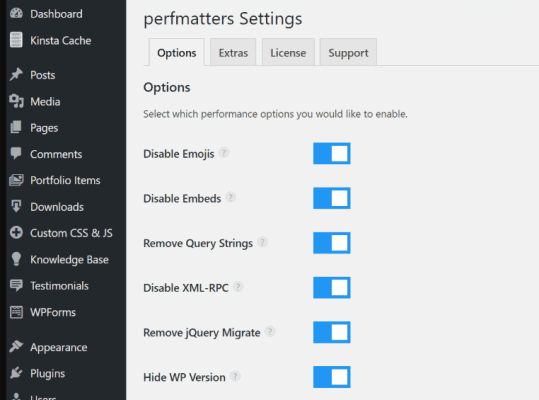
Perfmatters is a great plugin for optimizing every corner of your WordPress website and improving speed. As we know, Kinsta is one of the fastest web hosting companies and a favorite for many leading businesses. Perfmatters is developed by Kinsta Hosting to provide the same optimizations they use for other hosting platforms.
This plugin can enhance several aspects of your site to improve its performance. Disable unwanted scripts, limit post revisions, adjust auto-save intervals, enable lazy loading, and more. It is also useful to disable comments and optimize your database in one click.
The ability to change WordPress login URLs is another feature of Perfmatters. You will see this feature in all WordPress security plugins. Hiding your login page from hackers is a valuable option for securing your website.
Key Features
Price: $24.95/year
3. NitroPack
NitroPack is an all-around speed optimization solution for your website. It caches content using an advanced caching mechanism, optimizes images, and serves content through a world-class CDN to smooth delivery.
This cloud-based platform is an excellent choice for increasing your website speed and enhancing Core Web Vitals. It works across WordPress, Magento, WooCommerce, and custom websites.
With NitroPack, you can set smart rules for automatic, browser, and device-based caching. So your visitors won’t face any slow-loading issues across various devices and browser types.
Image optimization is another major attraction of the plugin. It optimizes images using advanced lossy and lossless techniques, converts them into the WebP format, and automatically resizes them according to the user’s device. Their built-in CDN can deliver pages and files faster than before.
Key Features
Price: $7/mo
4. W3 Total Cache
W3 Total Cache speeds up WordPress sites with multiple caching layers. It stores static pages, database queries, and objects to cut server load and reduce page loading time.
The plugin also supports CDN integration, minification of CSS/JS/HTML, and browser caching. These features help you with WordPress speed optimization and improve Core Web Vitals.
W3 Total Cache is a great option if you need deep control over cache settings. It offers free and pro options and has over a million installs.
Key Features
Price: Free
5. LiteSpeed Cache
LiteSpeed Cache is a powerful optimization plugin for WordPress, offering significant caching benefits. It is beginner-friendly and starts functioning immediately upon installation. There are no complex settings to configure.
The plugin is designed exclusively for LiteSpeed servers. It can cache content, minify files, and defer scripts to enhance the speed of your WordPress website.
Image and database optimization are other major features of the LiteSpeed Cache plugin. It will optimize images in lossy or lossless methods and lazy-load them to improve performance. This open-source software also allows you to optimize the database and remove post revisions with one click.
Key Features
Price: Free
6. ShortPixel

ShortPixel is one of the best image optimization plugins for WordPress. It will automatically compress images and deliver them in WebP format to get more love from search engines.
This plugin supports a wide range of image types, including JPG, PNG, PDF, and GIF, and serves them in next-generation formats with lazy loading features.
No need to resize and optimize images before uploading them to WordPress. Specify your ideal image height and width in the ShortPixel settings, and the plugin will handle the rest.
Key Features
Price: $9.99/mo
7. GP Premium

GeneratePress is the lightest and fastest WordPress theme ever built. It is free, but you need a premium plugin subscription to enjoy full theme features. The plugin is known as GP Premium.
With professional-quality website designs and unlimited customization settings, GP Premium helps you transform your simple blog into a lightning-fast website in a few clicks. GeneratePress is designed to create SEO-friendly websites and achieve a score of 100% in Google PageSpeed Insights.
If you want to build a custom website from scratch, it is also possible using GeneratePress and their theme builder. Add blocks to your visual editor, reorder, and customize without touching a single piece of code. GP Premium is the best choice for businesses, blogs, and online stores to easily create a Google-friendly website.
Key Features
Price: $59/year
8. WP-Optimize

WP-Optimize cleans and speeds WordPress sites with a few clicks. It will automatically clear database clutter, such as post revisions and transients.
The plugin compresses images and can convert them to the WebP format. You can enable lazy loading and minify CSS and JS. These tools help with WordPress speed optimization and boost page load times.
WP-Optimize bundles caching, cleanup, and image tools in one place. The plugin offers a free tier and paid plans for extra features.
Key Features
Price: Free
9. FlyingPress
FlyingPress speeds up WordPress sites with strong caching and fast delivery of front-end assets. It creates static HTML pages and serves them quickly.
The plugin also handles CSS and JavaScript optimization. It removes unused CSS, delays heavy scripts, and inlines critical CSS. These steps help your pages render faster.
FlyingPress includes lazy loading for images, videos, and iframes. It can optimize fonts and preload key assets. It pairs nicely with image optimizers and CDN services.
Key Features
Price: $59/year
10. WP Super Cache
WP Super Cache is another popular and lightweight caching plugin for WordPress. It will generate static HTML files from your blog content and serve those files instead of processing heavy PHP scripts.
There are two caching modes: Easy mode for one-click caching and Expert mode for advanced setups. WP Super Cache is free and widely installed.
The plugin supports CDN integration, cache preloading, and compressed cache files. It can skip caching for logged-in users and has debugging tools for developers.
Key Features
Price: Free
11. Astra Pro

Astra Pro is one of the best WordPress speed optimization plugins. It helps you unlock the advanced features of Astra, a popular lightweight WordPress theme.
With the plugin, you can customize anything from the header to the footer and adapt your site for any purpose. Astra surprisingly weighs less than 50 KB and is designed to load in under half a second. Trusted by more than 1 million websites, including us, it is the right theme for commercial websites and personal blogs.
Astra Pro ships with numerous beautiful website designs that you can import with just one click. They are mobile-friendly and built for ultimate performance. You can customize the site to any extent without editing theme files through theme settings, hooks & filters.
Key Features
Price: $59/year
12. Novashare

Novashare is a simple, lightweight plugin that displays social sharing icons on your site and boosts traffic. It supports more than 20 networks to share content and products.
Developed by the same team behind Perfmatters, it weighs less than 5 KB on the front end and loads quickly across various device types. Novashare is highly flexible to change the size, color, and shape of social icons.
Key Features
Price: $24.95/yr
13. Flying Scripts
Flying Scripts helps your site load faster by delaying selected scripts. It waits until a visitor interacts with the page. That could be a scroll, click, or tap. Once that happens, the delayed scripts will load. This reduces render-blocking tasks and speeds up the initial view of the page.
You can pick which scripts to delay. Target heavy scripts from chat widgets, analytics tools, or marketing tags. These scripts will slow down your pages. Delaying them keeps the layout smooth and improves user experience.
Flying Scripts focuses on script control, so it pairs nicely with a caching plugin and an image optimization tool. This makes it a useful WordPress speed plugin for sites that struggle with long initial load times.
Key Features
Price: Free
14. WP Fastest Cache

WP Fastest Cache is a simple cache cleaner for WordPress. It is easy to use and allows you to significantly boost page speed.
Clear your cache, minify files, and perform various other optimizations to boost your WordPress website’s speed. The plugin will delete your junk files when a post is published, updated. Alternatively, you can do it manually by clicking through the admin bar menu.
Key Features
Price: Free
15. a3 Lazy Load

a3 Lazy Load is a simple plugin to speed up your WordPress website instantly. You can use it to lazy load images, videos, scripts, and others, which will become visible only when a reader scrolls down to them.
This plugin is highly customizable, allowing you to define the lazy load behavior for each part of the site, such as content areas, widgets, post thumbnails, and Gravatars.
Key Features
Price: Free
16. Autoptimize

Autoptimize minifies and aggregates CSS, JavaScript, and HTML to cut file sizes and HTTP requests. It can also trim and bundle front-end code to speed WordPress sites. It
You can inline critical CSS and defer the rest. The plugin can move scripts to the footer and async non-aggregated JS. These steps help with WordPress speed optimization and improve render times.
Autoptimize handles images, too. It offers lazy loading and supports modern formats like WebP and AVIF. That lowers bandwidth and speeds page loads.
Pair Autoptimize with a caching solution for the best results. A Pro add-on adds image optimization, CDN support, and automatic critical CSS. This makes it a strong WordPress speed plugin among WordPress speed optimization plugins.
Key Features
Price: Free
17. Asset Cleanup
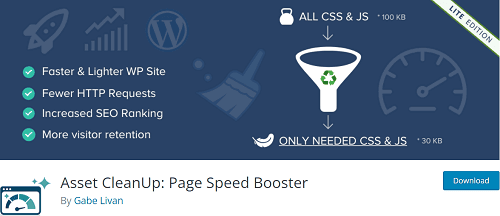
Asset CleanUp is another powerful WordPress speed optimization plugin you should consider. It can remove unnecessary files and scripts from your pages and disable various features that cause slow speeds.
Minify CSS & JS files, preload scripts, remove HTML source code, and much more in 1-click. The plugin is beginner-friendly and best suited to improve your page speed score on Google PageSpeed Insights, GTMetrix, and Pingdom.
AssetCleanUp will combine multiple Google Fonts requests into a single request and preload them to reduce the number of requests. It can also disable all Google Font requests and preload local fonts to enhance content delivery.
By default, all your plugins load on every page, which is totally unnecessary. For instance, contact form plugins. They serve form-related assets on the home page, single posts, and archives, thereby increasing their loading time. AssetCleanUp will locate such files and help you to disable them on page types and individual pages.
Key Features
Pricing: Free
18. Hummingbird
Hummingbird is a popular WordPress speed optimization plugin from WPMU DEV. It comes with advanced controls to cache, minify, and compress files, optimize images, and other assets, all designed to improve the user experience on your site.
Automated database cleanup is another feature that removes junk files at regular intervals and optimises page loading.
Key Features
Price: $180/yr for WPMU DEV subscription with access to all premium tools and services
19. Deactivate Plugins Per Page
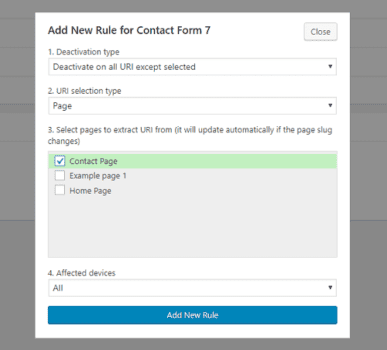
Deactivate Plugins Per Page is a simple plugin that enables you to deactivate unnecessary plugins on specific pages, thereby optimizing WordPress performance.
This reduces unused CSS and JavaScript, improving page performance. It is easy to use and lets you manage plugins by custom rules. You can also set separate rules for desktop and mobile devices.
Pick pages, posts, or URI patterns where you want to disable one or more plugins. Deactivate Plugins Per Page is a premium CodeCanyon product with regular updates and author support.
Pricing: $19 (One-time charge)
20. Cloudflare APO
Cloudflare APO speeds up WordPress sites by caching pages on Cloudflare’s global network. It serves your content from servers close to each visitor. This improves your load time and reduces strain on your hosting.
APO also supports full-page caching for both mobile and desktop. The plugin connects your site to Cloudflare using a single API token.
After setup, Cloudflare handles cache purging when you update posts or pages. This keeps your content fresh. APO improves TTFB, which in turn helps Core Web Vitals and enhances user experience.
Price: $5/mo for free plan users
Conclusion
To achieve a high ranking in search results, your website needs to load quickly. This is especially important for all businesses, including those that operate e-commerce sites and require a quick checkout process. We hope this article has been helpful to anyone seeking information on WordPress Speed Optimization.
If you have any queries, let us know through the comment form below.