Your website’s search visibility depends on how well SEO foundations are configured. Rank Math is a powerful WordPress SEO plugin, but simply installing it isn’t enough; you need to customize it to your specific needs.
Whether you are migrating from another plugin or starting fresh, mastering the Rank Math setup wizard is your first step toward search dominance. In this guide, we take a deep dive into the best Rank Math settings to ensure your site is fully optimised for AI-driven search results, rich snippets, schema markup, Local SEO, and others.
From fine-tuning your sitemaps to automating image SEO, I’ll teach you the Rank Math settings you need to save you time and increase your visibility.
Read to turn your website into an SEO powerhouse?
Let’s get started.
| Disclosure: Your support helps keep the site running! We earn a referral fee for some of the services we recommend on this page. |
What is Rank Math SEO?
Rank Math is the #1 SEO plugin for WordPress. Legacy plugins like Yoast or All in One SEO offer limited features compared to it. They also lock critical tools like redirect managers and local SEO behind expensive paywalls.
At the same time, Rank Math provides these essentials completely free. This consolidation saves you money and eliminates the need for multiple, heavy plugins.
Speed is a ranking factor you cannot ignore. Rank Math is designed for fast loading. Its unique modular architecture allows you to disable unused features instantly. This keeps your code lightweight and your page load times fast.
The true game-changer is the deep integration of Content AI. It goes far beyond simple keyword counting. You will get real-time, intelligent suggestions to match your content with actual user intent.
Additionally, the advanced Schema Generator offers granular control over rich snippets. It supports over 840 Schema types and also allows you to generate a custom schema or import a schema from any site easily. This helps you dominate search results with eye-catching displays that others struggle to implement.
With seamless Google Analytics 4 integration, you see actionable data, including search impressions, clicks, and average ranking positions, right in your WordPress dashboard. It will also tell you about ranking keywords and search traffic for each page. Rank Math can create sitemaps, track keyword rankings, add image alt tags, optimize WooCommerce pages, and more to improve your search visibility.
Rank Math SEO has premium customer support and a 30-day money-back guarantee. Our in-depth Rank Math review covers a full analysis of its key features and benefits.
You can’t use multiple SEO plugins on the same site. If you are using any other WordPress SEO plugin, such as Yoast or All-In-One SEO, export your settings and create your plugin backup first. This helps you import current plugin settings to Rank Math in 1 click.
Rank Math SEO Setup (2026 Ultimate Guide)
Rank Math is flexible and safe. From on-page SEO to meta, it offers unlimited settings to manage each part. Today, we’ll explore them in full, with step-by-step screenshots.
1. Starting the Rank Math Setup Wizard
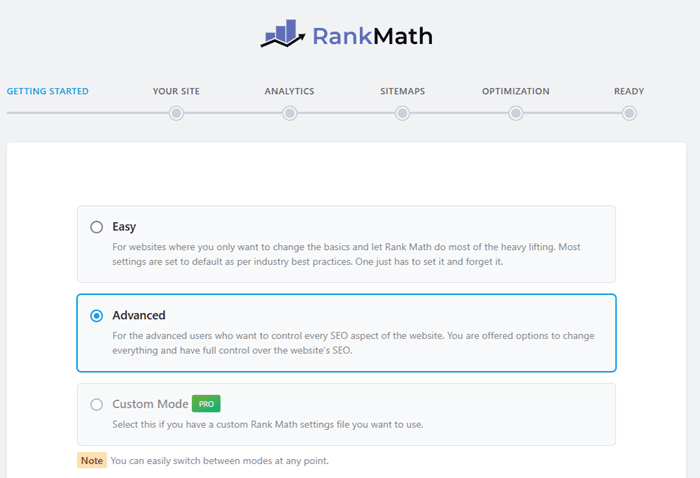
Once you install and activate the plugin, Rank Math will automatically launch its Setup Wizard.
Step 1: Choose a setup mode
Easy: suits personal blogs and basic sites. This applies default settings in accordance with industry best practices.
Advanced: unlocks sitemap control, schema, and indexing options
Custom: if you have a custom Rank Math SEO settings file, pick this option.
Then, tap the Start Wizard button. I selected the Advanced mode, so I will get full control over the plugin setup.
Step 2: Website options
On the next page, you will get options to choose your website type (blog, news, small business, etc).
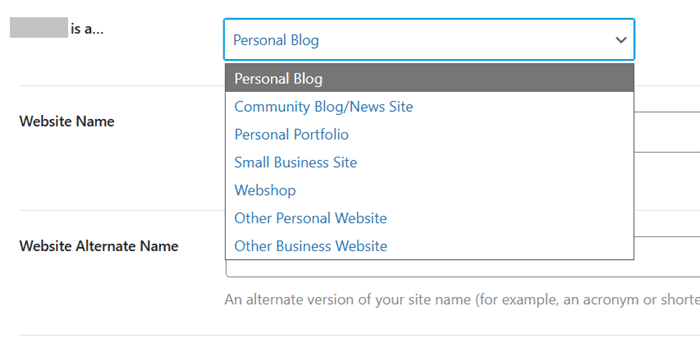
Set an appropriate option from the drop-down box. Enter your website name and upload your logo and the default social media sharing image next.
Click on Save and Continue to proceed.
Step 3: Analytics
In this step, you will be asked to connect to your Rank Math account. You can sign in using Google, Facebook, WordPress.com, or an email address. Grant it permissions to access your account data. It automatically verifies your licence (if any) and displays it. Click on connect.
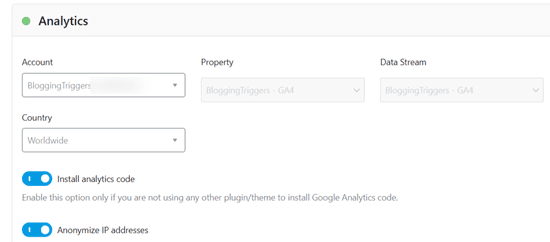
Rank Math will fetch your Google Search Console, Analytics, and AdSense properties and show them as drop-down lists. Pick your website properties so you can monitor your index status, traffic data, and AdSense earnings within WordPress. This plugin will also automatically insert your Analytics tracking code into theme files.
Enable Email alerts to receive weekly analytics reports. Again, click on Save and Continue.
Step 4: Sitemaps
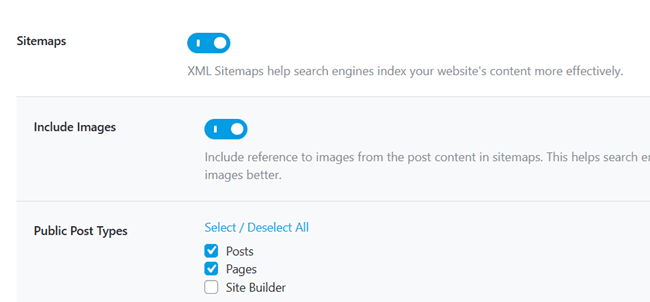
You can configure sitemap settings here. Select post types and taxonomies that you want to include in the sitemap. Enable ‘Include images’ to add your content images in the sitemap files and get traffic from image searches.
Step 5: Optimization
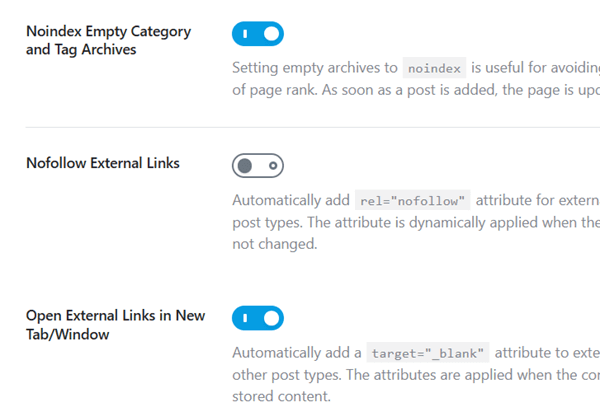
You can manage indexing for empty archive pages in this section. Drag the toggle button to the right to noindex your empty category and tag pages. Next, enable the ‘Nofollow external links’ option if you want to insert a nofollow tag on all your outgoing links and save time in assigning link attributes each time.
The last option enables your site visitors to open external links in a new tab. This helps keep readers on your pages for a long time without sending them away through link opens. Click on Save and Continue again.
Step 6: Advanced options
You will get options to configure Role Manager, 404 redirection, and Schema markup in the section.
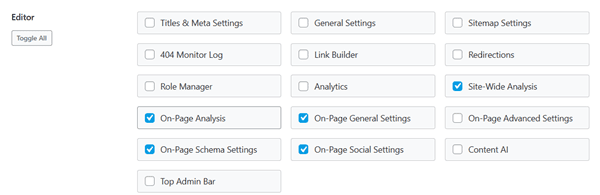
Here, you can decide which settings of the Rank Math plugin (Sitemap settings, analytics, etc) each WordPress user role can access. You can limit these to administrators only or give them to editors and writers as well.
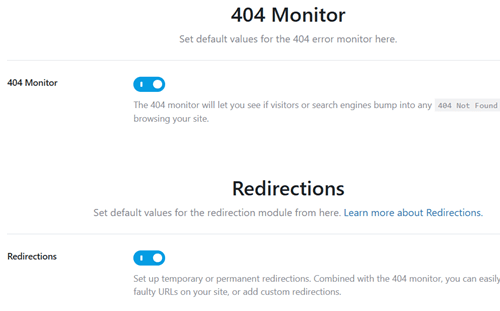
Then, enable 404 monitor and redirections on your site. Rank Math will automatically detect 404 errors on your pages via Google Search Console and redirect them to other pages.
Click on Save and Continue to go to the last step. Here, you can set Schema Markup for your entire site.
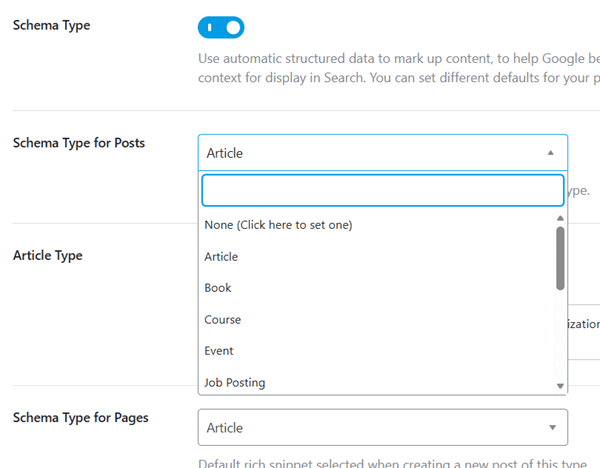
Pick a schema type, article type (article, blog post, news), and schema type for pages in this section. You can add a custom schema or import a website schema later through Rank Math settings.
Finally, click Save and Continue again to save the changes. This will redirect you to the Rank Math dashboard.
Rank Math Modules
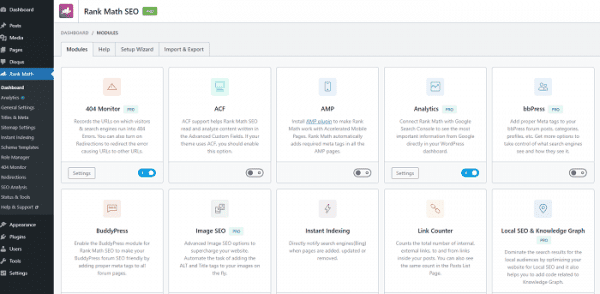
Rank Math uses a unique modular system that gives you complete control over your site’s resources. Unlike other plugins that auto-load all the features, Rank Math allows you to turn on only those modules that you need. This ensures you run only the code you need, keeping your site lightweight and fast.
Enable a module such as Content AI, Sitemap, Redirections, etc., and click Settings to manage them. But first, make sure you are in Advanced mode on the top-right. This will serve all Rank Math modules on your screen.
How to enable a Rank Math module:
- Navigate to Rank Math SEO > Dashboard.
- Locate a module, toggle the switch to O, and then open Settings.
2. Content AI
Rank Math’s Content AI is a revolutionary on-page assistant that uses proprietary algorithms to analyze search results and guide your writing in real-time. It doesn’t just count words; it understands semantic relevance.
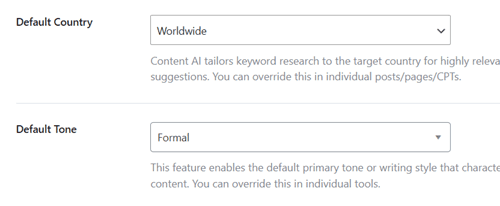
Here is how to configure it effectively:
Head to settings (Dashboard > Content AI > Settings) to personalize Content AI as per your requirements. You can also access these settings from Rank Math > General Settings > Content AI.
Recommended Content AI settings:
Default Country: Set this to your primary target market (e.g., USA, UK, India). Keyword search volume, difficulty, and intent vary by region. Setting this correctly ensures the AI scrapes the right SERPs for data.
Default Language: Select the primary language of your content.
Default Tone: Choose a voice that matches your brand (e.g., Professional, Conversational, or Formal).
Default Audience: Define who you are speaking to (e.g., Professionals, Beginners, Students).
Default Language: Your target language, such as US English, UK English, Chinese, etc.
Select Post type: Post types (Posts, pages, etc) where you want to use Content AI.
Save changes.
3. 404 Monitor
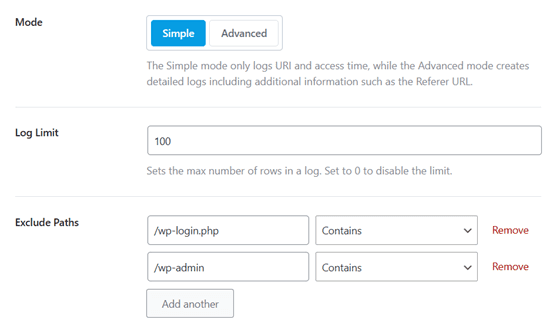
Rank Math’s 404 Monitor tracks broken links so you can plug the leaks, but it needs to be configured carefully to avoid bloating your database.
Recommended 404 Monitor settings:
Stick to Simple mode. This records the URI and the access time. The Advanced mode records the referrer and user agent, which is useful for deep debugging but creates significantly more database entries. For 99% of sites, “Simple” provides enough data without impacting performance.
Log Limit: 100. This limits the number of rows in your database. Old 404 logs are rarely useful. It ensures that your site database remains lean and fast.
Exclude Paths: Add common bot targets like /wp-login.php, /xmlrpc.php, or /wp-admin.
Why: Bots constantly scan for these backend folders. You don’t need to be notified every time a script tries to hack your login page; you only care about real content URLs that users can’t find.
Ignore Query Parameters: ON
Why: This consolidates errors. If someone visits domain.com/broken-page?utm_source=facebook and another visits domain.com/broken-page?utm_source=twitter, Rank Math will log them as the same 404 error rather than two separate ones. This makes your log much easier to read.
4. Analytics
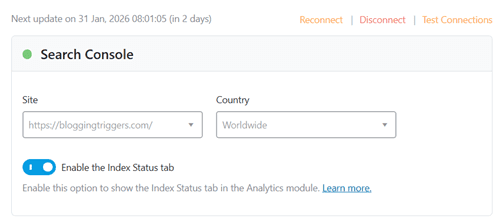
Rank Math’s Analytics Module acts as a unified “Single Source of Truth” directly inside your WordPress dashboard. Instead of frequently switching tabs between Google Search Console (GSC) and Google Analytics 4 (GA4), this module collects all your critical metrics—keywords, traffic, indexing status, and performance velocity—and displays them in WordPress.
Recommended Analytics settings:
Search Console: Select your specific property
→ Enable the Index Status tab: On
Analytics: Connect your GA4 property here.
→ Install analytics code: On
→ Anonymize IP addresses: On
→ Self-Hosted Analytics JS File: On
→ Exclude Logged-in users: On
AdSense: Connect your AdSense account.
Analytics Database: 30 days. You can store data for up to 180 days. However, it stores 2x data in your database, which will affect your site performance. So, keep this to a minimum.
Frontend Stats Bar: On
Email Reports: On
Email Frequency: 7/15/30 days
Customize the email subject and upload your logo if needed.
5. Image SEO

Visual search is a primary traffic driver, and accessibility is no longer optional—it’s a ranking necessity. Google cannot “see” your images the way humans do; it relies on Alt Text (alternative text) to understand the context. Rank Math can automate this task in 1 click.
Recommended Image SEO settings:
Add Missing ALT Attributes: On
Alt attribute format: %filename%
Add missing TITLE attributes: On
Title attribute format: %filename%
Add missing image caption: Custom
Use default settings for other options.
🚀 Rank Higher in 2026
Stop losing traffic to competitors. Upgrade to Rank Math PRO now and secure your #1 spot on Google.
Go Pro Today →6. Instant Indexing
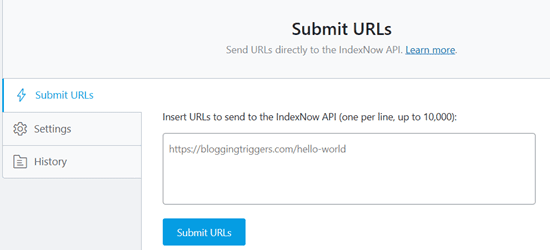
The Instant Indexing module allows you to ping URLs the moment you hit “Publish.” While it is presented by the standard Rank Math setup wizard, manual configuration is required to ensure you are sending the right signals without overloading the API.
Recommended Instant Indexing settings:
Settings: Under settings, you will see three options.
Auto-Submit Post Types: Select Posts.
Rank Math will automatically generate an API key for your site. If not, click on Change key to generate a new key.
Submit URLs: You can manually paste URLs into the “Console” tab of the module to force a re-crawl of older posts you have recently updated.
7. LLMS Txt
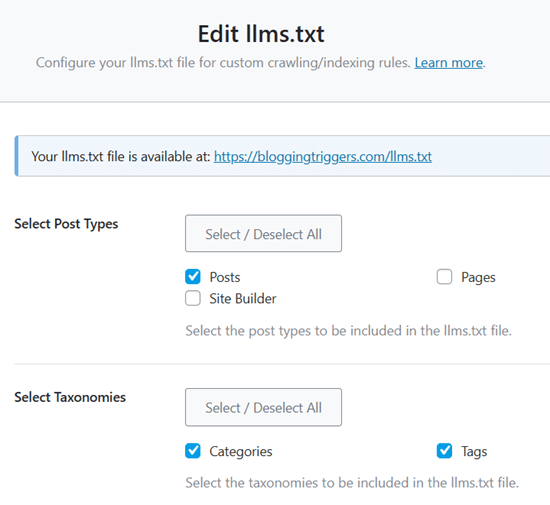
In 2026, optimizing for Google is only half the battle. You should also optimize for Large Language Models (LLMs) like ChatGPT, Claude, and Perplexity.
The LLMS TXT file is essentially “ROBOTS.TXT for AI”—a standardized text file that provides AI crawlers with a concise, token-efficient summary of your website’s most important content. Rank Math makes it easy to create this file.
Recommended LLMS Txt settings:
Select Post Types: Posts and Pages (Products if you are an eCommerce site)
Select Taxonomies: Categories and Tags
Posts/Terms Limit: 500/1000
Additional Content: This will appear at the bottom of all your content. Add your social media or YouTube channel links, copyright note, or contact email here.
8. Local SEO
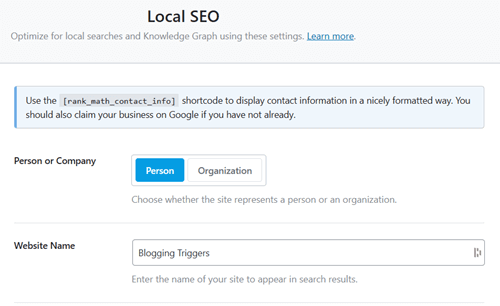
Local SEO is the strategic process of optimizing your website to rank higher in search results for location-specific queries. It connects your digital presence to your physical location through structured data, helping your business appear in the coveted Google Map Pack.
Recommended Local SEO settings:
Person or Organization: Organization
Why: This triggers the “Local Business” Schema markup. If you select “Person,” you miss out on critical fields like opening hours and physical address coordinates.
Website Name: Your official Brand Name (e.g., Apex Plumbing)
Website Alternate Name: Use a common abbreviation customers might search for (e.g., Apex NYC)
Person/Organization Name: Must match your Google Business Profile (GBP) name exactly.
Why: Any discrepancy here (e.g., adding “LLC” on your site but not on your GBP) can confuse the algorithm and lower your trust score.
Logo: Upload a square image, minimum 112×112 pixels (Recommended: 512x512px). JPG or PNG format.
URL: Your homepage URL
Email: Your business email address
Address: This must mirror your physical location exactly as it appears on Google Maps.
Tip: If you are a Service Area Business (SAB) without a physical office for customers, you generally leave the street address blank in GBP. But in Rank Math settings, it is safer to fill this out for Schema purposes and then choose not to display it publicly via shortcode if privacy is a concern.
About/Contact Pages: Pick relevant pages from the drop-down list.
9. Podcast
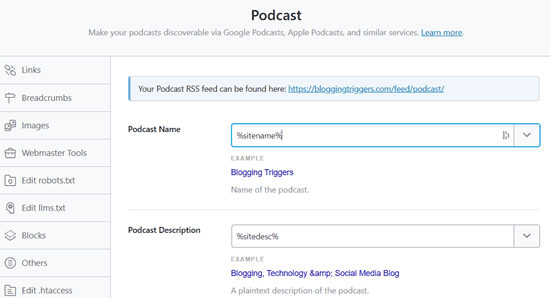
The Podcast module in Rank Math turns your WordPress site into a podcast host, generating an RSS feed compliant with Apple Podcasts, Spotify, and Google.
Recommended Podcast settings:
Podcast Name: Your official podcast show name (e.g., The SEO Mindset)
Podcast Description: A keyword-rich summary (Up to 300 characters)
Owner Name: Your real name
Owner Email: Your business email
Podcast Category: Choose the most specific sub-category available
Podcast Image: A JPG or PNG file exactly 1400 x 1400 pixels (maximum 3000 x 3000)
Tracking Prefix: Leave blank (unless you use a third-party analytics tool like Podtrac or Chartable).
Is Explicit?: Unchecked (unless your podcast contains adult content)
Copyright Text: Your copyright text
10. Redirections
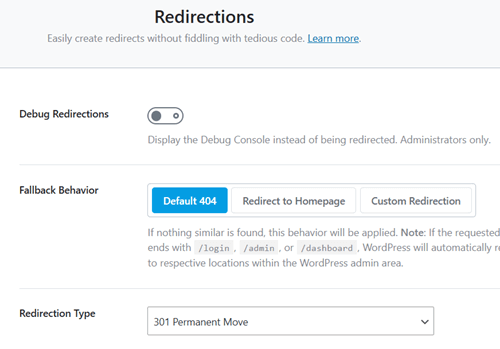
Rank Math will automatically send visitors from your old or broken pages to a new, relevant one. This simple action prevents frustrating “Page Not Found” errors and ensures you don’t lose the SEO authority (link juice) you have built up over time.
Recommended Redirections settings:
Debug Redirections: Off
Fallback Behavior: Default 404 (‘Redirect to Homepage’ will confuse search engines and readers, but this default 404 allows you to create custom redirections properly)
Redirection Type: 301 Permanent Move (This tells search engines, “This page has moved forever; transfer all its SEO credit to the new page”)
Auto Post Redirect: On
11. Schema
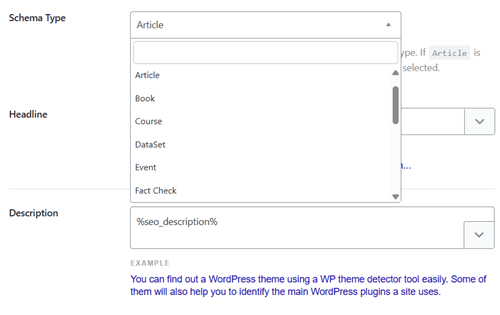
Schema markup is a code vocabulary that helps search engines understand the specific context of your content, explicitly identifying pages as recipes, reviews, events, or articles.
Recommended Schema settings:
Schema Type: Article
Headline: %seo_title%
Description: %seo_description%
Article Type: Blog Post (for standard blogs) or Article (for news/business sites)
Autodetect Video: On
Autogenerate Image: On
12. Sitemap
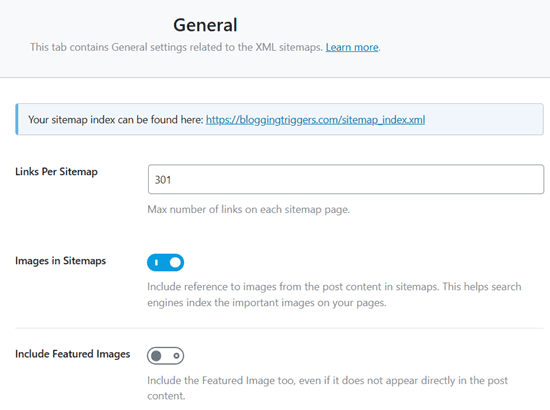
A sitemap is the essential roadmap that guides search engines to your most important content, ensuring they crawl and index your pages efficiently. It also acts as a safety net, helping Google discover deep links that might otherwise be missed by standard bots.
Recommended Sitemap settings:
Links Per Sitemap: 200 (While the default is often 1,000 (or higher), Rank Math recommends lowering this to 200. Smaller files are faster for Google to process and less likely to time out on shared hosting servers)
Images in Sitemaps: On
Include Featured Images: On
HTML Sitemap: On (XML sitemaps are for bots; HTML sitemaps are for humans. Adding an HTML sitemap link in your footer improves accessibility and helps visitors navigate your site structure, which is a positive UX signal for SEO)
Display Format: Page (Create a page titled ‘Sitemap’ or something similar to quickly guide readers about your posts, pages, and taxonomies)
Page: Your Sitemap page
Sort By: Published/modified date
Show Dates: On/Off
Item Titles: Item Titles
13. Video Sitemap
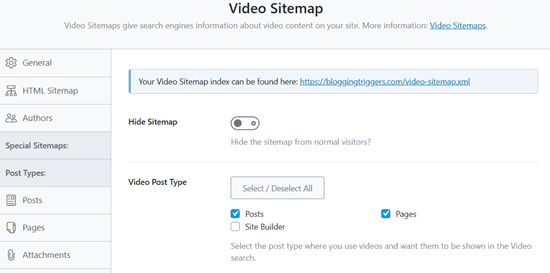
A Video Sitemap is a specialized XML file that lists all the video content on your website along with critical metadata like duration, thumbnail, and title.
Recommended Video Sitemap settings:
Hide Sitemap: On (This helps you display the video sitemap to search engine bots only)
Select Post Types: Posts and Pages
YouTube API Key: Enter your key to fetch video details from YouTube
Custom Fields: If you insert videos using “Advanced Custom Fields” or unique page builder modules rather than the standard WordPress editor, you must add the field name here. Otherwise, the scanner might miss your videos entirely, leaving the sitemap empty.
Final thoughts
Congratulations! You have officially graduated from the basic Rank Math setup wizard to a fully optimized SEO powerhouse. From the precision of Local SEO to the cutting-edge llms.txt configuration, your site is now speaking the native language of search engines and AI bots alike.
A perfect Rank Math setup is just the launchpad. The plugin handles the technical heavy lifting so you can focus on what matters most: creating incredible content. You’ve got the tools; now go claim your spot at the top of the search results!
Ready to Dominate the SERPs?
Stop guessing and start ranking with the world’s most powerful WordPress SEO plugin. Join 2+ million users and supercharge your site for 2026 today.
Get Rank Math SEO Now →