| Disclosure: Your support helps keep the site running! We earn a referral fee for some of the services we recommend on this page (at no extra cost to you). |

MonsterInsights is a popular WordPress Google Analytics plugin. It is easy to configure and provides real-time statistics on your website visitors, popular posts, most-selling eCommerce products, and more.
Google Analytics is our favorite and most powerful tool to analyze traffic. It monitors your visitors and provides reports on your target audience, top referral channels, and other key metrics.
Whether you are running a business website or blog, obtaining accurate traffic data helps you develop more relevant pages and boost your income. Find where your traffic is coming from, where visitors land, and how long they spend on your pages.
Add more related keywords to your high-performing content and link them to other internal pages to encourage readers to spend a long time on your site.
As a webmaster, you can easily install the Google Analytics code through your theme settings. However, an advanced WordPress tool is essential for uncovering hidden analytics features and saving time.
Today, I’m going to review MonsterInsights, the all-in-one Google Analytics plugin for WordPress.
What is MonsterInsights?
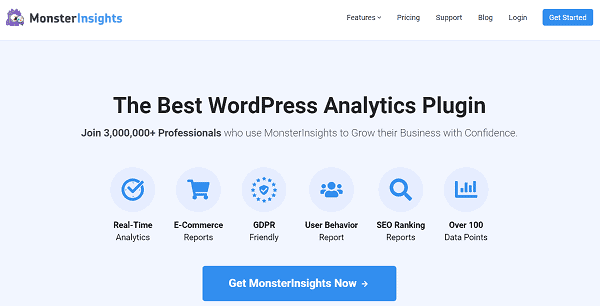
MonsterInsights is a great Google Analytics plugin for WordPress. Yoast SEO previously owned it under the name Google Analytics for WordPress. In 2011, Syed Balkhi, founder of WPBeginner, acquired the plugin and renamed it MonsterInsights.
Trusted by more than 3 million websites, it automatically inserts the Analytics tracking code and starts tracking visitors from the moment of activation.
This plugin collects your traffic data from Google Analytics and displays it in the WordPress dashboard. So, there is no need to visit your Analytics account each time to monitor page visits, bounce rates, and other things.
MonsterInsights can track various aspects of your site, including the countries from which you are receiving the most traffic, top referral channels, and top affiliate links, among others. If you want to find popular categories or authors on your site, it is also possible with the plugin.
eCommerce tracking is another advantage of MonsterInsights. It is helpful to track your most selling products, digital downloads, and predict your total revenue for a particular period.
These are the main features of MonsterInsights,
Pricing: $99.60/yr
Click here to visit MonsterInsights and track your website visitors like an expert (Up to 60% off)
How to Set Up MonsterInsights?
Follow these steps to activate and set up MonsterInsights on your WordPress website,
1. Sign in to MonsterInsights and head to the Downloads tab to download the plugin. On the left side, you will see the license key. Collect it. We need it in the next step to activate the plugin.

Visit WordPress and upload MonsterInsights as a new plugin. After activation, a new screen will appear with a welcome message.

Click Launch the wizard to set up the plugin.
2. The next page will show step-by-step instructions on configuring MonsterInsights for Google Analytics.

Choose your website category first. It will automatically apply recommended settings according to your choice. Click Save and Continue to proceed.
Enter your license key to verify your purchase and enable automatic plugin updates. Click the Connect MonsterInsights button to connect to your Google Analytics account. A box will appear to sign in with your Google account and allow MonsterInsights to access your website profile.

Choose a profile to connect. Click Complete Connection to save changes.
3. Configure tracking settings as next.
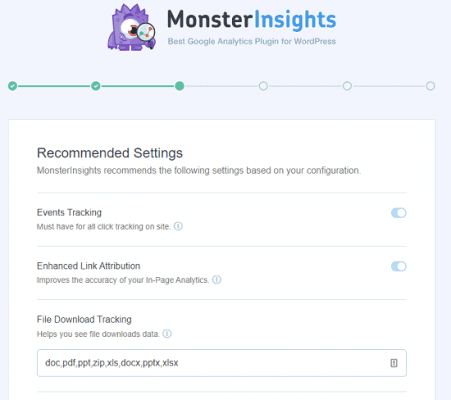
MonsterInsights automatically tracks all your external links, including affiliate links, download links, email links, and more. It will also help Google determine unique links on your site and direct search engine bots to the exact location of your pages.
By default, it tracks downloads of all popular file types, such as DOC, PDF, ZIP, etc. Add more file types if needed. Scroll down to set up affiliate link tracking and monitor the sales you referred to from the unique cloaked links.
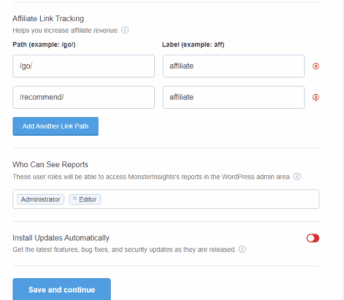
Enter your affiliate link path and assign a label to it. Click Save and Continue again.
4. Install recommended add-ons. The next screen will suggest you install various MonsterInsights addons to track individual posts, forms, ad clicks, and others. Alternatively, you can install them at a later moment through plugin settings. Save settings.
Finally, you will get a screen like this.

You’ve successfully configured MonsterInsights for Google Analytics. Exit the setup wizard to go back to the WordPress dashboard.
MonsterInsights Review: Top Reasons to Use MonsterInsights
MonsterInsights is a crucial WordPress plugin that enables businesses to uncover new growth opportunities and increase revenue. Let us check the main reasons for using it on your money-making website,
1. Easy to use
MonsterInsights was developed with a single motive: to help beginners use Google Analytics. From plugin setup to report generation, it works simply, and you don’t need to enter a single line of code at any stage.
After activation, launch the setup wizard to configure tracking, and the plugin will do the rest. MonsterInsights collects important data from Google Analytics and displays it in WordPress. No need to go out of your admin panel to monitor daily traffic and analyze visitors.
2. Monitor and optimize individual posts
Find out how many page views you got, how many user sessions you covered, and your bounce rate. MonsterInsights provides all these metrics and many others in detail. Individual post tracking is it’s another advantage.
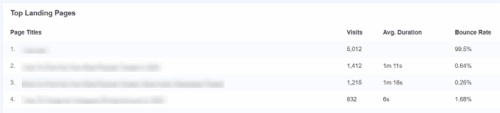
It displays the top landing pages on your website, along with the number of visits, average duration, and bounce rate.
If readers are leaving any page in quick moments, it may be because of slow speed issues. Check it using a page speed test tool like GTmetrix and optimize the content to encourage readers to spend more time on it. Add more information and keywords to make your post up-to-date. These strategies help you to improve page performance and reduce the bounce rate.
3. Discover most selling products
As an e-commerce shop owner, you should know which products are selling the most and generating the most profit.
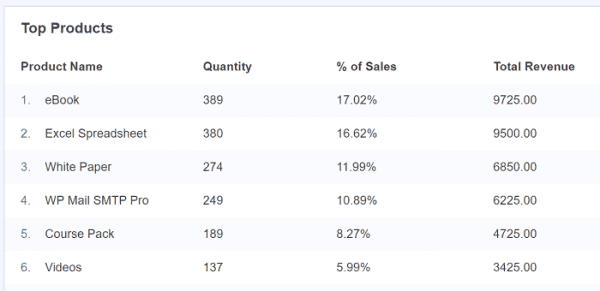
Visit Insights > Reports > eCommerce. Additionally, it will display the overall conversion rate, number of transactions, total revenue, and average order value for a selected period, providing a brief overview of the store’s performance.
Scroll down to view your top products, the number of units ordered, their percentage of the total sales, and total revenue. Sometimes, customers add products to the cart and remove them later for unknown reasons. MonsterInsights will track such user activities and display statistics on the same page.
4. Track authors, categories, and tags
MonsterInsights is a powerful tool for tracking almost anything on your WordPress website. It helps you to track popular authors, categories, published time, SEO score, focus keyword, and more using custom dimensions.
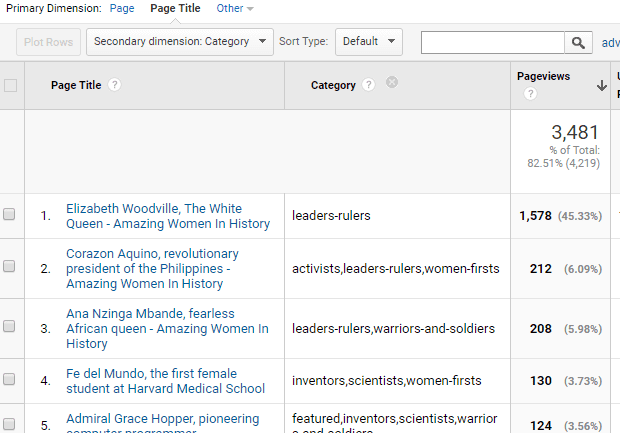
If you run a multi-author website, this information will help you measure each author’s popularity and reward them accordingly.
Creating new content according to the categories and tags most visited by visitors is helpful in improving your internal traffic and reducing the bounce rate. You can also track focus keywords and optimize content based on the traffic received to get more visitors.
5. Track outbound links
Outbound link tracking is another advantage of MonsterInsights. It includes affiliate links, phone links, email links, anchor links, and more.
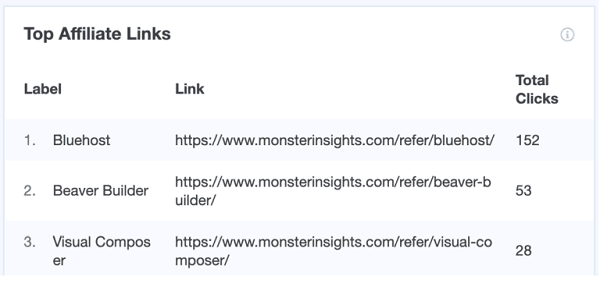
Link tracking is a very useful feature for marketers. It enables them to understand how many visitors have been referred to third-party websites and get better deals accordingly.
Identifying the most popular affiliate links will help you make the necessary adjustments to your content creation strategies and increase commissions.
6. Find and display popular posts
You may have seen the most popular products displayed in a widget form on the sidebar or main screen of many websites, including Amazon. It encourages visitors to click links to view trending products or content.
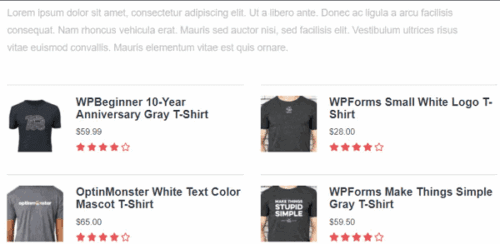
MonsterInsights collects your individual page metrics and lets you display titles as either inline or sidebar widgets. Choose from 14 beautiful themes, customize styles, and sort posts by comments, sharing counts, or random.
It can automatically add new posts to the widget based on your traffic for the past 30 days.
7. Google AdSense tracking
Do you want to track Google AdSense banner clicks and earnings with MonsterInsights? Yes, it is possible.
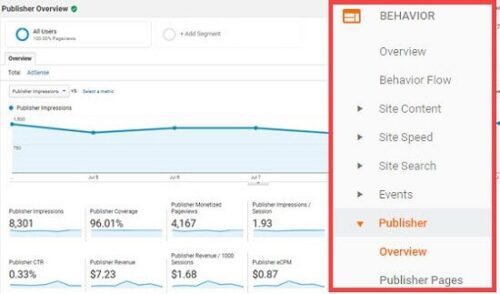
Link your Google AdSense account with Analytics and activate MonsterInsights add-on (Ads) to track ad impressions, clicks, and total income. Analyze reports to determine your best ad slots and change ad types if needed to improve earnings.
8. Detect top traffic sources
MonsterInsights is the right place to discover top countries and top referral sources that divert most visitors to your pages.
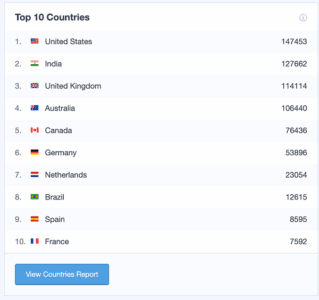
It will also inform you about the devices visitors use to access your site and the most popular Google search terms related to your site. For each keyword, it will display your ranking position in Google search results. Unlike other position tracking tools, it directly collects data from Google Search Console. So, this data will be more accurate than others.
Customize your marketing campaigns to attract more traffic from countries and social media sites listed on the list. Schedule and publish content at peak times for each platform to increase user engagement and page views.
9. Forms tracking
Forms allow you to collect user data and convert a casual visitor into a regular client. For the smooth functioning of the business, you may need to add different forms to the site. Once you understand which of them reaches the most people, you can change promotional plans to increase conversions.
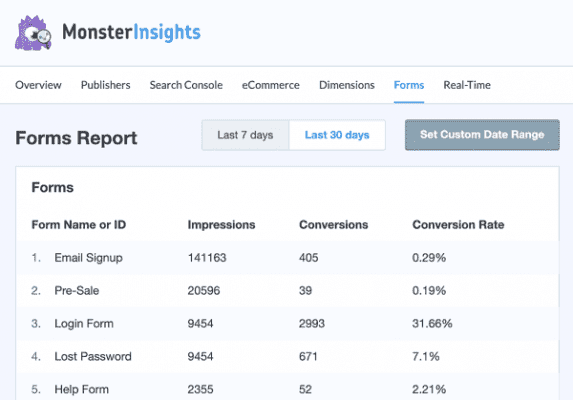
MonsterInsights can track and display form statistics, along with impressions, conversions, referral sources, and more.
10. Real-time statistics
Monitor your website traffic in real-time without needing to access your Google Analytics account. View how many visitors are on your live site, from where they are coming, and on what pages they are.
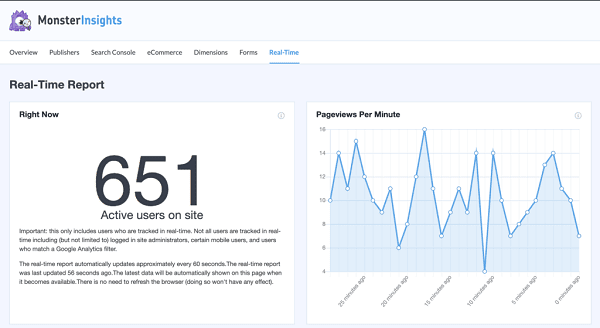
MonsterInsights collects and displays all this information, along with referral sources, audience cities, individual page views, and more. It will automatically refresh data every 60 seconds, ensuring you receive the most accurate details about live visitors.
11. Performance metrics
A fast-loading website can rank higher in SERPs and get more page visits. Scan your website and individual posts regularly through online speed test tools to ensure they load smoothly. If there are any slow-speed issues, fix them at the earliest to avoid losing visitors.
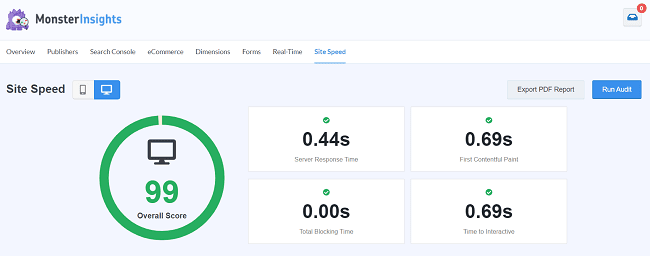
MonsterInsights audits your website and provides reports covering server response time, first contentful paint, total blocking time, and interaction time. It will also display the recommended time for each stat, along with improvement suggestions, so you can easily optimize pages to enhance performance.
12. Integrations
MonsterInsights is integrated with popular tools and WordPress plugins you use to extend functionalities. It includes WooCommerce, Easy Digital Downloads, MemberPress, ThirstyAffiliates, LifterLMS, and various WordPress form plugins, among others.
Hence, you can easily track eCommerce transactions, monitor the activities of MemberPress users, and determine which files are being downloaded the most, among other things, using Google Analytics.
13. Fast customer support
MonsterInsights offers priority customer support to promptly address your queries and resolve any complaints. Ask questions, raise a feature request, and even share your interest in writing a guest post for them. Their friendly support staff will respond to your messages in a few hours.
They also have a 14-day money-back guarantee on all plans.
Final thoughts
MonsterInsights is the #1 Google Analytics plugin for WordPress. It lets you track anything, including page views, file downloads, user scrolling, videos, and many others mentioned in this post.
The plugin is developed and maintained by the same team behind WPBeginner, OptinMonster, and WPForms. They have a deep knowledge of the industry, so they will never lag behind others, and you can expect the best service from them.
MonsterInsights adds more value to your marketing efforts through powerful statistics and integrations. It helps you to detect new content creation or product development opportunities and skyrocket your earnings.
Whether you are a business owner, a content marketer, or an e-commerce merchant, MonsterInsights is a great choice for gathering accurate visitor information and boosting your organic page views.
Click here to buy MonsterInsights with up to a 60% discount and monitor your traffic like experts do (Limited period offer + 14-day money-back guarantee)
Pricing
MonsterInsights has three subscription plans- Plus, Pro, and Agency.
Plus
- $99.60/year
- 1 website
- Unlimited users
- Standard features & support
Pro
- $199.60/year
- 5 websites
- Unlimited users
- Advanced features & priority support
Agency
- $399.60/year
- 25 websites
- Unlimited users
- WordPress multisite support
- Client management
- Premium support
Click here to buy MonsterInsights and grow your business (Premium support + 14-day money-back guarantee)
What is MonsterInsights?
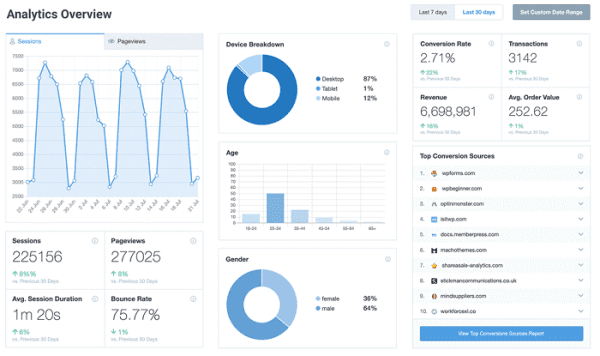
MonsterInsights is the #1 Google Analytics plugin for WordPress. It gives full data about your visitors and traffic sources directly on your website dashboard.
Find where your visitors are coming from, what marketing channels work best for you, and what type of content or product your audience likes most. Obtaining traffic and conversion data is crucial for running your business smoothly and identifying new opportunities. Therefore, we can say that MonsterInsights is an essential tool for any business.
FAQ
Click here to buy MonsterInsights and get in-depth stats about your website traffic (50% discount—limited period offer)