Direct Answer
Choose Shopify for a fast, hassle-free launch with managed hosting. Choose WooCommerce for 100% content ownership and the flexibility to scale your digital marketing. Running on WordPress, WooCommerce lets you deploy advanced SEO plugins to capture AI Overviews and dominate organic search traffic.
Starting an online store is one of the most exciting things you can do for your business. But before you can start picking out brand colors or adding products, you have to make a huge decision: which platform should you use to build your store?
If you are looking for the best e-commerce platforms in 2026, you have almost certainly narrowed your choices down to two massive names: WooCommerce and Shopify.
These two platforms dominate the internet. Together, they power millions of online stores, from tiny side hustles to massive global brands. But here is the catch: they work in completely different ways. Picking the wrong one could cost you a lot of time, money, and headaches down the road.
In this complete guide, I am going to break down the great WooCommerce vs Shopify debate. We will look at their pricing, ease of use, SEO features, transaction fees, and more. By the end of this post, you will know exactly which platform is the perfect fit for your online business.
| Disclosure: Your support helps keep the site running! We earn a referral fee for some of the services we recommend on this page. |
What is Shopify? (A Quick Overview)

Shopify is a fully hosted e-commerce platform. This means that when you sign up for Shopify, they provide the software, web hosting, security, and payment processing all in one place. You do not need to buy separate web hosting or install any software on your computer.
Think of Shopify like renting a storefront in a high-end shopping mall. The mall owner is responsible for the building’s security, plumbing, and keeping the lights on. All you have to do is decorate your shop, put your products on the shelves, and start selling.
Pros of Shopify:
- Easy to use: The dashboard is clean, simple, and perfect for beginners.
- Fast launch: You can launch a basic store in a single weekend.
- Zero technical maintenance: Shopify handles all major tasks like server speed and security updates.
- Premium customer support: You get 24/7 support via live chat, email, and phone.
- Built-in sales features: Comes with great tools for recovering abandoned carts and selling on social media.
Cons of Shopify:
- Monthly fees: You have to pay a strict monthly subscription fee that goes up as your business grows.
- Extra transaction fees: If you do not use Shopify’s own payment system, it charges you an extra fee for every sale.
- Less control: You are renting space on Shopify’s servers. If they change their rules, you have to follow them.
What is WooCommerce? (A Quick Overview)
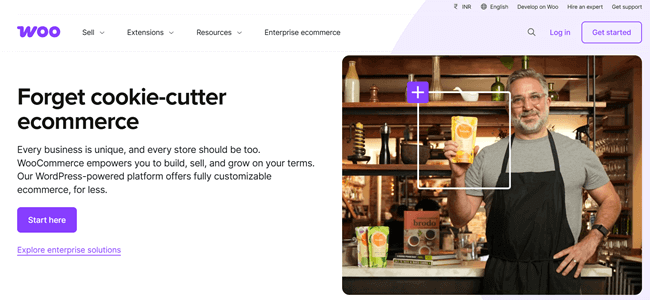
WooCommerce is completely different from Shopify. It is not a standalone platform. Instead, it is a free plugin built specifically for WordPress.
WordPress is an open-source website builder that powers over 40% of the entire internet. When you add the WooCommerce plugin to a WordPress site, it magically turns that site into an online store.
Because WooCommerce is open-source, it is self-hosted. This means you have to buy your own web hosting, secure your own domain name, and build the website yourself.
Think of WooCommerce like buying a plot of land and building your own standalone store from the ground up. You have to handle the electricity, the security, and the foundation. But once it is built, you own the building in its entirety, and you can change anything you want without asking a landlord for permission.
Pros of WooCommerce:
- Total ownership: You own your website completely. Nobody can shut you down or change the rules on you.
- Endless customization: You have access to thousands of WordPress plugins to make your store do precisely what you want.
- Great for SEO: WordPress is the best platform for search engine optimization.
- No extra transaction fees: WooCommerce does not take a cut of your sales. You only pay standard credit card processing fees.
- Cheaper to start: The plugin itself is free, which is excellent if you are on a tight budget.
Cons of WooCommerce:
- More complex: It takes time to learn how WordPress works if you have never used it before.
- You manage the technical stuff: You are responsible for keeping your site secure, backing up your data, and updating software.
- No central support team: If something breaks, you cannot just call a WooCommerce help desk. You have to figure it out yourself or hire a developer.
WooCommerce vs Shopify: Head-to-Head Comparison
Now that we know the basics, let us put these two giants head-to-head in the categories that matter most to online business owners.
1. Ease of Use and Setup Time
When you are starting a business, your time is your most valuable asset. How quickly can you get your store up and running?
Shopify is the clear winner when it comes to simplicity. From the moment you create an account, Shopify guides you through the process. The drag-and-drop store builder is very visual.
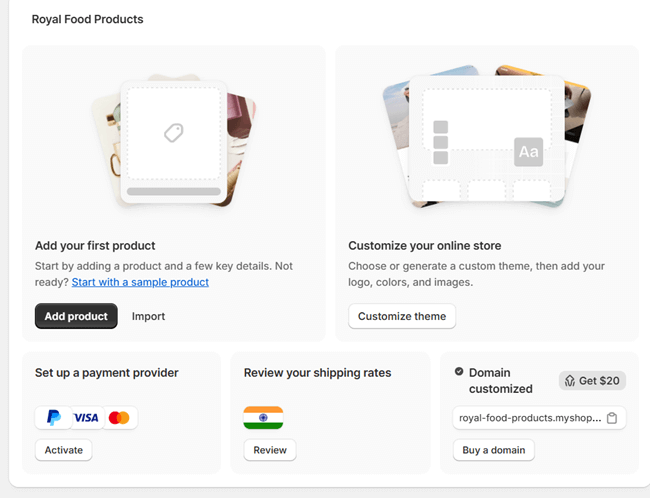
You can easily add product images, write descriptions, and set up your shipping rules without ever looking at a line of code. If you have all your product photos and descriptions ready, you could build a beautiful Shopify store in a few hours.
WooCommerce asks a lot more of you. First, you have to buy a domain name. Then, you have to sign up for a web hosting account. Next, you install WordPress. Finally, you install the WooCommerce plugin.
Once all that is done, you still have to find a theme and learn how the WordPress dashboard works. It gives you a lot of freedom, but that freedom comes with a lot of extra steps.
Winner: Shopify. It is the best choice for beginners who want to build a store fast and without stress.
2. True Costs and Pricing
Pricing is where the WooCommerce vs Shopify debate gets really interesting. A lot of people think WooCommerce is free and Shopify is expensive, but the truth is a bit more complicated.
How Much Does Shopify Cost?
Shopify uses a simple monthly subscription model. Their main plans are:
- Basic Plan: Around $29 per month.
- Grow Plan: Around $79 per month.
- Advanced Plan: Around $299 per month.
- Plus Plan: Around $2300 per month.
These prices give you almost everything you need: hosting, security, and the store builder.
However, you will likely end up paying for premium apps from the Shopify App Store to add extra features (like advanced email marketing or special discount pop-ups). These apps usually charge their own monthly fees, which can quickly push your monthly bill higher.
How Much Does WooCommerce Cost?
WooCommerce is “free” to download and use. But running a website is never totally free. Here is what you actually have to pay for:
- Web Hosting: $5 to $30+ per month (depending on your store’s size).
- Domain Name: $10 to $15 per year.
- Premium Theme: $50 to $100 (usually a one-time fee).
- Premium Plugins: $0 to $200+ per year.
The Verdict on Cost:
In the short term, WooCommerce is usually cheaper to start because you can find very cheap web hosting. But as your store grows, you might need to buy expensive plugins and upgrade to a faster hosting plan.
Shopify gives you predictable costs. You know exactly what your base bill will be every month. But WooCommerce gives you more control over your budget. You can choose exactly where to spend your money.
Winner: Tie. It depends on whether you prefer a fixed monthly bill (Shopify) or controlling your own budget (WooCommerce).
3. Payment Gateways and Transaction Fees
This is a massive factor that many new store owners overlook. When a customer buys something, how do you process their credit card, and how much does it cost you?
Shopify has its own built-in payment system called Shopify Payments. If you use it, you just pay the standard credit card processing fee (usually around 2.9% + 30 cents per transaction).
However, if you want to use a different payment gateway (like PayPal, Stripe, or a local bank provider), Shopify punishes you. They will charge you a penalty fee of 0.5% to 2% on every sale, just for not using their system. This can eat into your profits very fast.
WooCommerce is much friendlier to your wallet here. By default, they offer WooPayments, which charges the standard 2.9% + 30 cents fee. But the best part is that WooCommerce does not punish you for looking elsewhere.
You can connect Stripe, PayPal, Square, or hundreds of local payment gateways from around the world. WooCommerce will never charge you an extra platform fee on top of your sales. You keep more of your own money.
Winner: WooCommerce. The freedom to choose your payment processor without paying penalty fees is a massive advantage for growing businesses.
4. Design, Themes, and Customization
Your store needs to look good. Customers will not trust a website that looks outdated or broken. Both platforms give you great tools to design your site, but they approach it differently.
Shopify has a dedicated Theme Store. There are over 100 beautifully designed themes to choose from. Some are free, but the best ones cost between $150 and $350. These themes are tightly controlled by Shopify, which means they are guaranteed to work perfectly, load fast, and look great on mobile phones.
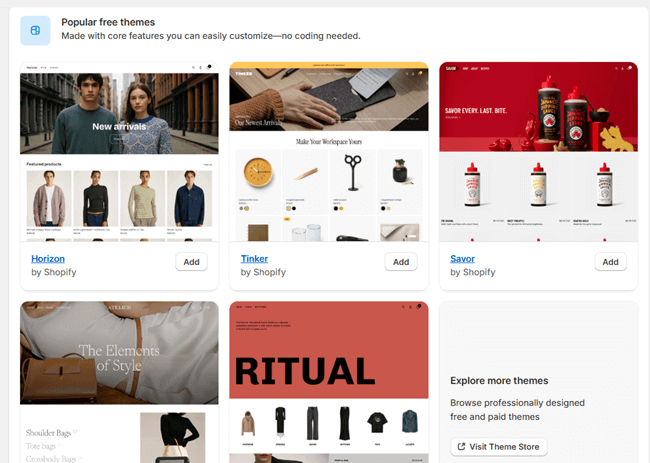
Customizing them is easy, but you are somewhat locked into the structure of the theme. If you want to make major, unique changes, you have to hire a developer who knows Shopify’s specific coding language (Liquid). You can also consider installing a top-rated Shopify theme from third-party marketplaces.
WooCommerce benefits from the endless world of WordPress. There are literally thousands of WooCommerce themes available online.
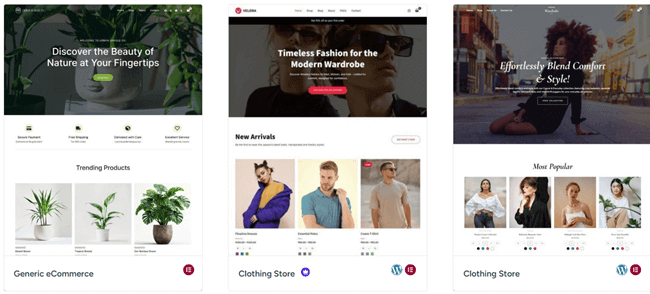
You can use visual drag-and-drop builders like Elementor or Divi to design your store exactly how you want it. You can change every single pixel, button, and layout. If you can imagine a design, you can build it with WooCommerce.
Winner: WooCommerce. If you want a truly unique brand experience and total control over your design, WooCommerce is unmatched.
5. SEO (Search Engine Optimization)
If you want customers to find your store without paying for expensive Facebook or Google ads, you need to rank high on search engines. When comparing WooCommerce vs Shopify SEO, the differences become very clear.
Shopify does a good job with basic SEO. It automatically generates sitemaps, allows you to edit title tags and meta descriptions, and ensures your site loads fast (which Google loves).
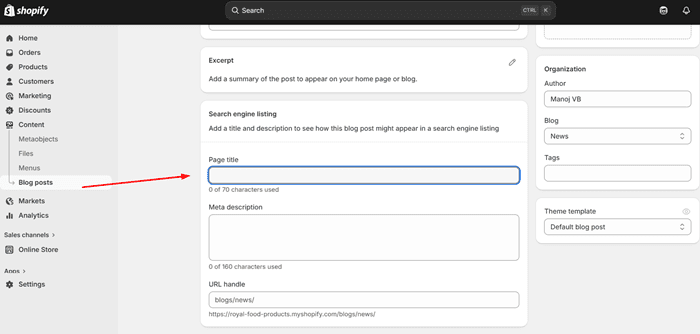
However, Shopify forces your store into a rigid URL structure. For example, all your product pages will have “/products/” in the link, and all your blog posts will have “/pages/” or “/blogs/”. You cannot change this. This lack of control over site architecture can be frustrating for advanced SEO experts.
WooCommerce is an absolute powerhouse for SEO. Because it is built on top of WordPress (the best blogging platform in the world), you have total control over every single SEO element.
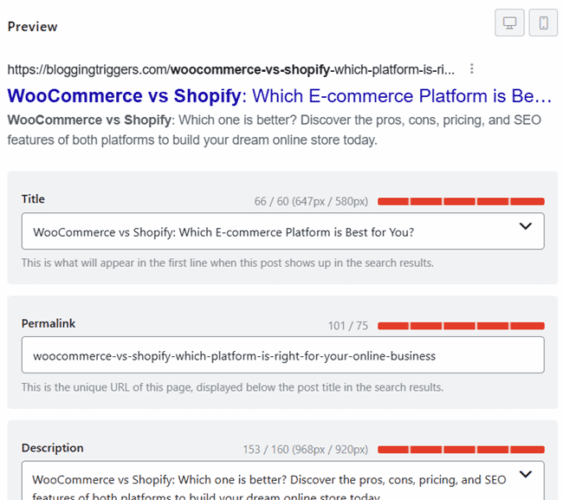
You can create perfectly clean URLs, optimize your site speed on your own server, and write incredibly detailed, media-rich blog posts to drive traffic. By adding a free SEO plugin like Rank Math or Yoast, you can easily guide Google’s search bots to rank your products higher than your competitors.
The Winner: WooCommerce. If organic search traffic is a major part of your marketing strategy, WooCommerce is the undisputed king.
6. Security and Maintenance
Running an online store means you are handling sensitive customer data, like addresses and credit card numbers. Keeping that data safe is not optional.
With Shopify, you never have to worry about security. Shopify is a massive tech company with a dedicated team of security experts.
They handle your SSL certificates (the little padlock next to your web address), they protect your site against hackers, and they make sure your site stays online even if you get a huge spike in traffic. They also handle all software updates automatically in the background. You never have to worry about backing up your site; Shopify does it automatically.
With WooCommerce, security is completely in your hands. You should make sure your web hosting is secure, install your own SSL certificate, and actively manage security plugins like Wordfence to block hackers.
You also need to make sure your WordPress theme and plugins are constantly updated, as outdated software is the number one way hackers get into a site. Finally, you are responsible for setting up daily backups just in case your site crashes.
Winner: Shopify if you are a beginner. Peace of mind is priceless. Shopify lets you focus on selling products, not playing the role of an IT security guard. Once you become familiar with the WooCommerce system, it works smoothly.
7. Apps, Plugins, and Expanding Your Store
No platform does everything perfectly out of the box. Eventually, you will want to add new features—like a loyalty program, advanced shipping calculators, or a tool that collects customer reviews.
Shopify has the Shopify App Store. It is heavily curated, meaning Shopify tests the apps to make sure they are high quality and will not break your site. It is very easy to find an app, click install, and have it working in seconds.
However, most of these apps charge a monthly subscription fee. Adding three or four apps can easily add $50 to $100 to your monthly bill.
WooCommerce uses WordPress plugins. There are nearly 60,000 free plugins available, plus thousands of premium ones. Because it is an open market, the quality can vary.
Some plugins are amazing, while poorly coded ones can slow your site down or cause crashes. The bright side is that you can often find free plugins to do exactly what a paid Shopify app does, saving you a lot of money over time.
Winner: Tie. Shopify wins for ease of use and safety. WooCommerce wins for variety and cost savings.
8. Dropshipping
Dropshipping is a popular business model where you sell products without holding any physical inventory. When a customer buys from you, the order is sent directly to your supplier, who ships it to the customer.
Shopify is famous in the dropshipping community. It has massive integrations with popular dropshipping apps like DSers, Zendrop, and Spocket. These apps allow you to import products directly from AliExpress or other suppliers into your Shopify store with one click.
When a customer places an order, the app fulfills it automatically. The whole process is incredibly smooth and beginner-friendly.
WooCommerce is also fantastic for dropshipping. You can use plugins like AliDropship or WooCommerce Dropshipping to automate the same processes.
The big benefit of using WooCommerce for dropshipping is that you have better profit margins because you aren’t paying monthly platform fees or extra transaction fees. However, setting up these plugins requires a bit more technical know-how than the plug-and-play apps on Shopify.
The Winner: Shopify. While both are great, Shopify’s seamless integration with dropshipping suppliers makes the daily operations much easier to manage.
Should You Migrate from WooCommerce to Shopify (Or Vice Versa)?
Often, business owners start on one platform and realize later that they made the wrong choice.
If you are feeling overwhelmed by the technical maintenance, slow loading speeds, or security worries of your WordPress site, migrating from WooCommerce to Shopify might be a smart move.
Shopify has a dedicated migration tool that helps you bring over your products, customers, and order history relatively easily. It will free up your time so you can focus purely on marketing and selling.
On the other hand, if you are currently using Shopify and you are frustrated by the high monthly app fees, the 2% extra transaction fees, or the limits on how you can design your store, moving to WooCommerce is the right path. It will give you back total ownership of your business and significantly reduce your ongoing monthly costs.
🛍️ Launch Your Dream Store with Shopify!
Start selling online in minutes with an all-in-one platform that handles your hosting, security, and payments effortlessly.
Try Shopify Risk-FreeThe Final Verdict: Which Platform is Right for You?
Choosing between WooCommerce vs Shopify for a small business is not about finding the “perfect” platform, because both have their flaws. It is about finding the platform that best matches your skills, your budget, and your business goals.
Choose Shopify if:
- You want ease of use above all else. You do not want to touch code, manage web servers, or worry about security updates.
- You want to launch quickly. You can have a beautiful, fully functioning store running in a matter of days.
- You have a healthy budget. You do not mind paying a monthly subscription fee and paying for premium apps to make your life easier.
- You want 24/7 customer support. If something breaks, you want to be able to jump on a live chat and have a professional fix it for you.
Choose WooCommerce if:
- You want total control. You want to own your website completely and have the freedom to customize every single pixel.
- You want to minimize fees. You refuse to pay extra transaction fees or expensive monthly software subscriptions.
- You have a content-heavy SEO strategy. You want to write blog posts and rely on Google to drive free organic traffic to your store.
- You are willing to learn. You do not mind spending some time watching tutorials and learning how to manage WordPress plugins and web hosting.
Ultimately, both WooCommerce and Shopify are incredibly powerful tools. Pick the one that aligns with the way you like to work, set up your store, and start selling.
🛒 Build a Custom Empire with WooCommerce!
Unlock endless customization and total ownership of your online store with the most flexible eCommerce platform built for WordPress.
Get WooCommerce Today