| Disclosure: Your support helps keep the site running! We earn a referral fee for some of the services we recommend on this page. |
URL Shortener Pro is an all-rounder URL shortener plugin for WordPress. It is best for affiliates, social media marketers, and others to shorten links, cloak affiliate links, etc.
Key Features
Rating
Pricing
$19/year
Do you want to power up marketing campaigns by shortening URLs and tracking link clicks, user device types, referrer sources, etc.?
Or
Do you want to replace long, ugly affiliate URLs with short, cloaked links and monitor performance within WordPress?
Long affiliate links hurt clicks. They look messy and may scare some readers away. Link shortening or link cloaking tools can fix that. They also help you track clicks and manage many links from one place.
URL Shortener Pro is a WordPress plugin that can shorten links on your own domain. It can also hide affiliate URLs, offer several redirect types, and show click stats in your dashboard.
Today, I will review URL Shortener Pro by MyThemeShop in this post and analyze its features, pros & cons, and pricing to find if it fits your needs.
Let’s begin,
Why should You Use a Link Cloaking Plugin?
Long URLs are visually unappealing and distracting to readers. They take up too much space in posts, emails, and social updates.
Affiliate links look even worse because they include long tracking strings from your merchant partners. A short link can fix this. It looks cleaner and easier to share.
Cloaking hides the long affiliate URL behind a short slug, which makes your content look better and easier to manage.
Tracking analytics is another advantage. You can see which links work best and fix campaigns that fail to perform. They also make updates easier when affiliate programs change URLs. Short links are more professional and help you boost conversions.
What is URL Shortener Pro?
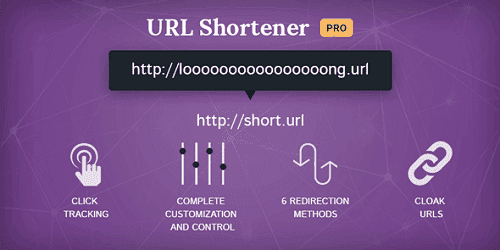
URL Shortener Pro is a URL shortening and link cloaking plugin for WordPress. It is fast, easy to use, and customizable.
I have been using this plugin for link cloaking and shortening links for a long time. Unlike other WordPress link-cloaking plugins, URL Shortener Pro is very cheap.
Pretty Links Pro and ThirstyAffiliates Pro are the most popular plugins in this category. But they cost $99 per year for 1 website. On the other hand, URL Shortener Pro is available at just $19 per year for unlimited websites.
Developed by the same team behind Rank Math SEO, it is a great tool for affiliates to beautify their referral links and increase click-through rates (CTR).
URL Shortener Pro hides your affiliate URLs and tracks user clicks. So you can know how many visitors clicked on each link and what OS, device type, and browser they used to open links.
Link category is another advantage. It allows you to organize blog post links and affiliate URLs in separate categories. As a result, you can retrieve them easily at a later moment.
URL Shortener by MyThemeShop is not just an affiliate marketing plugin. It can also shorten your blog post links for social media posts and even redirect visitors to other internal pages.
They have 24/7 premium support and a 30-day money-back guarantee.
How to Cloak Affiliate Links on WordPress?
Cloaking affiliate links is very easy on WordPress. Let us check how you can do it with the URL Shortener Pro plugin.
- After installing and activating the plugin, you will see a new top-level menu on the WordPress sidebar (under Settings). Short Links.
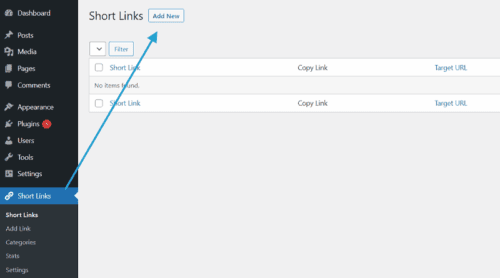
Expand the menu and click on ‘Add New’.
2. You will get a new screen like this,
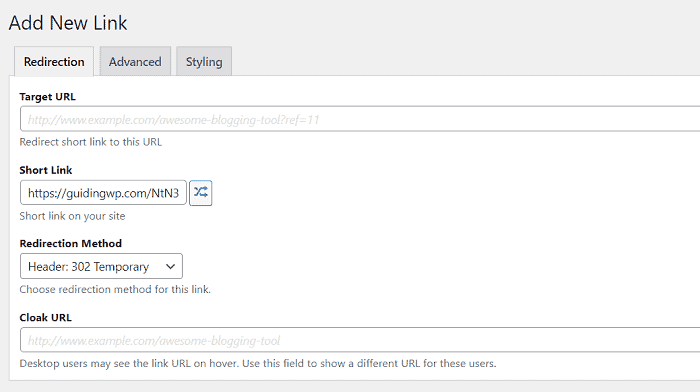
- Target URL: Enter your direct affiliate link here
- Short Link: Enter a short link that you can use on the website and social media posts. e.g., www.example.com/generatepress
- Redirection method: Choose a redirection method like 302 temporary, 307 temporary, 301 permanent, HTML tag, JavaScript, and invisible iFrame
- Cloak URL: When a visitor hovers over the link, they will see this URL. e.g., www.example.com/recommends/generatepress
Scroll down to replace links and keywords in your old posts and pages with this new short link.
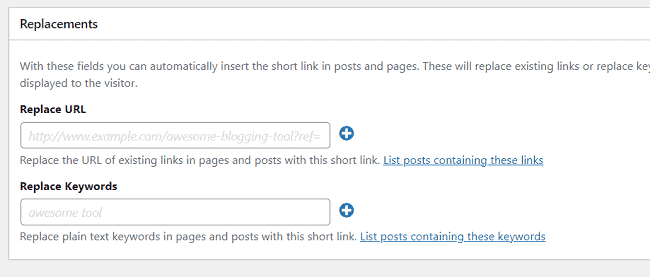
- Replace URL: Enter a URL in existing posts and pages you want to replace. e.g., www.example.com/buy/generatepress
- Replace Keywords: Enter keywords that need to be replaced with the new short link. e.g., GeneratePress, blogging theme, etc
Switch to the Advanced tab to set a title attribute, anchor text, and other settings.
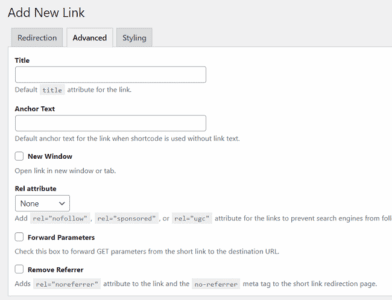
Check the New Window box to open your affiliate link in a new tab. Next, assign a Rel attribute such as ‘nofollow’ sponsored’, and ‘ugc’ to your link.
URL Shortener Pro allows you to manage all these things globally through the plugin settings. If you are already finished with that part, forget about this individual setting, as it will override your default configurations.
Click Add Link to save.
You have successfully cloaked your affiliate link. Copy your short link or cloak URL to use it on posts, pages, or anywhere on the web.
URL Shortener Pro Pricing
You can buy URL Shortener Pro in two ways- as a single product or with other MyThemeShop products (bundle).
Single Product
- $19/year
- Unlimited websites
- 24/7 support
Membership
- $199/year
- All MyThemeShop Themes & Plugins
- All Future products
- Unlimited websites
- 24/7 support
Click here to buy URL Shortener Pro and customize all your marketing campaigns like an expert (30-day money-back guarantee)
URL Shortener Pro Review: Key Points
Take a look at the key advantages of the plugin,
1. Fast
Common plugins take some time when redirecting visitors to external sources. However, URL Shortener Pro is different from them.
This plugin doesn’t slow down your pages in any way. It is 40% faster than similar tools, so visitors don’t have to wait even a second to open links.
You can also redirect users with JavaScript, invisible iframe, meta refresh tags, and headers. Redirecting via HTML and iframe ensures better functionality and allows you to provide the latest information instantly.
2. User-friendly
URL Shortener Pro is easy to use. It has a clean layout and simple settings. You can add links quickly and organize them into categories.
Use the search box at the top to locate any link using keywords. The plugin will show link statistics for all links on the home screen. This helps you understand how each campaign performs without opening links.
3. Create shortlinks
URL Shortener Pro makes link creation quick and stress-free. You can create a short link in seconds. Add the long URL and set a shortlink. Click on Add link to save.
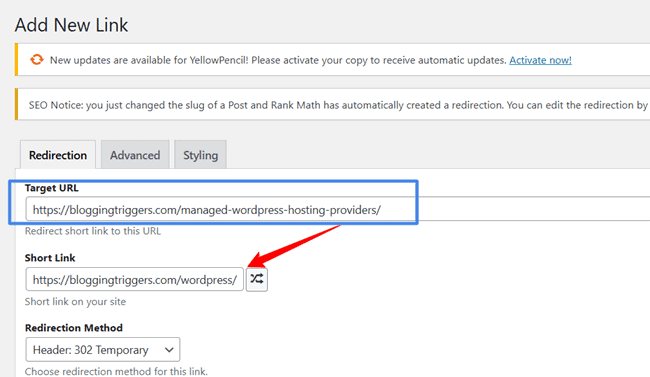
Suppose your original link is example.com/best-managed-wordpress-hosting-providers. You can shorten it like this: example.com/wordpress.
Such shortlinks work best in social media posts, email newsletters, and others. It applies an authentic touch to your campaigns and brings more visitors.
4. Link cloaking
Link cloaking is a major attraction of URL Shortener Pro. It is a proven strategy to sell more products and increase affiliate earnings.
For example, you can create tiny URLs like example.com/bluehost or example.com/recommends/bluehost to send visitors to merchant websites or your blog posts.
Readers see a link based on your domain, not a long chain of letters and numbers. This makes your content look cleaner and more professional.
Cloaking also helps when you want slugs that match product names or topics. This makes the link easier to recognise during edits. When you publish many reviews and buying guides, this feature saves time and keeps your pages tidy.
5. Increase Internal Traffic
URL Shortener Pro can be used to create and monitor internal links. Follow these steps to create internal links using the plugin,
- Head to the Short Links menu on the WordPress sidebar and click Add New to create a new link.
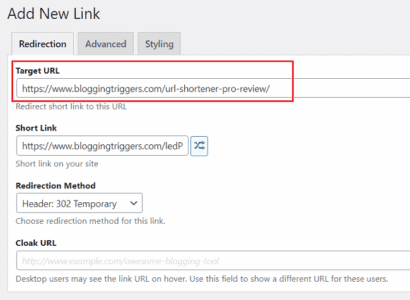
In the Target URL field, enter a blog post/page link where you want to send visitors.
Scroll down to the bottom to locate the Replacements section. Add your target keyword (e.g., WordPress hosting) under Replace Keywords.
Click Add Link to save.
- Open Replacement settings (Short Links > Replacement settings) to set a limit for replacements.
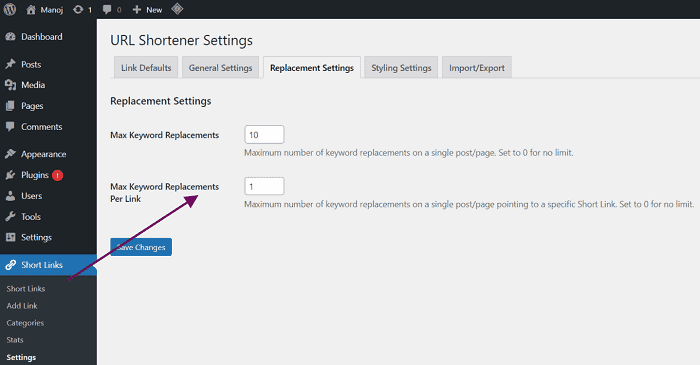
Max Keyword Replacements: Enter how often you want to replace the target keyword with short links (globally). Type ‘0’ for unlimited replacements.
Max Keyword Replacements Per Link: Enter how often you want to replace a keyword on a single post or page. Type ‘0’ for no limit.
Save changes.
URL Shortener Pro automatically replaces your target keyword with the target link globally based on these configurations. You can use this bulk replace keywords option to insert your affiliate links for any keyword, such as ‘Rank Math SEO’, and boost sales.
6. Redirect types
URL Shortener Pro offers several redirect options. You can use header redirects such as 301, 302, or 307.
Each type behaves differently, and the plugin allows you to select the one that best suits your goal. Sometimes you may need a permanent redirect or a temporary redirect. The plugin does not lock you into one method.
You can also use JavaScript, the meta HTML tag, or an invisible iframe. These options are helpful when you need to specify a specific behavior for affiliate tracking or campaign links.
For example, some networks track clicks better through JavaScript redirects. Others work best with header redirects. The plugin keeps things simple by consolidating all redirect types on a single screen.
7. Styling
Whether you create internal or external links, there are built-in styling settings to customize your links. Assign separate colors for direct appearance and hover, and set font weight and underline if needed.
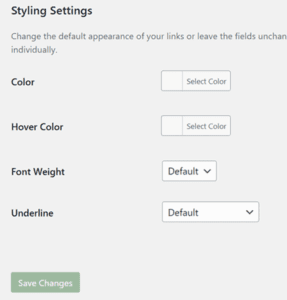
Go to Short Links > Settings > Styling settings to access styling controls. It will bring changes to short links throughout the site. However, you can override these settings and apply custom styling to individual links via link settings.
8. Categories
URL Shortener Pro allows you to organize links into categories, helping to keep your dashboard organized as your list grows. You can group links by topic, affiliate programs, social media campaigns, or internal links. This makes it easier to find links later when editing posts or updating offers.
Categories also help when managing multiple affiliate links across your blog posts. You can open the category and view all related links in one place. This reduces search time and keeps your workflow smooth.
9. Analytics
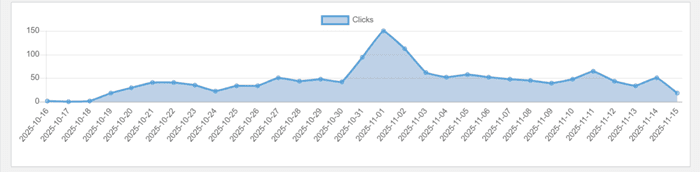
URL Shortener Pro displays click statistics directly within your WordPress dashboard. The reporting screen lists every link along with its total number of clicks.
Open each statistic to see the device type, browser type, and referrer that brings traffic. This helps you understand traffic flow across each campaign or link. You can spot posts that get substantial traffic and posts that bring weak traffic. This provides clues on where to update content or adjust affiliate placements.
You may discover that certain pages receive traffic from mobile users, which can guide you about layout decisions. Links with very low click-through signals indicate a weak placement or an outdated offer. You can check stats each week and improve your content strategy based on real clicks, not guesses.
10. Affordable
URL Shortener Pro is very affordable compared to other link-cloaking plugins such as Thirsty Affiliates and Pretty Links Pro. Their pricing starts at $99.60 per year for new customers. Thereafter, you should pay $249 per year for 1 website.
On the other hand, URL Shortener Pro costs just $19 per year. It is easy to use and lightweight as well. This plugin is a versatile solution suitable for affiliate marketing, social media promotions, internal page redirections, and more. Therefore, $19 is a very affordable price for anyone, including beginners.
11. Import or export
If you’ve used another link tool before, URL Shortener Pro allows you to import those links into its system. This helps you switch without losing slugs or click paths.
Head to Import/Export settings and import your links from the current plugin. The plugin reads your old entries and assigns them to its own list.
No need to rebuild links manually. You can retain your existing structure and continue from where you left off. This feature encourages users to migrate without stress.
12. Fast support
URL Shortener Pro has premium technical support. If you have any questions or concerns, please contact them through the support forums.
They will address your queries in a few minutes. A 30-day money-back guarantee is another advantage. So you can use the plugin freely for up to 30 days.
If you are unsatisfied, please contact our customer care team and request a refund. You will get the full amount back in a few minutes.
Conclusion
URL Shortener Pro is the best and most affordable link-cloaking plugin for WordPress. It helps mask affiliate links, shorten blog post links, divert visitors to other blog posts using keywords, and much more.
No more slow-loading external links. This plugin can deliver the most recent data via multiple redirection methods, including permanent and temporary headers, invisible iframes, and JavaScript. They help you manage broken links, increase user engagement, and open links instantly.
URL Shortener Pro by MyThemeShop is a great choice for affiliates, social media marketers, and other WordPress website owners. It lets you beautify links and monitor clicks from one place.
Click here to buy URL Shortener Pro and increase your internal traffic and affiliate earnings (30-day money-back guarantee)
URL Shortener Pro
Summary
URL Shortener Pro is our favorite link-cloaking plugin for WordPress. It can cloak your affiliate links and send visitors to your internal posts using keywords.
Key Features
- Fast and secure
- Affiliate link cloaking
- URL shortener
- Analytics
- Link categories
- Unlimited website usage
- Premium customer support
- 30-day money-back guarantee
Pricing
$19/year