
Direct Answer
To dominate search results, you must use the hidden Rank Math SEO features built right into the plugin. Tools like the instant SEO Analyzer, advanced XML sitemaps, and automated image text give your WordPress site a massive technical advantage. Unlocking these 17 secret settings is the absolute easiest way to skyrocket your organic traffic and beat your competitors.
You’ve probably seen the little red, yellow, and green circles in your WordPress dashboard. Most people think Rank Math is just a tool to help you get a “green score” on your blog posts. But if that’s all you’re using it for, you’re basically using a Ferrari to go to the grocery store.
Rank Math is a massive “Swiss Army Knife” for SEO. It can replace at least five or six other plugins, saving you money and keeping your site fast.
In this guide, we are going deeper than the basic settings. I’m going to show you more than 15 Rank Math SEO features that can actually move the needle on your rankings and increase organic traffic.
| Disclosure: Your support helps keep the site running! We earn a referral fee for some of the services we recommend on this page. |
- Rank Math SEO (A Quick Overview)
- Key Features of Rank Math SEO
- Best Rank Math SEO Features: 20 Secret Tools for Higher Rankings
- 1. Rank Math Content AI: Your 40+ Tool AI Writing Suite
- 2. [Bonus Section] The Ultimate AI Writing Workflow
- 3. The "Secret" Schema Import Tool
- 4. Finding "Low-Hanging Fruit" with the Analytics Dashboard
- 5. Focus Keywords
- 6. Google Search Console & Google Trends Integration
- 7. Track Your Wins with Custom Keyword Tracking
- 8. Automatic Image SEO: Saving Hours of Boring Work
- 9. Fixing "SEO Bloat" with Canonical URLs
- 10. Instant Indexing: Get Notified by Google in Seconds
- 11. The 404 Monitor: Stopping the "Silent Traffic Killer"
- 12. The Single Post Performance Widget
- 13. Page Speed Tracking (Core Web Vitals)
- 14. Breadcrumbs: The Secret to Better Navigation & SERP Links
- 15. Boosting Internal Link Juice: Detect Orphan Pages
- 16. Sitemaps
- 17. SEO Analyzer
- 18. The Built-in Robots.txt & .htaccess Editor
- 19. Local SEO & Knowledge Graph: Dominating Your Area
- 20. WooCommerce SEO: Boosting Your Online Store
- Final thoughts
- FAQ
Rank Math SEO (A Quick Overview)
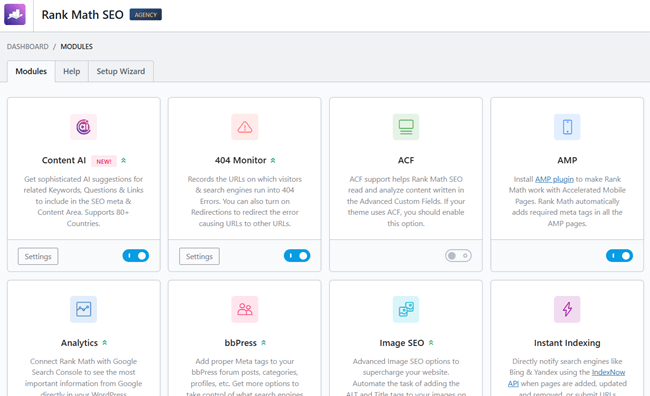
Let’s do a quick recap before jumping into the hidden tools. If you run a WordPress site, you already know SEO is non-negotiable for getting traffic. Rank Math is a plugin that handles the technical side of that for you.
Instead of installing five separate plugins for things like sitemaps, redirects, and schema, Rank Math puts it all in one clean menu. It works directly inside your post editor, grading your content as you type and telling you exactly where to drop your keywords. It essentially acts like a proofreader to make sure search engines understand and rank your page.
With the basics out of the way, let’s look at the features you’re probably ignoring.
Key Features of Rank Math SEO
Thinking about making the switch? 🤔
We tested it for months. See the good, the bad, and the bottom line in our complete breakdown.
👉 Read our full Rank Math SEO ReviewBest Rank Math SEO Features: 20 Secret Tools for Higher Rankings
You probably know the basics, but are you using this plugin to its full potential?
I’ve rounded up the best Rank Math SEO features that most users completely ignore. These secret tools will give your rankings a serious edge.
1. Rank Math Content AI: Your 40+ Tool AI Writing Suite
If you’ve ever used expensive tools like SurferSEO, Jasper, or Frase, you know how quickly those monthly subscriptions add up. One of the most powerful Rank Math SEO features is the built-in Content AI, which includes over 40 specialized AI writing tools.
Instead of just giving you a “green score,” Rank Math’s AI actually helps you write the content. Here’s what’s hidden inside:
- The AI Writer: You can generate entire paragraphs, sections, or even full blog posts directly inside your WordPress editor.
- 40+ Specialized AI Templates: This includes tools for:
- Topic Ideas & Outlines: If you have writer’s block, the AI can brainstorm your next 10 post ideas for you.
- Blog Post Intros & Conclusions: Hook your readers immediately.
- Social Media Posts: Automatically turn your blog post into a punchy caption for LinkedIn, Facebook, or X (Twitter).
- Product Descriptions: Perfect for those using the WooCommerce module.
- LSI & Keyword Intelligence: It still does the “heavy lifting” by looking at what is currently ranking on Google and telling you exactly which LSI keywords, word counts, and heading structures you need to win.
By using these 40+ tools, you can publish high-quality, SEO-optimized content 10x faster. It ensures you never miss a critical keyword that Google expects to see, which drastically improves your topical authority and search rankings.
2. [Bonus Section] The Ultimate AI Writing Workflow
To really increase organic traffic in 2026, you need to be fast. Here is a quick 15-minute workflow you can use with Rank Math’s Content AI to build a ranking post:
- Step 1: Research (2 Mins): Type your main keyword into the Content AI “Research” tab. It will tell you the average word count and the keywords your competitors are using.
- Step 2: Outline (3 Mins): Use the “Blog Post Outline” AI tool to generate a structure. It will give you H2 and H3 headings that are already optimized for search intent.
- Step 3: Draft (8 Mins): Use the “AI Writer” to expand on each heading. Don’t just copy-paste; read through and add your own personal experience to keep it “human.”
- Step 4: Optimize (2 Mins): Check the “Content Score.” If it’s below 80, add a few more of the suggested LSI keywords into your text.
This workflow allows you to maintain a consistent publishing schedule without burning out, which is the #1 secret to long-term traffic growth.
3. The “Secret” Schema Import Tool
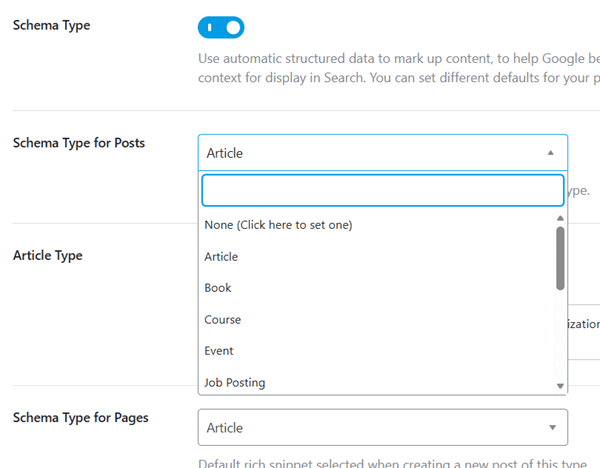
Schema markup helps you get those “Rich Snippets” on Google—like the star ratings or the FAQ dropdowns that make people click your link instead of someone else’s.
But Rank Math has a “hidden” feature: Schema Import.
If you see a competitor who has a beautiful Review box or an FAQ section that you want to replicate, you don’t have to build it from scratch. You can simply go to the Schema tab in Rank Math, click “Import,” and paste the URL of your competitor’s page. Rank Math will “scrape” their schema structure so you can modify it for your own post.
Extra: Rank Math SEO supports 840+ Schema types to improve your content visibility in organic search results. It also allows you to build a custom schema type without installing any dedicated Schema Markup plugin!
4. Finding “Low-Hanging Fruit” with the Analytics Dashboard
Most people go to Google Search Console to see their data. But Rank Math brings that data directly into your WordPress site and organizes it in a way that’s much easier to understand.
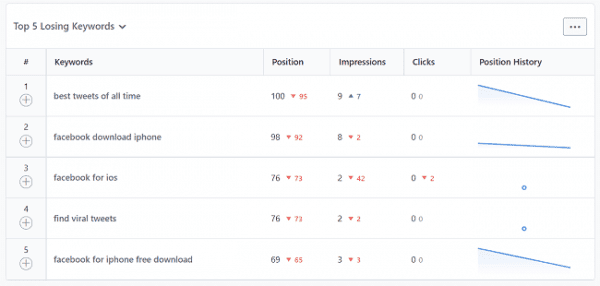
Inside the Analytics section, look for the Top & Worst Performing Posts and Keywords report. If you are getting good search impressions, but low clicks, you need to optimize your SEO title and meta description to attract visitors. Also, search Google with your target keywords and read the top-ranking pages to find what you miss.
- The Strategy: Find posts that are ranking in positions 11 to 20 (the “Striking Distance” keywords). These are posts that Google already likes but hasn’t put on the first page yet. Update these specific posts with fresh info or a few more internal links, and you’ll often see them jump to the first page within days.
5. Focus Keywords
Most SEO plugins let you insert a single focus keyword per post. But Rank Math is different. Its free users can insert up to 5, and premium users can insert unlimited primary keywords in a single post.
What else? Rank Math’s Focus Keyword tool works like having a personal SEO coach right inside your editor.
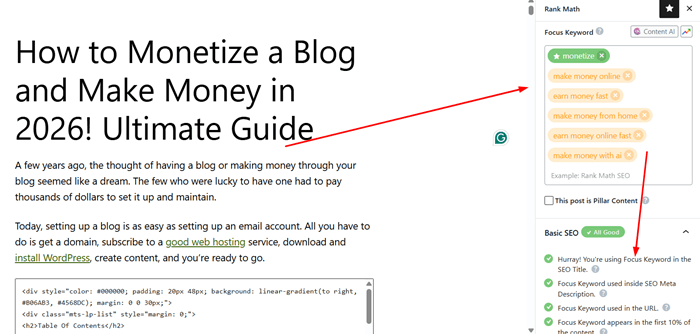
When you enter your target phrase, the plugin instantly grades your content and hands you a simple, color-coded checklist. It tells you if your keyword is in the right spots—like your title, URL, and subheadings—and warns you if you’re overdoing it.
Knocking out these quick tweaks before hitting publish makes your post incredibly easy for Google to understand and rank, driving a steady stream of organic traffic right to your site.
6. Google Search Console & Google Trends Integration
Rank Math is the only SEO plugin that integrates Google Trends directly into the keyword research tool.
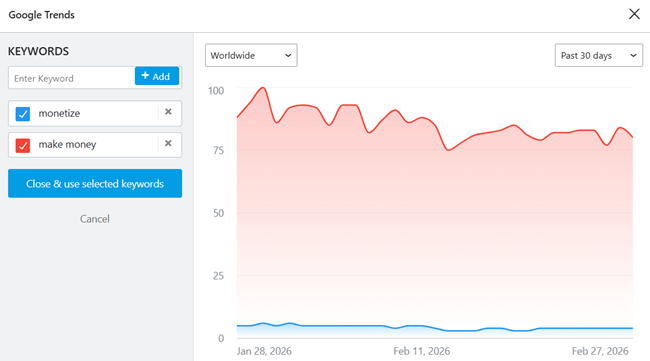
When you are typing in your “Focus Keyword,” you can click a button to see if that topic is rising or falling in popularity.
If you see a downward trend, you might want to pivot your keyword strategy before you waste time writing the post. Combining this with your live Search Console data gives you a “command center” for your content strategy.
7. Track Your Wins with Custom Keyword Tracking
You shouldn’t have to pay $50 a month for a separate rank tracker like Ahrefs or AccuRanker if you are just starting out.
Rank Math allows you to track specific keywords that you want to dominate. You can see your daily position changes, your average position, and even which specific page is ranking for which keyword.
Knowing exactly where you stand helps you react quickly if a competitor starts to overtake you. Pro users can track 500 keywords, Business users 10k, and Agency-level customers can track 50k custom keywords.
Extra: Rank Math will track all your ranking keywords by default. The custom keyword tracking is different. It is useful to track the performance of certain keywords, such as “Semrush vs Ahrefs comparison” or some keyword related to your recent product launch or a recently published sponsored post.
8. Automatic Image SEO: Saving Hours of Boring Work
Images are a huge source of organic traffic via Google Image Search, but most bloggers are too lazy to add “Alt Text” and “Title Tags” to every single image they upload.
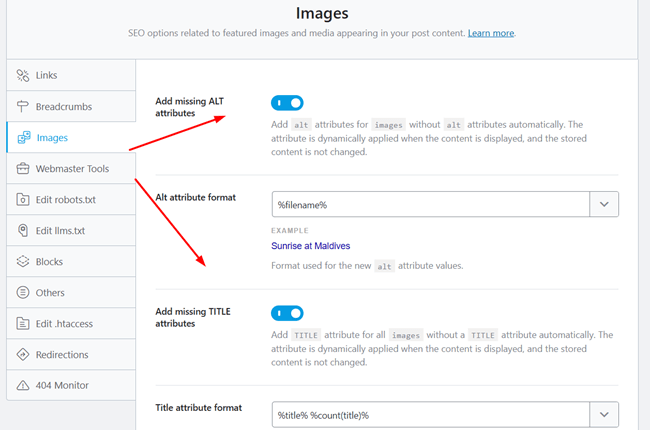
Rank Math has an Image SEO module that does this for you automatically. You can set a “template” that tells Rank Math to:
- Automatically use the post title as the image Alt text.
- Automatically use the filename as the image Title.
This ensures that every single image on your site is optimized for search engines without you having to lift a finger. This is one of those Rank Math hidden features that can drive thousands of extra visitors from image searches over time.
9. Fixing “SEO Bloat” with Canonical URLs
Duplicate content is a silent killer for WordPress sites. Sometimes, WordPress creates multiple versions of the same page (like archive pages or category pages).
Rank Math gives you easy access to the Canonical URL field. This tells Google: “Hey, even if you see three versions of this page, this one right here is the original. Please only rank this one.” This prevents your own pages from competing against each other in the search results.
Supercharge your WordPress SEO ⚡
Why let your competitors steal the top spot? Install Rank Math and skyrocket your organic traffic in minutes.
Try Rank Math for Free10. Instant Indexing: Get Notified by Google in Seconds
Waiting for Google to crawl your site can be frustrating. Sometimes it takes days, or even weeks, for a new post to show up in search results.
Rank Math has a built-in Instant Indexing feature that uses the IndexNow protocol. This is essentially a “ping” that goes directly to search engines like Bing and Yandex, telling them, “Hey, I just published something new, come look at it right now!”
While Google still uses its own crawling methods, Rank Math also integrates with the Google Indexing API. This is a game-changer for news sites or time-sensitive blog posts.
Why it helps traffic: The faster you get indexed, the faster you can start ranking and getting clicks. If you are writing about a trending topic, being indexed five minutes after hitting “Publish” can be the difference between being #1 and being buried on page five.
11. The 404 Monitor: Stopping the “Silent Traffic Killer”
A 404 error happens when someone clicks a link to your site, but the page doesn’t exist anymore. This usually happens when you change a URL or delete a post.
Most people have no idea how many 404 errors they actually have. This is a “silent killer” because:
- It creates a terrible user experience (people leave immediately).
- You lose all the “link juice” that was pointing to that old URL.
Rank Math’s 404 Monitor tracks every single time someone hits a dead end on your site. You can see the exact URL they were trying to reach.
Pro Tip: If you delete any post or page, Rank Math will automatically create a redirection to avoid 404 errors and send visitors to your home page. This “saves” the traffic and keeps the visitor on your site. You can replace the target URL and redirect visitors to a similar post if needed.
12. The Single Post Performance Widget
Have you ever been looking at one of your live blog posts and wondered, “How much traffic is this specific page actually getting?”
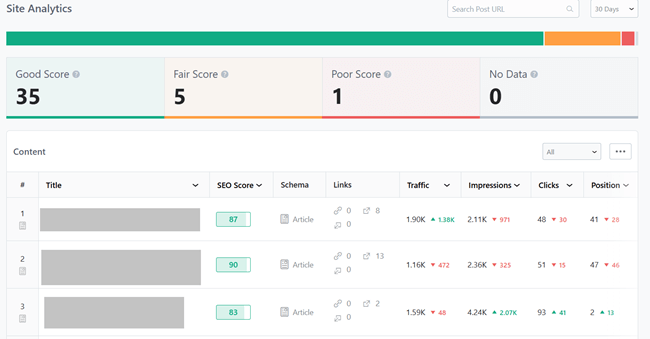
With the Single Post Performance Widget, you don’t have to leave your site. When you are logged in and viewing a post, Rank Math shows a small bar at the top with the impressions, clicks, and ranking history for that specific URL. It makes it incredibly easy to spot which posts need a quick “tune-up.”
Pro tip: Head to Rank Math and open your Site Analytics tab. It will show all your posts along with their search traffic, impressions, clicks, ranking position, and internal and external links. You will also know what keywords are ranking on each page. Monitor position changes and make changes in your content to improve traffic.
13. Page Speed Tracking (Core Web Vitals)
Google has made it very clear: if your site is slow, you won’t rank as well.
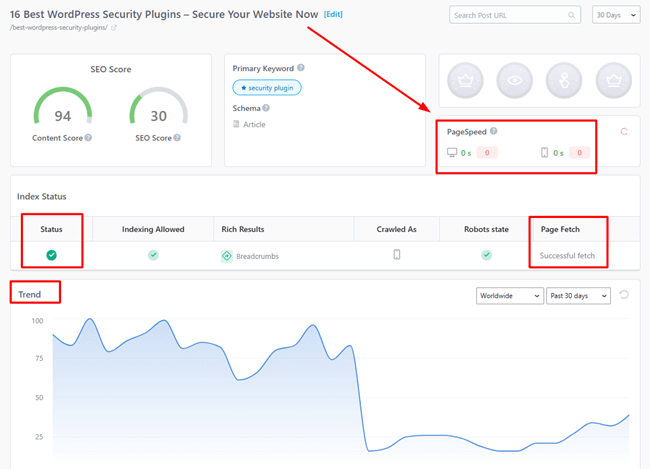
Rank Math includes a performance tab that monitors your Page Speed and Core Web Vitals. It gives you a score for both mobile and desktop.
Since many of you are using themes like GeneratePress or Astra, you should already have high scores, but this tool helps you catch it if a new plugin or a heavy image suddenly slows your site down.
Pro tip: Open a post from the Site Analytics tool to view its index status, search trends, page speed, ranking keywords, and other crucial metrics you need to know.
14. Breadcrumbs: The Secret to Better Navigation & SERP Links
Have you ever noticed how some search results on Google show a nice “path” like Home > SEO > Plugins instead of just a raw URL? Those are Breadcrumbs.
Google loves breadcrumbs because they help the search engine understand the structure of your site. It also helps users navigate back to your category pages easily.
Normally, you would need a separate plugin or a specific theme setting to enable this, but Rank Math has a highly customizable breadcrumb engine built in. It is clean, helping your search results look more professional and clickable. You can customize labels, change separator characters, and display or hide links easily.
15. Boosting Internal Link Juice: Detect Orphan Pages
An “Orphan Page” is a post on your site that has zero internal links pointing to it. Google hates this because it’s hard for their “crawlers” to find these pages. If Google can’t find them, they won’t rank.
Rank Math has a built-in “Link Counter.” You can sort your posts by “Incoming Internal Links.” If you see a post with a “0,” it’s time to go into your other popular posts and add a link to it. This “passes the juice” and can instantly revive dead traffic.
16. Sitemaps
Most sites settle for basic sitemaps, but Rank Math takes it to another level.
Its automatic XML sitemaps act as a direct roadmap for search engines, ensuring your newest posts get crawled and ranked instantly. Meanwhile, the visual HTML sitemap keeps human visitors clicking around your site, which boosts engagement and strengthens internal linking.
Want to dominate specialized search results? Turn on Rank Math’s dedicated news and video sitemaps. They push your media directly into Google News and Video tabs, unlocking huge new traffic sources that you would otherwise miss out on.
17. SEO Analyzer
Think of Rank Math’s built-in SEO Analyzer as a free, full-scale site audit. Instead of guessing why your traffic is stuck, this tool runs a deep scan of your entire WordPress website in seconds.
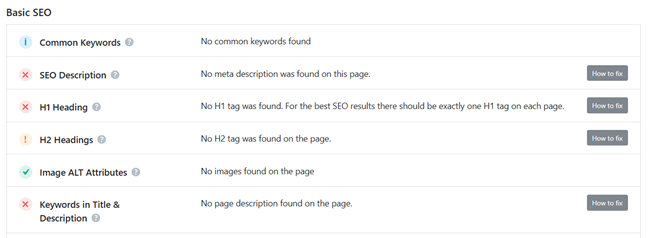
It instantly flags technical headaches holding your rankings back—like missing alt tags, bad redirects, or broken links—and gives your site a health score.
The best part? It tells you how to fix each error. Cleaning up these hidden technical issues makes Google’s crawlers very happy, directly leading to higher search placements and more organic traffic flowing your way.
18. The Built-in Robots.txt & .htaccess Editor
Normally, editing your robots.txt file is scary because one wrong move can de-index your whole site. Rank Math makes it safe and easy.
You can use the editor to tell search engine bots exactly where they are allowed to go.
Pro Tip: You can use this to block certain “bad bots” that just scrape your content and steal your bandwidth. By disabling bots on parts of your site that don’t need to be indexed (like your /wp-admin/ or private folders), you save “crawl budget,” which helps Google focus on your important content.
19. Local SEO & Knowledge Graph: Dominating Your Area
If you have a physical business or you want your brand name to show up with a professional “Knowledge Panel” on the right side of Google, you need Local SEO.

Rank Math allows you to enter your business address, phone number, opening hours, and even your GPS coordinates. It then turns this information into “Schema Markup” that Google can read.
Pro tip: This helps you show up in the “Map Pack” (the top three local results on Google). For many businesses, the Map Pack is where 80% of their organic traffic comes from. Even if you are a solo blogger, filling out the “Person” or “Organization” schema helps Google understand who you are, which builds E-E-A-T (Experience, Expertise, Authoritativeness, and Trustworthiness).
20. WooCommerce SEO: Boosting Your Online Store
If you run an e-commerce store, standard SEO isn’t enough. You need specific tags for prices, stock availability, and product reviews.
Rank Math has a dedicated WooCommerce SEO module. It automatically adds the necessary schema so that your products show up in Google Search with their price, “In Stock” status, and star ratings. These “rich snippets” significantly increase your click-through rate compared to a plain text link.
Final thoughts
SEO isn’t about doing one big thing right; it’s about doing 100 small things correctly.
By using these Rank Math SEO features, you are optimizing the technical foundation of your site. Whether it’s fixing 404 errors, automating your images, or “stealing” competitor schema, these tools give you a massive advantage over people who are just chasing a “green light.”
If you haven’t already, I recommend going into your Rank Math dashboard right now and turning on the Advanced Mode. Start with the 404 Monitor and the Internal Link Counter—these are the quickest ways to find traffic leaks and fix them.
Ready to unlock your site’s full potential? 🚀
Stop leaving organic traffic on the table. Get Rank Math SEO today and start using these hidden features to dominate the search results.
👉 Get Rank Math SEO Now