Direct Answer
When comparing Kinsta vs WP Engine, the best choice comes down to your budget and traffic. Kinsta wins on raw speed, premium support, and handling high-traffic sites effortlessly. WP Engine is the better option if you need more storage space, agency-focused tools, and a lower starting price. Both deliver top-tier managed WordPress hosting.
If you run a growing business, a high-traffic enterprise website, or a busy digital agency, your web hosting is more than just a place to store files. It is the foundation of your online presence.
Slow load times, security breaches, or unexpected downtime can cost you thousands of dollars in lost revenue and damage your brand’s reputation. That is why standard shared hosting simply won’t cut it. You need managed WordPress hosting.
When it comes to the absolute best in the managed WordPress hosting space, two names constantly dominate the conversation: Kinsta and WP Engine. Both are premium web hosts, promising blazing-fast speeds, iron-clad security, and expert support. But when you look under the hood, there are distinct differences in how they operate, the infrastructure they use, and the value they offer to growing businesses.
In this comprehensive guide, we will compare Kinsta vs WP Engine head-to-head. We will look at their performance, security features, server locations, pricing, user reviews, and everything else you need to make the right choice for your business or agency.
| Disclosure: Your support helps keep the site running! We earn a referral fee for some of the services we recommend on this page. |
- What is Managed WordPress Hosting?
- Kinsta (A Quick Overview)
- WP Engine (A Quick Overview)
- Kinsta vs WP Engine: Which is Better in 2026?
- 1. Performance and Speed
- 2. Server Locations
- 3. Essential Hosting Features: Backups and Migrations
- 4. Security and Kinsta's Infection Removal Guarantee
- 5. Dashboard and Ease of Use
- Kinsta's MyKinsta Dashboard
- 6. Customer Support
- 7. Real User Reviews (Trustpilot and G2)
- 8. Pricing Plans
- Scaling a business or agency? 📈
- Final Verdict: Which One Should You Choose?
- FAQ
What is Managed WordPress Hosting?
Before we dive into the direct comparison, let’s briefly clarify what managed WordPress hosting actually is.
Unlike shared hosting—where you share server space and resources with thousands of other websites—managed WordPress hosting provides an environment built specifically and exclusively for WordPress. The hosting provider takes care of all the technical heavy lifting. This includes daily backups, security monitoring, WordPress core updates, and server-level caching.
For agencies and enterprises, managed hosting frees up your IT team and developers. Instead of wasting hours fixing server errors or configuring caching plugins, your team can focus on what matters most: building great websites and growing your business. Both Kinsta and WP Engine excel at this, but they take slightly different approaches.
Kinsta (A Quick Overview)

Founded in 2013, Kinsta has quickly grown into one of the most respected names in the hosting industry.
What makes Kinsta unique is its infrastructure. The entire platform is powered exclusively by the Google Cloud Platform (GCP) Premium Tier network. This is the same network that powers Google’s own products like Gmail and YouTube.
Kinsta is known for its modern approach to hosting. They utilize container technology (LXD), meaning every single website is housed in its own isolated container with all the necessary software resources (Linux, NGINX, PHP, MySQL) completely private. This provides incredible security and ensures your site’s performance is never impacted by another website on the same server.
Who it’s for: Kinsta is incredibly popular among web agencies, high-traffic publishers, WooCommerce stores, and corporate websites that demand top-tier performance and modern, developer-friendly tools.
Key Features of Kinsta
Speed up your site today 🚀
Move to Kinsta’s premium cloud network and stop losing visitors to slow load times.
Try KinstaWP Engine (A Quick Overview)
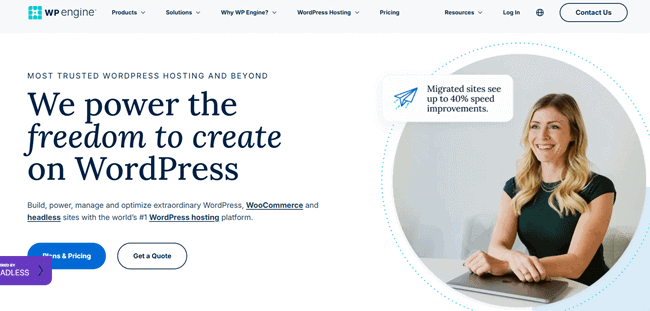
WP Engine is the pioneer of managed WordPress hosting. Founded in 2010, they were one of the first companies to realize that businesses needed hosting specifically tuned for WordPress.
Today, WP Engine is a massive company with a huge global footprint and a vast ecosystem of tools.
Unlike Kinsta, which strictly uses Google Cloud, WP Engine uses a mix of top-tier cloud providers, including Amazon Web Services (AWS) and Google Cloud Platform, depending on the plan you choose. WP Engine is famous for its proprietary EverCache technology, which handles massive traffic spikes without breaking a sweat.
Furthermore, WP Engine acquired StudioPress, meaning all WP Engine customers get free access to the Genesis Framework and premium StudioPress themes.
Who it’s for: WP Engine is a fantastic choice for large enterprises, traditional businesses, marketers, and developers who want a battle-tested platform with a long track record of reliability and a suite of integrated marketing tools.
Key Features of WP Engine
Need a host that scales? 📈
Let WP Engine handle the heavy lifting with rock-solid reliability and agency tools.
Try WP EngineKinsta vs WP Engine: Which is Better in 2026?
Choosing between Kinsta and WP Engine in 2026 is tough. Both are premium managed WordPress hosts built for speed, security, and scaling. But which one actually fits your business or agency needs?
Let’s find out the real differences.
1. Performance and Speed
When a potential customer clicks on your website, you have less than three seconds to load the page before they hit the back button. For enterprise websites and eCommerce stores, speed equals money.
Kinsta Performance
Kinsta’s performance is legendary, and it all comes down to their exclusive use of the Google Cloud Premium Tier network. This premium tier routes your website’s data through Google’s private, global fibre-optic network rather than the public internet, reducing latency and boosting speed.
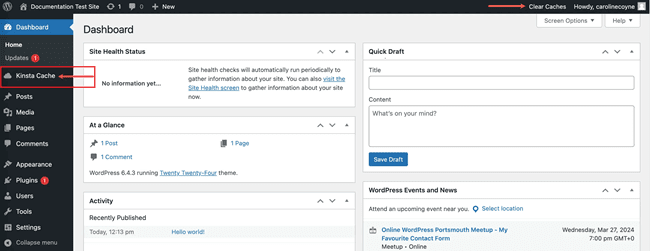
It’s built-in caching saves a lightning-fast copy of your website on servers around the world. When visitors arrive, pages load instantly without forcing WordPress to do any heavy lifting. This dramatically speeds up your site and easily handles sudden traffic spikes.
Furthermore, Kinsta integrates deeply with Cloudflare Enterprise CDN. Every Kinsta plan includes free Cloudflare enterprise-level CDN and edge caching. This means your website’s HTML pages are saved in Cloudflare servers worldwide. When a user visits your site, the content is delivered from the server closest to them almost instantly.
WP Engine Performance
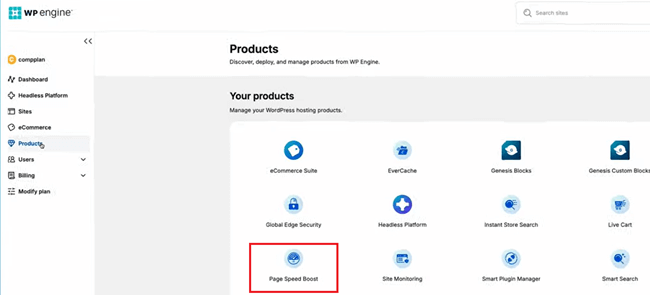
WP Engine is not far behind when it comes to speed. They utilize their highly customized EverCache system. This caching technology is specifically designed to recognize WordPress patterns and deliver pages incredibly fast while bypassing the cache for dynamic parts of your site (like a WooCommerce shopping cart).
WP Engine also partners with Cloudflare to provide a global Content Delivery Network (CDN) to ensure fast load times across the globe. For enterprise clients, WP Engine offers advanced custom server configurations on AWS, allowing for massive scalability during major traffic events like Black Friday.
WP Engine also offers an automated add-on called Page Speed Boost that makes your site load faster. It instantly shrinks images, cleans up messy code, and prioritizes important content. This improves your Google performance scores without requiring any coding.
Winner: Kinsta. While both are extremely fast, Kinsta’s standard inclusion of the Google Cloud Premium Tier and Cloudflare Enterprise CDN on every plan (even the cheapest ones) gives it a slight edge for out-of-the-box performance.
2. Server Locations
The physical distance between your website’s server and your visitors plays a massive role in load times. The closer the server is to your audience, the faster your site will load. Having a wide variety of data center locations is crucial for businesses with specific regional audiences.
Kinsta Server Locations
Because Kinsta is built on the Google Cloud Platform, they offer access to 37+ data center locations around the world. You get to choose exactly which data center you want your site to be hosted in, completely free of charge.
Locations span across North America, Europe, Asia, South America, and Australia. If you have an agency with clients all over the world, you can assign different server locations for each client’s website from a single dashboard.
WP Engine Data Centers
WP Engine also offers excellent global coverage because it uses both Google Cloud and AWS. They offer data centers across North America, Europe, Asia, and Australia. However, the exact data centers available to you might depend on the specific plan you choose, as some premium AWS locations are reserved for higher-tier custom plans.
Winner: Kinsta. Kinsta makes it slightly easier by offering all 37+ Google Cloud locations on all plans, giving you complete geographic flexibility.
3. Essential Hosting Features: Backups and Migrations
For businesses and agencies, manual backups and complicated site migrations are a massive waste of time. Premium managed hosts should handle these automatically.
Daily Backups
Both Kinsta and WP Engine treat data security very seriously.
- Kinsta offers automatic daily backups on all plans, which are kept for 14 days (or up to 30 days on higher plans). You can also create manual backups with a single click or download a full .zip backup of your site. They even offer hourly backup add-ons for busy eCommerce sites.
- WP Engine also provides automated daily backups and stores them for 40 days. Like Kinsta, you can instantly roll back to a previous version if an update breaks your site or a developer makes a mistake.
Free Migrations
Moving a big corporate website or an entire agency portfolio of 50 sites is a daunting task.
- Kinsta scores here. They offer an unlimited free basic migration plugin, but more importantly, they offer free premium migrations performed by their expert engineering team. Depending on your plan, you get a set number of expert migrations where Kinsta’s staff does all the heavy lifting for you with zero downtime.
- WP Engine handles migrations via an automated plugin built in partnership with BlogVault. The plugin works exceptionally well and makes migrating a breeze, but it is largely a “do-it-yourself” process compared to Kinsta’s hands-on expert service.
Winner: Tie. WP Engine gives you longer backup retention (40 days), but Kinsta offers personalized, expert migrations handled by real humans. Both offer incredible reliability here.
4. Security and Kinsta’s Infection Removal Guarantee
WordPress powers over 40% of the internet, which unfortunately makes it a massive target for hackers, malware, and DDoS attacks.
Kinsta Security and Hack Fix Guarantee
Kinsta provides incredible security features, including automatic daily backups, hardware firewalls, and active monitoring. Because every site is isolated in an LXD container, cross-site contamination is physically impossible. Kinsta also includes enterprise-level Cloudflare DDoS protection for free.
But where Kinsta completely changes the game is their Malware Infection Removal Guarantee. If your website is hosted on Kinsta and somehow gets hacked or infected with malware, Kinsta’s security engineers will clean the site, remove the malware, and restore your site to perfect working order—for completely free.
For an agency hosting 30 client sites, or an enterprise handling sensitive data, this hack fix guarantee offers unmatched peace of mind. Hiring a security firm to clean a hacked WordPress site can cost thousands of dollars; Kinsta does it for free.
WP Engine Security
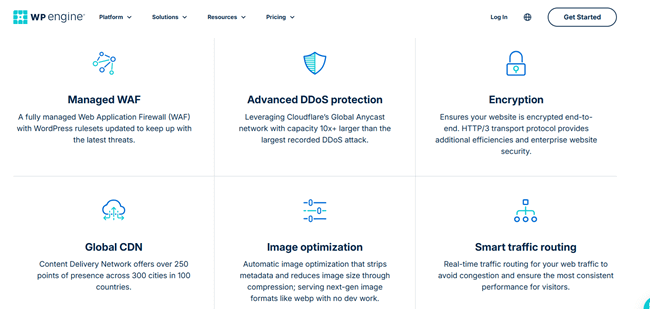
WP Engine takes a proactive approach to security. They block millions of cyber attacks daily. They perform automatic core WordPress updates to ensure you are never running vulnerable software.
They also have strict limitations on which plugins you can install, blocking plugins known to cause security or performance issues. WP Engine provides a free SSL certificate and enterprise-grade threat detection.
Winner: Kinsta. WP Engine is highly secure, but Kinsta’s free malware removal guarantee is a massive insurance policy that businesses simply cannot ignore.
5. Dashboard and Ease of Use
Because managed WordPress hosts don’t use traditional control panels like cPanel, they build their own custom dashboards.
Kinsta’s MyKinsta Dashboard
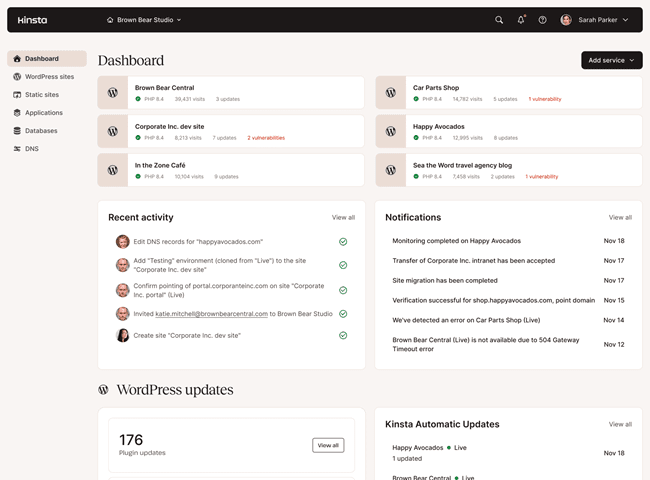
Kinsta built its dashboard, called MyKinsta, entirely from scratch. It is widely considered the best custom dashboard in the entire hosting industry. It is visually beautiful, incredibly fast, and very intuitive.
Even if you aren’t a developer, you can easily use MyKinsta to push a staging site to live, search and replace database URLs, track your analytics and bandwidth usage, and manage server locations.
For agencies, MyKinsta includes powerful user management, allowing you to give specific clients access to only their own website metrics without seeing the rest of your agency portfolio.
WP Engine User Portal
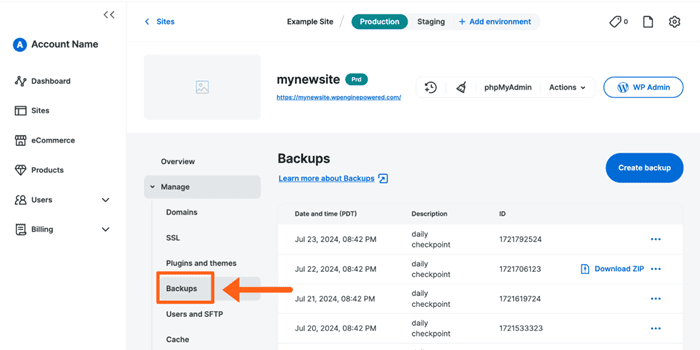
WP Engine uses a proprietary dashboard called the User Portal. It is very clean, professional, and packed with tools. From here, you can manage your billing, access your staging environments (WP Engine gives you Development, Staging, and Production environments for every site), clear your cache, and manage SSL certificates.
Because WP Engine has so many advanced features, the dashboard can feel slightly overwhelming to absolute beginners, but developers will feel right at home.
Winner: Kinsta. The MyKinsta dashboard is a masterpiece of user experience and design.
Leaning towards Kinsta? 🤔
Before you make the switch, see exactly how it performed in our rigorous speed and support tests.
👉 Read our full Kinsta Review6. Customer Support
When your enterprise website goes down in the middle of a major marketing campaign, you don’t want to submit a ticket and wait 24 hours. You need help right now.
Kinsta Support
Kinsta handles support differently. They do not offer phone support at all, regardless of how much you pay. Instead, they offer 24/7 support exclusively through an integrated Intercom chat widget inside the MyKinsta dashboard.
While the lack of phone support might scare some enterprise clients, Kinsta’s chat support is famous for being incredibly fast and highly technical.
You don’t get passed around from a Level 1 to a Level 3 technician. The first person who answers your chat is a senior WordPress developer or Linux engineer who can fix your problem immediately. Average response times are typically under 2 minutes.
WP Engine Support
WP Engine provides 24/7 support via live chat for all customers. If you are on their higher-tier plans, you also get access to 24/7 phone support. WP Engine’s support staff consists of WordPress experts who know the platform inside and out. They also have an absolutely massive library of documentation and tutorials.
Winner: Tie. It depends on your preference. If your business absolutely demands the ability to speak to someone on the phone, WP Engine is the winner. If you prefer blazing-fast, highly technical chat support, Kinsta wins.
7. Real User Reviews (Trustpilot and G2)
Marketing copy is great, but what do actual users, agencies, and enterprise customers think about these platforms?
Let’s look at the average sentiment across major software review platforms like Trustpilot and G2.
Kinsta User Reviews
Kinsta boasts incredibly high ratings across the board.
- Trustpilot: Kinsta consistently maintains a rating of around 4.8 out of 5 stars. Users constantly praise the lightning-fast chat support, the ease of the MyKinsta dashboard, and the noticeable speed improvements after migrating.
- G2: On G2, Kinsta is ranked as a “Leader” in the managed hosting category, with 4.8 out of 5 stars. Agency owners frequently highlight how Kinsta saves them hours of server management time.
WP Engine User Reviews
WP Engine also has a strong reputation, though its scores are slightly more mixed.
- Trustpilot: WP Engine scores around 4.3 out of 5 stars. Positive reviews highlight server stability and the free StudioPress themes. However, some users note frustrations with WP Engine’s strict plugin bans and overage charges if you exceed your visitor limits.
- G2: On G2, WP Engine maintains a strong 4.6 out of 5 stars. Enterprise users love the scalability and the dedicated account managers on custom plans.
Winner: Kinsta. Kinsta maintains slightly higher average review scores, particularly regarding their customer support experience.
8. Pricing Plans
Premium hosting comes with a premium price tag. Neither of these hosts is cheap, but the return on investment in speed, security, and saved time is immense for serious businesses.
Kinsta Pricing
Kinsta’s entry-level plan (Starter) starts at $35 per month. This includes 1 website, 25,000 monthly visits, 10GB of storage, and 100GB of bandwidth (double the bandwidth of WP Engine).
Kinsta offers a very clear scaling system with Pro, Business, and Enterprise tiers. Kinsta makes it very easy to predict costs, and they do not lock you into long-term contracts; you can upgrade or downgrade with a single click in the dashboard.
They also provide the first month of free hosting in selected plans. This means your subscription will start only after 30 days of sign-up. During this period, you can host your websites and test all its premium features without any restrictions.
WP Engine Pricing
WP Engine’s entry-level plan (Startup) usually starts around $30 per month (often discounted if paid annually). This allows for 1 website, 25,000 monthly visits, 10GB of storage, and 50GB of bandwidth.
As you scale, WP Engine offers Professional, Growth, and Scale plans. For large companies, WP Engine provides custom Enterprise pricing that utilizes dedicated server environments.
Bonus: WP Engine includes 10 premium StudioPress themes for free on all plans, which is a great value if you are building a site from scratch.
Winner: Tie. WP Engine is slightly cheaper to start and includes premium themes. Kinsta gives you more bandwidth and access to Google Cloud’s Premium Tier right out of the gate.
Scaling a business or agency? 📈
Get the developer tools, stellar support, and flexible pricing you need to grow your WordPress sites effortlessly.
👉 Get Started with WP EngineFinal Verdict: Which One Should You Choose?
Both Kinsta and WP Engine are exceptional managed WordPress hosts. Moving your business to either of them will result in a faster, more secure, and more reliable website. However, there are clear scenarios where one is better than the other.
Choose Kinsta if:
- You are a digital agency managing multiple client sites and want the absolute best custom dashboard (MyKinsta) in the industry.
- You want the fastest possible load times powered by Google Cloud’s Premium Tier network and Cloudflare Enterprise CDN/Edge Caching.
- You want ultimate peace of mind with their free Malware Infection Removal Guarantee.
- You need access to highly technical, developer-level chat support in under two minutes.
Choose WP Engine if:
- You are a large enterprise that needs complex, custom AWS server configurations.
- Your company policy requires a host that offers 24/7 phone support.
- You are building a new website and want to take advantage of their free StudioPress premium themes and the Genesis Framework.
Ultimately, for most modern businesses, digital marketing agencies, and scaling eCommerce stores, Kinsta takes the slight edge. Their modern infrastructure, incredible dashboard, and commitment to security make them the most powerful managed WordPress host on the market today.
Ready for lightning-fast speeds? ⚡
Stop losing customers to slow load times. Upgrade to Kinsta’s premium cloud infrastructure and watch your site fly.
👉 Try Kinsta Today