Direct Answer
Choose Substack if you want a simple, free platform focused entirely on email newsletters and built-in audience growth. Choose WordPress if you need complete ownership, limitless customization, advanced SEO, and the ability to sell products without paying platform fees. Ultimately, it depends on whether you prioritize effortless publishing or total control.
The creator economy is booming right now. Every day, more writers, marketers, and business owners are looking for ways to share their ideas, build an audience, and make money online. If you are reading this, you are probably figuring out where to build your digital home.
You have narrowed it down to two major options: Substack and WordPress.
These two platforms are the popular names for web publishing today, but they are different in many ways. Substack is the rising star with built-in email newsletters and subscriptions. It makes writing and getting paid incredibly simple. WordPress, on the other hand, is the undisputed king of website building. It powers over 40% of the entire internet and gives you total control over everything you create.
So, when it comes down to Substack vs WordPress, which one should you choose? The honest answer is that it depends entirely on your goals. Do you want a simple, writing-focused newsletter business, or do you want to build a fully customizable digital empire?
In this guide, I am going to compare both platforms step by step. I will analyze their features, costs, SEO benefits, e-commerce capabilities, and ease of use so you can decide which one is the perfect fit for your content journey.
- What is Substack? (A Brief Overview)
- What is WordPress? (A Brief Overview)
- Substack vs WordPress: The Ultimate Head-to-Head Comparison
- 1. Ease of Use and Initial Setup
- 2. Design, Themes, and Customization
- 3. Email Newsletters and Audience Building
- 4. E-commerce and Selling Products
- 5. True Cost Comparison: Which is Cheaper?
- 6. SEO (Search Engine Optimization) and Organic Traffic
- 7. Mobile Friendliness and App Experience
- 8. Data, Tracking, and Analytics
- 9. Security and Maintenance
- 10. Content Ownership and Portability
- Can You Use Substack With WordPress?
- The Verdict of Substack vs WordPress: Who Should Choose Which?
- Final Thoughts on Building Your Digital Home
- FAQ
What is Substack? (A Brief Overview)
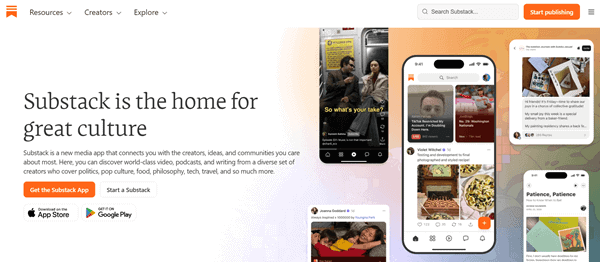
Substack launched in 2017 and completely changed the way writers think about publishing. Before Substack, if you wanted to start a newsletter and charge people for it, you had to build a website, connect a payment processor, set up an email service provider, and figure out how to put it all together.
Substack changed all of that by putting everything in one box. It is a specialized platform designed specifically for writers, podcasters, and video creators to publish content and get paid directly by their subscribers.
When you publish a post on Substack, two things happen at the same time: the post goes live on your Substack website, and it gets sent directly to the email inboxes of your subscribers.
Pros of Substack:
- Super simple setup: You can create an account and publish your first post in less than five minutes. You do not need any coding or technical skills.
- Built-in audience network: Substack has a feature called the “Substack Network.” Other writers can recommend your newsletter, which helps you grow your audience much faster.
- No hosting fees: It is completely free to start. You do not have to pay for web hosting or a domain name to get your writing out into the world.
- Focused entirely on writing: Because there are very few design options to play with, you spend less time tweaking your website and more time actually writing content.
Cons of Substack:
- Limited design options: Almost every Substack publication looks the same. You cannot build a unique brand identity.
- High transaction fees: Substack is free to use, but if you decide to charge subscribers for your content, the platform takes a flat 10% cut of your revenue (plus standard Stripe processing fees).
- Poor SEO capabilities: Substack websites do not rank very well on Google compared to standard blogs because you cannot optimize the technical SEO elements.
- Lack of custom features: You cannot add an e-commerce store, a custom portfolio, or advanced landing pages.
What is WordPress? (A Brief Overview)
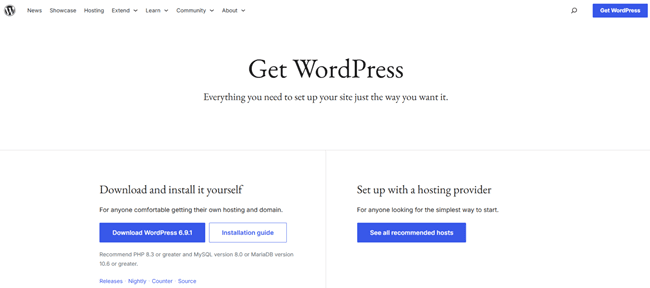
When we talk about WordPress in this article, we are talking about WordPress.org, which is the self-hosted, open-source content management system (CMS). (Do not confuse it with WordPress.com, which is a limited hosting service.)
WordPress is the most popular website builder in the world. It is the foundation for millions of websites, ranging from tiny personal blogs to massive media companies like The New York Times and TechCrunch.
Unlike Substack, which is a software service that you use on their terms, WordPress is a piece of software that you own and install on your own web server. This gives you absolute, limitless freedom to do whatever you want.
Pros of WordPress:
- Total control and ownership: You own the website, the files, the design, and the audience. Nobody can shut your website down or tell you what you can and cannot publish.
- Limitless customization: There are tens of thousands of free and paid themes and plugins. You can make your site look and function exactly how you want.
- Powerful SEO: WordPress is the gold standard for search engine optimization. You have total control over how your site appears to Google.
- 0% platform fees: If you sell products, memberships, or subscriptions on WordPress, you keep 100% of the profits. WordPress does not take a cut.
Cons of WordPress:
- Steeper learning curve: WordPress is not as simple as Substack. There is a dashboard to learn, plugins to update, and settings to manage.
- Requires managing hosting: You have to buy your own web hosting (like Bluehost, DreamHost, or WP Engine) and your own domain name.
- More setup required for newsletters: WordPress does not send emails out of the box. You will need to connect a third-party email service like Mailchimp or ConvertKit to run a newsletter.
Substack vs WordPress: The Ultimate Head-to-Head Comparison
Now that we know the basics, let us dive into the details. If you are wondering whether you should move from WordPress to Substack or start fresh on one of these platforms, this head-to-head comparison will give you the answers.
1. Ease of Use and Initial Setup
When it comes to getting started quickly, there is a very clear winner.
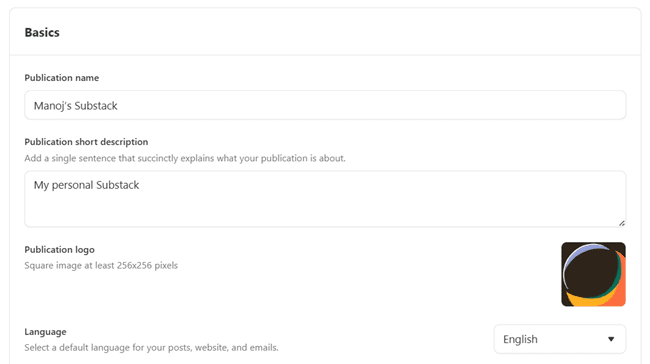
Substack is built for speed and simplicity. The onboarding process is incredibly smooth. You sign up with your email, pick a name for your publication, write a brief description, and you are immediately taken to an editor where you can start typing.
You don’t have to worry about servers, security certificates, or software updates. Substack handles all the technical heavy lifting behind the scenes.
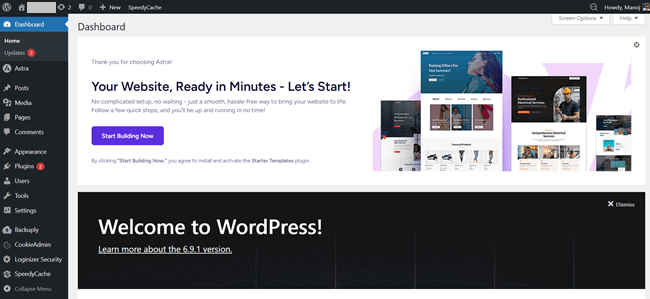
WordPress, however, requires some patience. To start a WordPress site, you first need to find a web host, purchase a domain name, and install the WordPress software. Once you log in, you are greeted by a complex dashboard with menus for Posts, Pages, Appearance, Plugins, and Settings. There is a definite learning curve.
You have to learn how themes work, how to navigate the block editor, and how to configure your site for public viewing.
The Winner: Substack. If you want zero technical headaches and want to write, Substack is unmatched.
2. Design, Themes, and Customization
Your website is your digital storefront. How much control do you need over the way it looks?
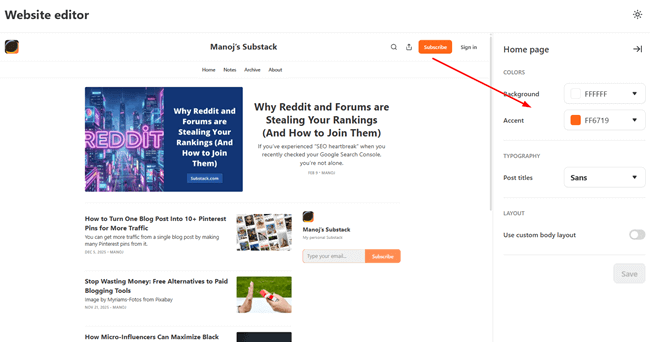
Substack gives you very few design choices. You can change your background color, pick from a handful of basic fonts, and upload a logo. That is it.
While this minimal approach is great for readability, it is terrible for branding. Your newsletter will look exactly like thousands of other newsletters on the platform. You cannot add custom menus, build unique landing pages, or organize your content into complex categories.

WordPress is the exact opposite. Because it is open-source, the design possibilities are literally endless. You can choose from thousands of free themes or buy premium themes that look highly professional.
Furthermore, you can use drag-and-drop page builders like Elementor or Divi to design custom pages without writing a single line of code. You can add video backgrounds, custom animations, photo galleries, and specialized contact forms.
The Winner: WordPress. If you care about building a unique brand identity and want a website that stands out, WordPress is the only choice.
3. Email Newsletters and Audience Building
This is where the battle really heats up, especially if your primary goal is to reach people in their inboxes.
Substack is an email newsletter platform first and foremost. Writing a post and sending it to your subscribers is one seamless action. But where Substack really shines is its built-in growth tools.
The “Substack Network” allows writers to recommend each other. When a user subscribes to a newsletter you recommend, they are asked if they want to subscribe to yours as well. Many writers report that this feature alone drives up to 40% of their new email signups. Substack also makes it easy for readers to pledge money to support your work.
WordPress does not have native email sending capabilities. To send a newsletter, you have to use a WordPress newsletter plugin or connect your site to a third-party email marketing service like MailerLite, ConvertKit, or ActiveCampaign. This means you have to manage two different pieces of software.
You write the blog post in WordPress, then you have to go into your email software, design the email, and send it to your list. However, these third-party tools offer advanced features that Substack lacks, like automated email sequences, tagging, and audience segmentation.
The Winner: Substack (for pure simplicity and network growth) or WordPress (if you need advanced email marketing automation).
4. E-commerce and Selling Products
What happens when you want to expand beyond just selling a newsletter subscription?
Substack is highly specialized. It allows you to sell monthly or annual subscriptions to your newsletter, and that is where its e-commerce capabilities end.
You cannot create a storefront, sell physical merchandise, offer digital downloads (like eBooks or templates), or host premium online courses directly on the platform. If you want to sell these things, you will have to link out to a different platform like Gumroad or Shopify.
WordPress is an absolute powerhouse for e-commerce. By installing a free plugin like WooCommerce, you can instantly turn your blog into a fully functioning online store. You can sell physical goods, software, digital downloads, and coaching services.
If you want to create a paid community or sell online courses, plugins like MemberPress and LearnDash make it incredibly easy. You have total control over the checkout experience, discount codes, and payment gateways.
The Winner: WordPress. If you plan to sell anything other than a newsletter subscription, WordPress is the clear champion.
5. True Cost Comparison: Which is Cheaper?
It is easy to assume one platform is cheaper than the other, but the real cost depends on your success.
Substack is completely free to start. There are no monthly hosting fees, no domain costs, and no charges for sending emails, even if you have a massive free list.
However, Substack makes its money by taking a flat 10% fee from your paid subscriptions (plus Stripe processing fees). This means if your newsletter generates $1,000 a month, Substack takes $100. If you scale up to $10,000 a month, Substack takes a whopping $1,000 every single month.
WordPress has upfront and fixed ongoing costs. You have to pay for a domain name (about $10-$15 a year) and web hosting (anywhere from $5 to $30+ a month, depending on your traffic). You can also buy a premium theme ($50) or invest in premium plugins.
However, WordPress does not take a percentage of your revenue. If you make $10,000 a month selling subscriptions or products on WordPress, you keep 100% of it (minus standard Stripe/PayPal processing fees).
The Winner: Substack is cheaper when you are just starting out and making no money. WordPress is drastically cheaper in the long run once you start generating real revenue.
6. SEO (Search Engine Optimization) and Organic Traffic
If you want people to find your content by searching on Google, SEO is critical.
Substack is notoriously weak when it comes to SEO. The platform does not allow you to change essential SEO elements. You cannot edit your meta descriptions, optimize your URL slugs easily, or add alt text to images properly.
Furthermore, Substack’s site structure is not optimized for Google’s web crawlers. While you can rank on Google with a Substack post if the keyword competition is very low, it is an uphill battle.
WordPress is a powerhouse for organic traffic. It was built with SEO in mind. By installing a free plugin like Rank Math or Yoast SEO, you get total control over how search engines view your site. You can edit title tags, meta descriptions, create XML sitemaps, manage redirects, and optimize your site speed.
The vast majority of top-ranking blogs on Google are built on WordPress. If your strategy involves targeting low-competition keywords and driving organic traffic over time, WordPress is exactly what you need.
The Winner: WordPress. There is no competition here; WordPress is the best platform for SEO.
7. Mobile Friendliness and App Experience
A massive portion of your audience will read your content on their smartphones. How do these platforms handle mobile readers?
Substack has invested heavily in the mobile experience. Not only are all Substack web pages automatically optimized for mobile screens, but Substack also has a highly popular dedicated mobile app for iOS and Android.
When readers use the app, they get a clean, ad-free reading experience that feels like a personalized magazine. The app also features a “Notes” section, which functions similarly to Twitter, allowing you to engage with your audience seamlessly on their phones.
WordPress is also completely mobile-friendly, but the experience depends entirely on the theme you choose. Almost all modern WordPress themes are “responsive,” meaning they adapt to fit phone and tablet screens perfectly.
However, WordPress does not have a centralized reading app for your audience. Your readers will consume your content via their mobile web browsers or by reading your emails in their native email apps.
The Winner: Substack. The dedicated Substack reader app provides a smoother, more unified mobile experience for discovering and reading content.
8. Data, Tracking, and Analytics
To grow your audience, you need to understand where they are coming from and how they behave.
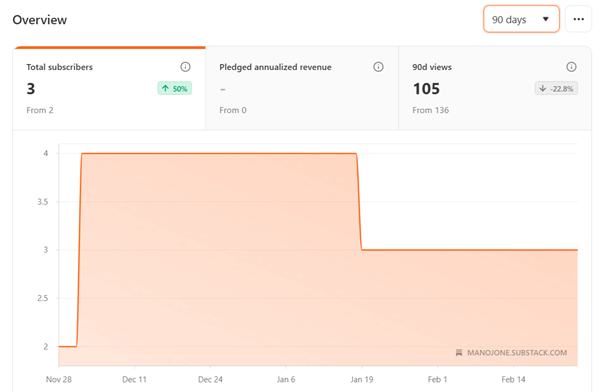
Substack provides very basic analytics. From your dashboard, you can see how many subscribers you have, your email open rates, click-through rates, and a rough estimate of where your traffic is coming from (e.g., direct, Substack network, or Google).
It is easy to digest, but it lacks depth. You cannot track detailed user journeys or set up complex conversion tracking.
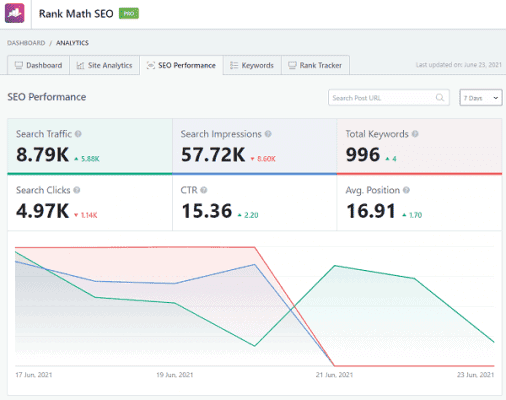
WordPress gives you access to enterprise-level data. Because you control the code, you can easily integrate tools like Google Analytics, Google Search Console, or privacy-focused alternatives like Fathom and Plausible.
With plugins like MonsterInsights, you can track exactly how long people stay on a page, which links they click, what their demographics are, and where they drop off in your sales funnel.
The Winner: WordPress. If you want deep, actionable insights to optimize your marketing, WordPress is far superior.
You might also be interested in these posts:
9. Security and Maintenance
Keeping your digital home safe from hackers and glitches is a top priority.
Substack handles 100% of the security and maintenance for you. You never have to worry about updating software, managing SSL certificates, preventing brute-force attacks, or backing up your database. Substack’s engineering team takes care of all the technical infrastructure. You log in and write.
WordPress puts the responsibility of security and maintenance in your hands. Because it is self-hosted software, you have to ensure it stays updated. Outdated themes or plugins are the leading cause of hacked WordPress sites.
You will need to install a security plugin (like Wordfence), ensure your web host provides daily backups, and regularly log in to update your software. While managed WordPress hosts (like WP Engine or Kinsta) can handle much of this for you, it still requires more oversight than Substack.
The Winner: Substack. It offers complete peace of mind with zero maintenance required.
10. Content Ownership and Portability
What happens if you decide to leave the platform? Who truly owns your audience?
Substack is actually very good about ownership compared to other social platforms. They make it clear that you own your email list and your content. You can export your subscriber list as a CSV file and take it to another platform at any time.
However, moving your actual website structure and previous posts is not always perfectly seamless. You are still “renting” space on their platform.
WordPress offers true digital independence. You own the server space, you own the database, and you own every single file. You are not at the mercy of a tech company changing its rules, adjusting its algorithm, or shutting down your account.
You can back up your entire website, pack it up, and move it to a different hosting provider whenever you want. You have complete control over your own destiny.
The Winner: WordPress. Total ownership is always better than relying on a third-party platform.
Can You Use Substack With WordPress?
One common question creators ask is: Can you use Substack with WordPress?
Yes, absolutely! In fact, a hybrid approach is one of the smartest strategies for modern content creators. Many successful business owners use WordPress as their main “hub” and Substack as their newsletter delivery tool.
How it works: You build your main website on WordPress. This is where you host your “About” page, your storefront, and your highly optimized, long-form SEO blog posts to attract Google traffic.
Then, instead of paying for an expensive email tool like ConvertKit or Mailchimp, you can create a free Substack account. Place a simple Substack email signup form on your WordPress site. When people visit your WordPress site via Google, they read your content and subscribe. Then, you use Substack purely to write and send your weekly newsletters to that list.
This gives you the best of both worlds: the massive SEO power, e-commerce, and customization of WordPress, combined with the free email sending and community features of Substack.
The Verdict of Substack vs WordPress: Who Should Choose Which?
Still not sure which one to pick? Let us break it down into simple terms.
You should choose Substack if…
- You are a solo writer who wants to write. If looking at website settings or security updates gives you a headache, Substack is your best friend.
- You want to build a newsletter, not a website. If email is your only focus, the Substack ecosystem is perfect.
- You want to tap into a built-in network. The recommendation engine and mobile app are massive advantages for new writers trying to find their first 1,000 subscribers.
- You have zero budget. You can start, grow, and run your publication for free until you decide to charge for it.
You should choose WordPress if…
- You want a fully branded website. If you want a digital home that matches your unique style and business, you need WordPress.
- You plan to make significant money. Giving up 10% of your hard-earned revenue to Substack is a tough pill to swallow. WordPress lets you keep all your profits.
- SEO and detailed analytics are your main growth strategies. If you want to rank on Google and track user behavior deeply, WordPress is mandatory.
- You need to sell other things. If you plan to sell physical products, digital courses, or consulting services, WordPress can handle it all effortlessly.
Final Thoughts on Building Your Digital Home
Choosing between Substack and WordPress ultimately comes down to the classic debate of renting versus owning.
Using Substack is like renting a beautiful apartment in a busy, popular neighborhood. The landlord takes care of all the maintenance, security, and plumbing. Plus, there is a lot of foot traffic right outside your door. But at the end of the day, you do not own the building, you cannot knock down walls to expand your store, and the landlord takes a big cut of your business.
Using WordPress is like buying a piece of land and building your own house from scratch. It takes more time, effort, and money up front. You have to lay the foundation, handle the security, and do the plumbing yourself. But when it is done, the house is 100% yours. You can paint it whatever color you want, build an extension, open a shop in the front window, and keep all the value you create.
If you are looking for the best WordPress alternatives for bloggers to write and connect, start with Substack. If you are serious about building a long-term, scalable, and fully owned digital business, take the time to learn WordPress.
Pick the platform that aligns with your future goals, and start writing today!