Let’s be completely honest for a second. We have all experienced that moment of opening up X (formerly known as Twitter), hoping to see engaging updates from our favorite creators, industry peers, or friends.
As your account grows over the years, your “Following” list naturally gets messy. You follow people to win a giveaway. Or you follow them back to be polite. Instead, what do we get?
Some people follow us initially, then unfollow us silently. They do this to improve their follower-following ratio and build a mass follower list. It is very frustrating. Is it?
Manually auditing your following list and clicking the “unfollow” button one by one is an incredibly tedious, mind-numbing, and time-consuming process. Nobody has hours to sit there and scroll through thousands of profiles to see if they are still active.
This is exactly where the best Twitter unfollow tools come in to save the day.
Today, you need to choose tools that prioritize account safety so you don’t get hit with a shadowban or a suspended account.
If you are looking for the best tools to clean up your timeline in 2026, you are in the right place. Let’s explore the ultimate list.
| Disclosure: Your support helps keep the site running! We earn a referral fee for some of the services we recommend on this page. |
Why You Need a Twitter Unfollow Tool in 2026
“Is it that big of a deal who I follow?” you might be wondering, and the short answer is definitely yes.
A cluttered account with a terrible following ratio is bad news for your algorithm reach and your personal experience on X. The platform’s algorithm heavily rewards accounts with a healthy follower-to-following ratio, meaning a messy account full of bots or inactive users can hurt your overall reach.
An X follower tracking tool makes it easy to find and remove ghost followers, spam accounts, and people who never follow you back. By cleaning up your list, you’re not only increasing the credibility of your profile, but you’re also completely refreshing your home feed.
Instead of wading through junk posts and irrelevant arguments, you’ll finally see high-quality content that you actually care about. Plus, using a tool saves you countless hours of manual scrolling and clicking, giving you time to focus on connecting with your real audience.
How Your Follower Ratio Impacts Your X Algorithm Reach
You might be asking yourself why it even matters how many people you follow. Why not just leave them there and ignore them? The answer comes down to how the algorithm decides to push your content to new people.
The algorithm constantly looks for signals of trust and authority to figure out if your account is worth promoting. One of the easiest ways it does this is by checking your follower-to-following ratio.
If you have 500 followers but you are following 5,000 people, the algorithm views your account as low-value or potentially spammy. It looks like you are using the old “follow-for-follow” trick rather than growing an organic, genuine audience. As a result, your posts might get suppressed, meaning fewer people will ever see your content in their “For You” feeds.
On the flip side, if you have 5,000 followers and you only follow 500 high-quality, relevant accounts, the algorithm sees you as an authority figure in your niche. People want to hear what you have to say, and you are selective about who you listen to.
Cleaning up your list using an X follower tracking tool helps fix this ratio. You remove the dead weight, improve your account health, and give your posts a much better chance of going viral. It is one of the easiest, fastest ways to give your profile an immediate algorithmic boost.
Best X (Twitter) Unfollow Tools 2026
Finding the right unfollow tool is a balancing act between safety and features. Here is our carefully selected list of the absolute best tools still working safely right now.
1. SocialDog

Why pay for a scheduling tool and a separate unfollow tool when you can have both in one place? SocialDog provides a brilliant balance between follower management and content creation.
SocialDog is one of the best Twitter unfollow tools. It will tell you who unfollows you and which accounts are inactive in your network. By seeing accounts you are not following, you can quickly check and follow them back if you missed any key accounts.
This is an inevitable tool for social media marketers, from scheduling tweets to running X contests. It monitors your account and tweet performance to identify your target audience, popular hashtags, frequently used keywords, etc. You will also know the best time to send tweets based on the engagements you receive.
SocialDog displays accounts that recently unfollowed you on Twitter in a dashboard widget. Click on it to view all your non-followers, following each other, new unfollowed, and people who engage with your tweets mostly.
Apply filters to view accounts with over 1000 followers or search users by name, location, gender, keyword, etc. SocialDog is a great Twitter management tool for finding and removing unfollowers and applying various strategies to grow your network.
Visit SocialDog (7-day free trial)
2. Circleboom

Circleboom is another best Twitter management tool to analyze your followers, find non-followers, and delete tweets in bulk. It will tell you who engages with your posts mostly, who are inactive followers, and who are not following you back.
You will get detailed insights about your account and followers. Easily detect accounts without a profile picture, verified or non-verified status, and spam followers in your network to take further action.
Circleboom analyzes your followers and generates reports covering their interests, language, gender, and when they are active on Twitter. This helps you create unique Twitter campaigns that address their needs and schedule them at the best times to maximize engagement. It can also, unlike all your Twitter likes and delete all tweets to clean up your account.
3. Owlead

Owlead is a premium tool that helps you build a targeted social media audience to promote products and increase Twitter followers. It can identify the best accounts to include in your network and expand your audience on autopilot.
Say no to spam or bot accounts. Owlead’s search algorithm can detect real human accounts that will engage with your tweets.
You must connect your Twitter account and apply filters like keywords, location, language, etc., to run campaigns. Owlead automatically follows accounts that match your criteria on a daily basis and unfollows non-followers on your behalf. Therefore, you don’t need to waste time on Twitter management. Owlead will do it for you.
4. X (Twitter) Mass Unfollow

X (Twitter) Mass Unfollow is a Chrome browser extension to find and remove your unfollowers in 1 click. Install this extension and open your Twitter profile. Head to your following list.
Click the Twitter Mass Unfollow icon on your extension bar and tap ‘All’ to unfollow all your followers. Remember that it will unfollow all Twitter accounts, including your followers. Perform this operation only if you want to clean up your profile and make a fresh start.
Tap the ‘Not following you’ button to unfollow only your non-followers. It will unfollow only those accounts that you are not following back. Wait for a few moments. When finished, it will automatically refresh your page.
5. Fedica

Fedica is a powerful social media management suite to schedule posts and clean up your Twitter account. It supports all leading social sites to automate promotions, monitor engagements, and build a strong audience around your brand.
Track brand mentions, hashtags, and keywords, and get email alerts for them. Fedica will monitor your network on a daily basis and send email briefs with the latest changes in the account. It displays the data using a graphical chart to easily see trends in new follows and unfollowers.
6. X Unfollower
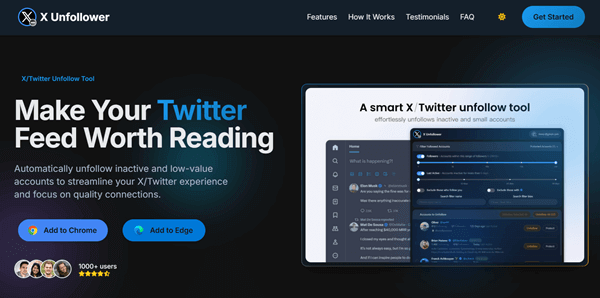
Since many desktop apps have become too expensive, browser extensions have surged in popularity. X Unfollower is a powerful and safe browser extension for Chrome and Edge that allows you to clean up your feed directly from your browser without handing over deep account permissions.
Instead of blindly removing everyone, X Unfollower lets you set smart rules. You can define the maximum number of inactive days before someone is flagged, set a minimum follower count, and most importantly, protect the accounts that actually follow you back.
7. Unfollow Assistant
Unfollow Assistant is a lightweight Chrome extension that runs in the background over time to keep your account from getting flagged.
You can set specific parameters—for instance, if a user has over a certain number of followers, you can choose to continue following them even if they don’t follow you back. It is incredibly user-friendly and handles the slow, drip-feed unfollowing process automatically.
8. FollowerAudit

If your biggest problem is spam and fake profiles, FollowerAudit is an excellent platform. It is built for users who want to run a deep scan on their audience before making any major moves.
FollowerAudit scans your entire following and follower lists to identify fake accounts, inactive users, and bots. It provides detailed audit reports so you know exactly how healthy your profile is. You can also track your follower growth and get alerts when people unfollow you.
9. Audiense Connect

If you are running a marketing agency, a massive brand account, or managing a profile with half a million followers, simple tools may not work. You need Audiense Connect, an enterprise-grade platform built for serious data strategy and community management.
You can filter users by extremely specific criteria, such as location, language, exact follower count, time zones, or even the number of public lists they belong to. The segmentation tools here are completely unmatched in the industry.
Audiense Connect also allows you to even force-unfollow people (make them unfollow you) to remove spam from your own follower count.
10. TweetStorm
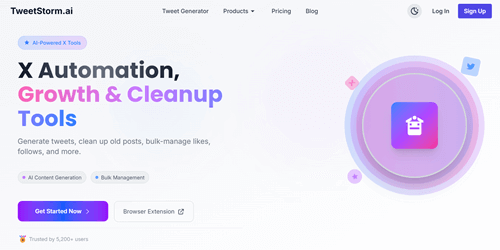
If you are looking for an incredibly powerful browser toolkit, TweetStorm brings a unique angle to the cleanup process. It allows you to clean your feed based on context, rather than just recent activity, all right from your browser.
Imagine you used to be heavily into cryptocurrency back in 2021, and you followed 500 accounts related to “Crypto.” Now, your interests have changed, and you want them off your feed. TweetStorm allows you to filter based on specific keywords in user bios.
You just type in a keyword, and it pulls up every account you follow with that word in their profile, so you can purge them instantly. It also acts as a full growth suite with auto-likes, mass follows, and bulk tweet deletion features.
Which is your favorite tool to track Twitter unfollowers? Feel free to share your thoughts in the comments section.
Read 10 Best Video Downloader Tools to Download Videos from Any Website